jackieyang9
Members
-
Joined
-
Last visited
-
Seems new config is the right way to go. I created a new config preserving all settings and restarted the array.
-
I probably have a faulty cable, and three (one parity and two data) disks disconnected immediately right after the array started. Is there a way to allow me to force enable the two data disks because I'm sure they are mostly fine?
-
never mind. it worked after a few tries automatically. super weird.
-
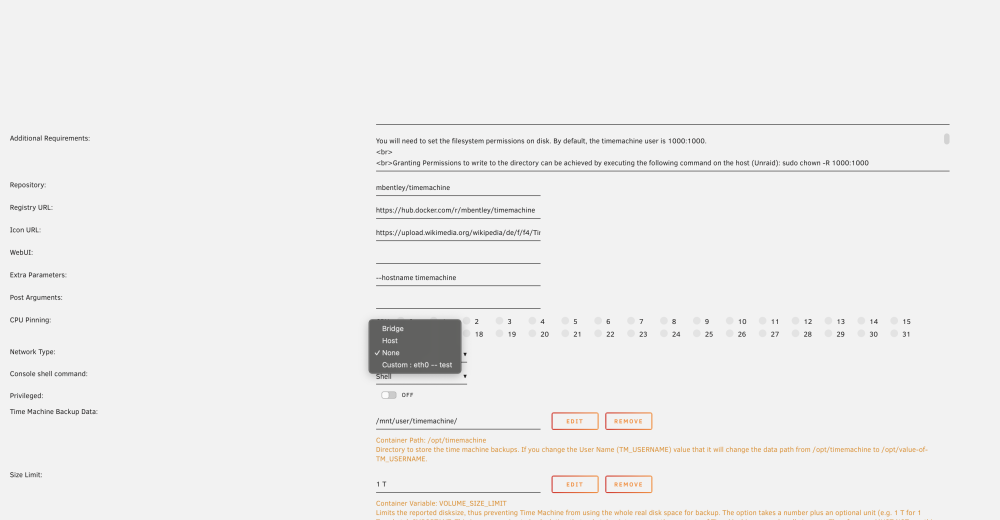
Thanks for the response. Running with custom eth0 does seem better. At least I can connect to the drive. However, I'm getting "The backup disk image could not be created." when backing up on my Mac. I checked log in my console and here are the log around that time filtered by "backup": default 19:38:15.537085-0700 TimeMachineSettings [0x10d60ac20] activating connection: mach=true listener=false peer=false name=com.apple.backupd.session.xpc default 19:38:15.537085-0700 SystemUIServer [0x11e60c610] activating connection: mach=true listener=false peer=false name=com.apple.backupd.session.xpc default 19:38:15.537216-0700 SystemUIServer [0x11e706ca0] activating connection: mach=true listener=false peer=false name=com.apple.backupd.session.xpc default 19:38:15.537431-0700 SystemUIServer [0x11e70c900] activating connection: mach=true listener=false peer=false name=com.apple.backupd.session.xpc default 19:38:15.542511-0700 backupd [0x135fbd820] activating connection: mach=false listener=false peer=true name=com.apple.backupd.session.xpc.peer.0x135fbd820 default 19:38:15.543309-0700 backupd [0x135f77ce0] activating connection: mach=false listener=false peer=true name=com.apple.backupd.session.xpc.peer.0x135f77ce0 default 19:38:15.544008-0700 backupd [0x135eaaee0] activating connection: mach=false listener=false peer=true name=com.apple.backupd.session.xpc.peer.0x135eaaee0 default 19:38:15.545370-0700 backupd [0x135e989c0] activating connection: mach=false listener=false peer=true name=com.apple.backupd.session.xpc.peer.0x135e989c0 default 19:38:15.560856-0700 backupd [0x135fbd820] invalidated after getting a no-senders notification - client is gone default 19:38:15.564254-0700 backupd [0x135eaaee0] invalidated after getting a no-senders notification - client is gone default 19:38:15.565289-0700 backupd [0x135e989c0] invalidated after getting a no-senders notification - client is gone default 19:38:15.565383-0700 backupd [0x135f77ce0] invalidated after getting a no-senders notification - client is gone default 19:38:15.696481-0700 distnoted register name: com.apple.backup.prefschanged object: com.apple.backupd token: fa000000b7 pid: 563 default 19:38:16.025173-0700 backupd keychain blob version does not support integrity default 19:38:16.206166-0700 backupd -[DICreateParams createDiskImageParamsWithError:]: entry with <private> default 19:38:16.318962-0700 backupd SparseBundleBackend::write_info_plists: <322> Updating Info.bckup, disk size: 0 default 19:38:16.685297-0700 backupd SparseBundleBackend::write_primary_info_plist: <304> Updating Info.plist default 19:38:17.312078-0700 backupd -[DIBaseXPCHandler createConnection]: Creating connection with com.apple.diskimagescontroller default 19:38:17.312187-0700 backupd [0x135e16b50] activating connection: mach=false listener=false peer=false name=com.apple.diskimagescontroller default 19:38:17.880223-0700 backupd SparseBundleBackend::SparseBundleBackend: <93> Mode for new files in bundle: 664 default 19:38:17.906671-0700 backupd [0x135e16b50] invalidated on xpc_connection_cancel() default 19:38:17.909643-0700 backupd DiskImageSparseBundle::DiskImageSparseBundle: <46> Initialized bands array of size 64 default 19:38:17.910875-0700 backupd SparseBundleBackend::get_existing_bands: <437> Looking for existing bands default 19:38:17.979022-0700 backupd SparseBundleBackend::get_existing_bands: <446> Found 0 existing bands default 19:38:17.979289-0700 backupd SparseBundleBackend::write_info_plists: <322> Updating Info.bckup, disk size: 16000000000000 default 19:38:18.365968-0700 backupd SparseBundleBackend::write_primary_info_plist: <304> Updating Info.plist default 19:38:18.685194-0700 backupd -[DICreateParams resizeWithNumBlocks:error:]: Disk image resized to 16000000000000 bytes default 19:38:18.685446-0700 backupd SparseBundleBackend::write_info_plists: <322> Updating Info.bckup, disk size: 16000000000000 default 19:38:18.956207-0700 backupd SparseBundleBackend::write_primary_info_plist: <304> Updating Info.plist default 19:38:19.555655-0700 backupd DiskImageSparseBundle::~DiskImageSparseBundle: <246> Closing bands default 19:38:19.753288-0700 backupd +[BackendXPC newFileBackendWithURL:fileOpenFlags:error:]: Image file stat: dev(0x3600001a), inode(-7740288681637848958), mode(40775), uid(0), gid(0), size(16384), blocks(32) default 19:38:19.762594-0700 backupd +[DiskImageParamsXPC newWithURL:fileOpenFlags:error:]: Image file <private> opened with flags 0 default 19:38:19.787096-0700 backupd -[DIAttachParams newAttachWithError:]: entry: DIAttachParams[DiskImageParamsLocked_XPC[SparseBundleBackendXPC]] default 19:38:19.787547-0700 backupd -[DIBaseXPCHandler createConnection]: Creating connection with com.apple.diskimagescontroller default 19:38:19.787770-0700 backupd [0x135fec070] activating connection: mach=false listener=false peer=false name=com.apple.diskimagescontroller default 19:38:19.791054-0700 backupd +[DIEncryptionFrontend hasGUIaccess]: User session flags: 0x1 (0x1=root, 0x10=graphics, 0x20=hasTTY, 0x1000=IsRemote), secRes=0 default 19:38:19.931834-0700 backupd -[DIAttachParams reOpenIfWritableWithError:]: isWritableFormat: YES default 19:38:19.931924-0700 backupd +[BackendXPC newFileBackendWithURL:fileOpenFlags:error:]: Image file stat: dev(0x3600001a), inode(-7740288681637848958), mode(40775), uid(0), gid(0), size(16384), blocks(32) default 19:38:19.932107-0700 backupd -[DIAttachParams reOpenIfWritableWithError:]: Image file <private> re-opened with RW permissions default 19:38:19.932264-0700 backupd -[DIStatFS initWithFileDescriptor:error:]: File system is smbfs default 19:38:19.932451-0700 backupd -[DIStatFS logWithHeader:]: Input underlying FS: mounted on <private>, 1024 bytes block size, remote mount default 19:38:20.479228-0700 backupd -[DIController2ClientDelegate attachCompletedWithHandle:reply:]: Received: DIDeviceHandle[disk12, unmanaged] default 19:38:20.896728-0700 backupd [0x135fec070] invalidated on xpc_connection_cancel() default 19:38:20.921308-0700 backupd [0x135fd4690] activating connection: mach=true listener=false peer=false name=com.apple.storagekitd.dm default 19:38:22.456006-0700 backupd DMLocalizedUserErrorString DMErr=-69879 request for localized end-user error string; CODE: -69879 TECH/UNLOC: Couldn't open disk USER/LOC: Couldn’t open disk. default 19:38:22.456103-0700 backupd DMUnlocalizedTechnicalErrorString DMErr=-69879 request for un-localized tech error string; CODE: -69879 STR: Couldn't open disk error 19:38:22.456358-0700 backupd Erase failed for disk <DADisk 0x135e37150 [0x1e1897720]>{id = /dev/disk12}, error: Error Domain=com.apple.diskmanagement Code=-69879 "Couldn't open disk" UserInfo={NSDebugDescription=Couldn't open disk, NSLocalizedDescription=Couldn’t open disk.}, dictionary: { Dissenter = 0; DissenterPID = "-1"; Error = "-69879"; MadeBootable = 0; } default 19:38:22.911554-0700 TimeMachineSettings [0x10d609300] activating connection: mach=true listener=false peer=false name=com.apple.backupd.session.xpc default 19:38:22.986912-0700 backupd [0x135e401f0] activating connection: mach=false listener=false peer=true name=com.apple.backupd.session.xpc.peer.0x135e401f0 default 19:38:22.997432-0700 backupd [0x135fd4690] invalidated on xpc_connection_cancel() default 19:38:23.170274-0700 backupd [0x135e401f0] invalidated after getting a no-senders notification - client is gone default 19:38:23.488440-0700 backupd [0x135e401f0] activating connection: mach=true listener=false peer=false name=com.apple.storagekitd.dm
-
Question: what should be selected as network type? I tried leaving it default (none) and custom eth0. Neither of them work.