bereasonable
Members
-
Joined
-
Last visited
-
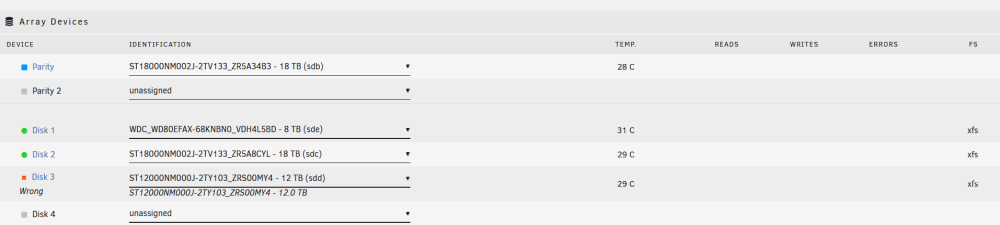
Thanks. I started a new config. The other disks were added successfully (nice feature to have the existing array structure preserved 👍). But, the disk with issues was not able to be added successfully. I removed it from the array and am running xfs_repair. Hopefully I can get it to a point where it can mount (eg: via mount -t xfs) and then copy the files from the disk into the (now parity protected) array. I've picked up another drive to have as a hot spare in case this happens again.
-
is it worth getting a sata expansion card and seeing if things sort themselves out? ie: could it be an issue with the controller?
-
weird. why would the size change?
-
thanks for the quick reply! I've never had a parity drive. I was trying to add an 18tb drive to be the parity drive. This is why I stopped the array. The 12TB (Disk3) was never parity. It's always been a storage drive. I didn't make any changes to it.
-
Hello, Last night I stopped the array to add a parity drive. Everything was working fine until I stopped the array. I just wanted to add a pre-cleared disk. I was blocked from starting the array again due to a "wrong" error for one of the existing drives. I've tried rebooting, and the "wrong" error persists. The only change I made to the array was to select the parity drive from the drop-down. It was already installed in the pc, so I didn't need to reboot before trying to add it. The build consists of an nvme cache drive, two old spinning drives (between 3-4 years old), as well as two "new" spinning 18TB drives (manufacturer refurbished from serverpartdeals). The existing 12TB drive is giving me issues. The spinning metal drives are plugged into the SATA ports on the motherboard. The cache drive is an nvme directly mounted on the motherboard. I love Unraid, but could use some help getting past this issue. Thank you in advance. apollo-diagnostics-20231221-0728.zip