





Red_Stag
Members
-
Joined
-
Last visited
Everything posted by Red_Stag
-
Dear Wody, thank you, I very much appreciate you making the time to respond. I re-read that thread and the language in it carefully and advise that there is nothing in THAT LANGUAGE which causes me to conclude that the ASMedia is an issue. The language does not suggest strongly ENOUGH that there is an issue. Below is the language "6 ports: Asmedia ASM1166 (PCIe 3.0 x4 physical, x2 electrical) * * There have been some reports that some of these need a firmware update for stability and/or PCIe ASPM support, see here for instructions. These exist with both x4 (x2 electrical) and x1 PCIe interface, for some use cases the PCIe x1 may be a good option, i.e., if you don't have larger slots available, though bandwidth will be limited:" I pick up that connections are physical (x4) and electrical (x2) and the firmware issue. Prior to installing the ASMedia PCIe card I updated the firmware. I did not interpret "physical vs electrical" to mean "in all likelihood the physical connections will work fine albeit perhaps a little slow. As regards the electrical connection goes this approach is not recommended and there is a more than reasonable chance that it will result in issues and might well result data loss." Extremely frustrated but thank you for responding Red Stag
-
Dear All, My unraid PC is experiencing repeated setbacks. A new 8TB HDD lasted 4 months then issued CRC errors. I had it replaced under warranty and the new disk has upon insertion failed a preclear. This HDD no longer even appears in the Unraid GUI, its as though it has been physically disconnected! Seperately from this another HDD, a 4TB currently used for parity, which is less than a year old has given up as well. I did have HDD connectivity issues some months ago and addressed it by replacing the power cables, the data cables and the PCIe card. I would have to be very unlucky to have one of these components fail again within 6 months surely? Dont understand and would appreciate any insights please, the diagnostics file is attached. I dont get it because I read about other Unraid users who talk about up to 10 years of worry free Unraid use. Many thanks Red Stag henderson-diagnostics-20250207-2210.zip
-
Thank you JorgeB, okay have replaced the data cable as I had a spare new one on hand. I retested and have the same response ie parity drive is offline. Will get new power cable tomorrow and replace that and retest. Kind regards Red_Stag
-
Dear All, I recently acquired a UPS, CyberPower CP900PFCLCD (VA900, 540W) and attached it to my unRaid server (Dell Optiplex 9020, 255Watt). We are approaching summer, which means storm season which means unreliable power. So in the interests of securing my data I took the step of getting a UPS. I leave unRaid running 24/7 so the primary purpose of the UPS is to allow sufficient time to get a graceful and clean shutdown for the unRaid server. If the unRaid server is down for an hour or even a few days its not the of the world for me. If there is a power outage and both unRaid and UPS have subsequently turned off I would prefer to restart them manually so that I can check all systems are okay. The UPS is connected to the unRaid server via a USB cable. The only device connected to the UPS is the unRaid server and according to unRaid the load on the UPS is circa 10%. I have not installed the UPS software on unRaid because after reading the forums I came to the conclusion it was not necessary and that instead I can simply configure it via "Settings | UPS Settings" in unRaid which is what I have done. The other reason that I have not installed the CyberPower software is because it is not clear which version I ought to be using. CyberPower offers 64bit software for Red Hat Enterprise 8, Red Hat Enterprise 7, CentOS 7, openSUSE 15.2, Debian 10.1, Debian 9, Ubuntu 20.04 LTS, Ubuntu 18.04 LTS in .tar, .rpm and .deb formats so it was not clear to me which format I ought to be using. My understanding is that .rpm is for Red Hat distros and .deb is for Debian based distros. I don't understand where that leaves me as my reading on the forums suggest that unRaid is based on Slackware (which I have limited knowledge of). The reason that I mention the UPS software is because I cannot supply a log from the UPS because as stated above I have not installed that software on unRaid. When I conducted two tests both the UPS and unRaid behaved as expected based on the settings I chose in "Settings | UPS Settings". I achieved a clean graceful shutdown of the unRaid server. I now have errors that I have never seem before, including a read check on the parity drive (this scares me) and am unsure how to interpret as per the attached file. Is it possible that I have multiple things happening at the same time? Would appreciate some help / pointers please? Many thanks Red_Stag henderson-diagnostics-20240925-0821.zip
-
That was 21 hours from start to finish with my heart in my mouth. Nerve wrecking stuff
-
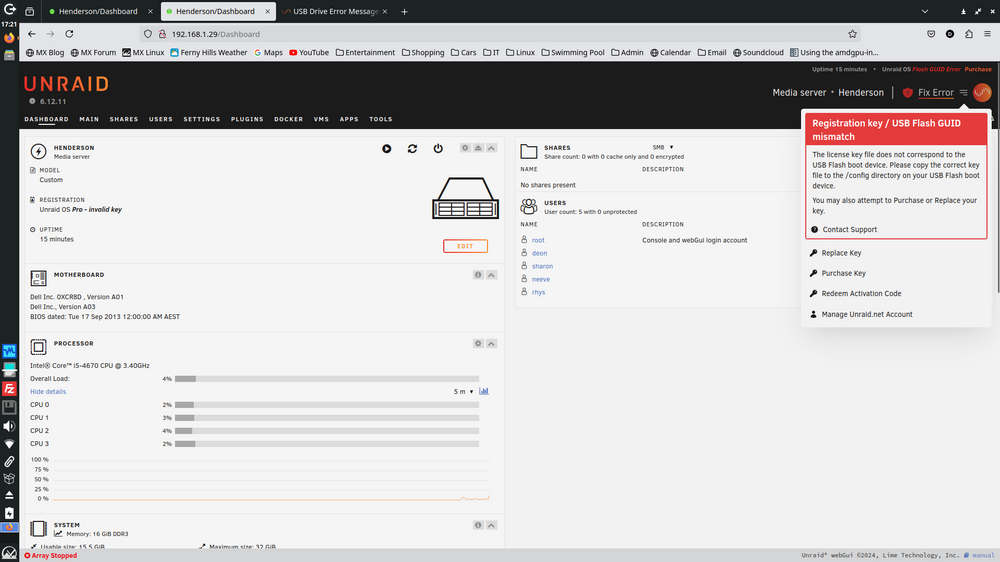
Think I have resolved by selecting the "Replace Key" option, which makes no sense to me at all, however it worked. Thank you
-
Hi JorgeB, I went through the process as described in unraid documentationbut I found it difficult to follow. UnRaid boots now using the new USB and I get the screen below. However I don't want to "Replace Key" (I purchased a Pro licence in March this year so I am not expecting to have purchase again because a USB drive got corrupted) or "Purchase Key" or "Redeem Activation code" (dont know what this is ) I want to "Replace USB" but this option doe snot exist? Really hard to understand how to progress with the set of options presented to me?
-
I followed the instructions regarding replacing the USB but it has not worked. I've lost unraid, now can't get in.
-
Looks like I may be too late to identify the problem. I wonder if it related to a power outage we had last week. I normally let the unraid server run 24/7

-
Ok, JorgeB am advising that there is only ONE USB in the unraid PC and the rror messages continue to show as per the attached syslog. Thank you henderson-syslog-20240813-2305.zip
-
Hi JorgeB, okay will try this next. I recall that I have a USB Wifi in the back of the unraid machine as a backup in case the ethernet failed. I'll pull that out tomorrow. I am pre-clearing a disk right now so just want to wait until that process is finished. Thank you
-
Dear All, Am getting persistent error messages indicating a USB. My unraid server only has one USB device, a PNY32Gb USB for booting into unraid. My search found https://urukrama.wordpress.com/2009/01/27/usb-drive-not-recognised-error-71/ https://www.spinics.net/lists/usb/msg02644.html A search of unraid did not find an /etc/modprobe.conf file as per the above guidance Anybody experienced this before and have a workaround or is it simply time to replace the USB?? Many thanks for any feedback henderson-syslog-20240813-0900.zip henderson-diagnostics-20240813-1919.zip
-
Dear All, am running into permission issues when trying to use "luckyBackup 0.5.0". Unsure if I have chosen an incorrect setting or other. For "luckyBackup 0.5.0" to work it needs to be able to access certain files an folders to be able make comparisons however if those files have "root root" permissions "luckyBackup 0.5.0" throws an error as per the attached log file. I also attach the diagnostics file for completeness. What I am trying to achieve: I am trying to backup PC's, used by multiple users, on home network to "UnRaid 6.12.4" using "BackInTime 1.3.3". From each PC I backup using "BackInTime 1.3.3" and I back up the "home" folder with the intent of capturing all users data. Following this my intent is to copy from "UnRaid 6.12.4" to unassigned device using "luckyBackup 0.5.0". I run "UnRaid 6.12.4" 24/7 and have no UPS. I have a 5.25" bay in "UnRaid 6.12.4" PC which enables me to swap out unassigned devices for another 3.5" hard disk drive and in this way I have a physical backup copy in the event of power failure. This is my attempt at data security. Any advice / comments / guidance would be greatly appreciated? Kind regards Red Stag 7624-machines-20231127080922.log henderson-diagnostics-20231127-0822.zip
-
Dear itimpi, thank you. I think the volume of information has undone me. I find takes multiple goes at it to piece it together. Thank you I will start a new thread regarding my other question. Red Stag
-
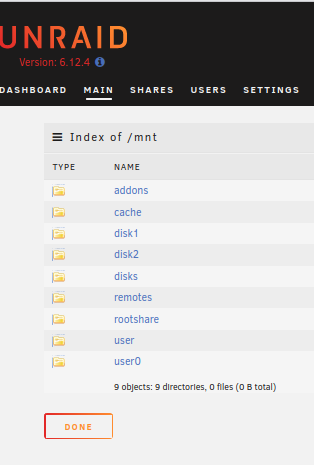
Dear Community, Would someone please advise if the attched folder structure looks normal? I have a "user0" which seems to be replicate of "user". Chances are I have messed something up. I am not having an easy time of setting up unRaid. Am thinking about restarting from scratch because I just cant get it to behave in a way that makes sense or is consistent. Not sure how to rebuild from scratch as yet but dont believe it would be a "new config" because I have already tried that. Any pointers / help would be appreciated please? Red Stag
-
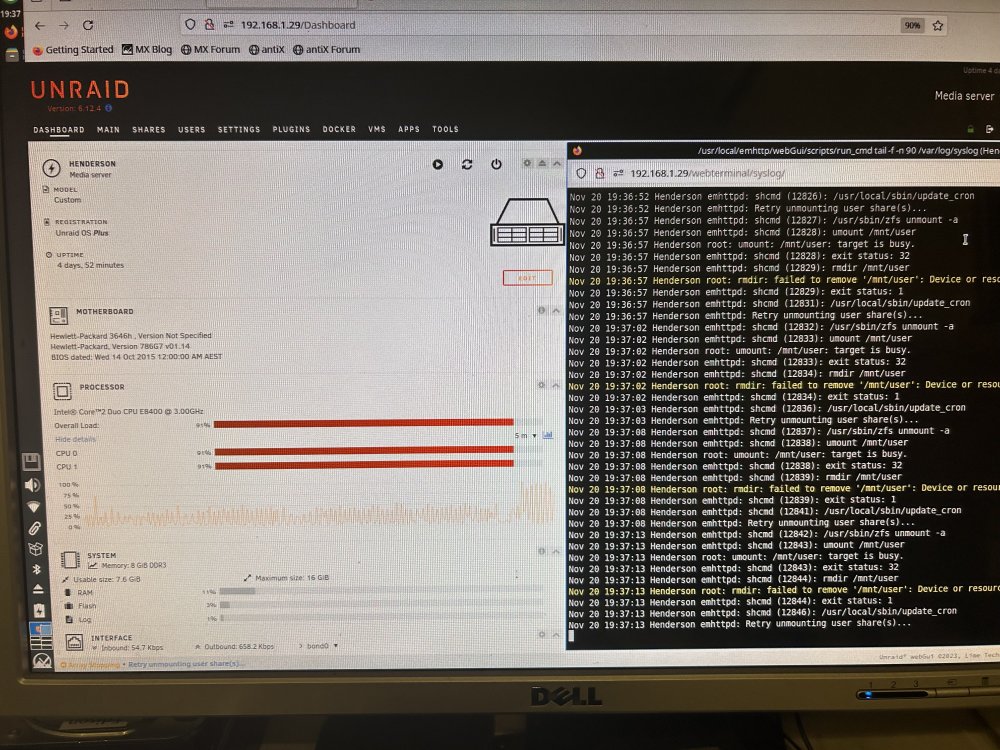
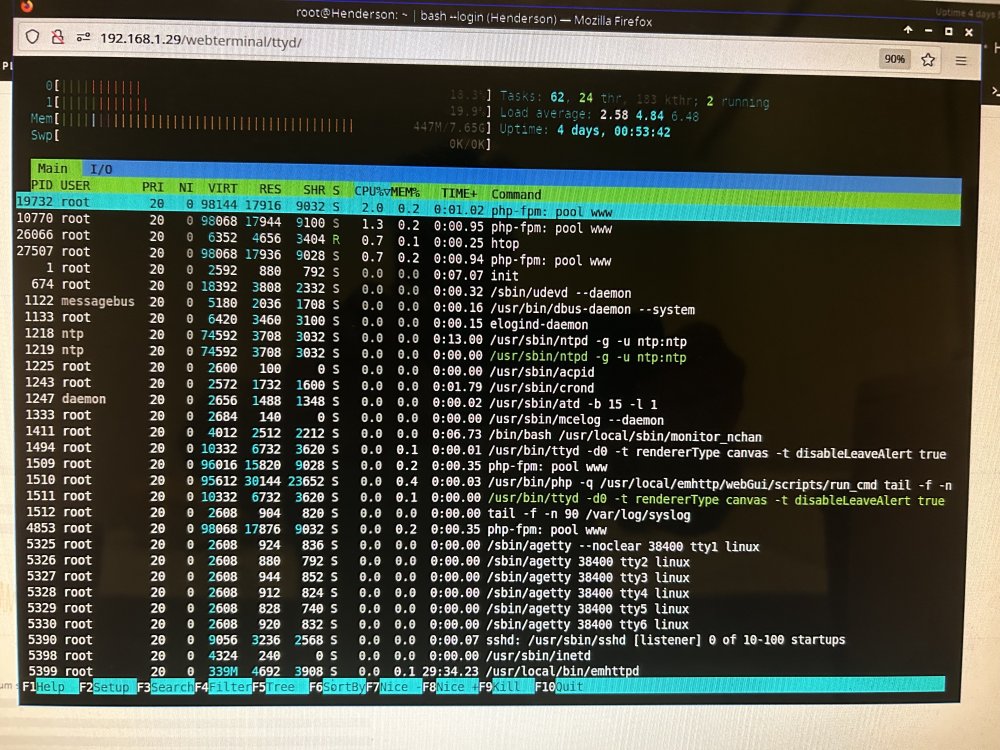
Dear All, As requested I have waited until unRaid got into an unresponsive state and I now attach the log and diagnostics files. I also attach photos showing the CPU activity. Once unRaid got into this state I decided to stop the array. Stopping the array took 11 minutes to complete. Five minutes prior to the unresponsive state I had completed a backup of unRaid data to unassigned devices using a luckybackup docker. Unclear to me if these are related as the time lapse seems long enough to seperate the two IMHO. Photo of Htop doesn't point the finger at anything that I can determine. Would be very pleased if I could get some pointers please? Many tahks Red Stag henderson-diagnostics-20231120-1945.zip henderson-syslog-20231120-0945.zip
-
Dear itimpi, I clearly misinterpreted that, thank you for clarifying. I confirm that the log is created in the "appdata" folder now and I simply await a system crash now and will be back in touch with the syslog file.This may take a few days. Thank you again
-
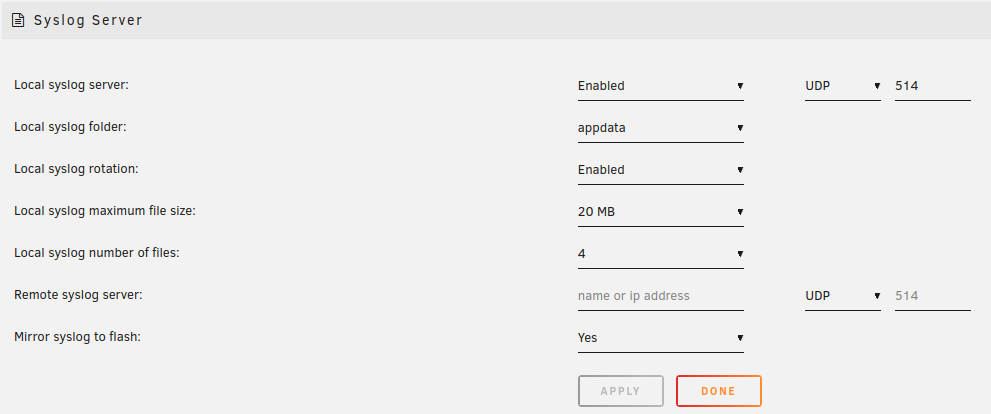
Thank you for the guidance JorgeB. I have attempted to do as asked. In the attached screenshot you will see that I have enabled the syslog. Unfortunately since committing these settings I do not see any evidence of a log file created in the "appdata" folder. After this I enabled "mirror syslog to flash" in the pursuit of a log file. This worked and I attach the syslog file. Perhaps I have a permissions issue which prevents me from writing files to the "appdata" folder? I had to rebuild the UnRaid server again (took over 16 hours) so I created a new config file and it now only contains brand new 4TB CMR disks. I attach the updated diagnostics file as well. I understand that the attached syslog file may not be of limited assistance because it is not a syslog file after a crash. I expect to have to wait a few days for a crash. But in the interim I provide the information that I do have and ask if there is some way that I can get the syslog to write to an array folder instead of to the flash drive please? I have scanned the syslog file and the only thing that I observe which seems prospectively questionable is the repeated "Device or resource busy" notice. Many thanks for any guidance offered henderson-diagnostics-20231108-0729.zip syslog(1)
-
Thank you for the feedback. I never thought to consider plugins because in my humble opinion I thought that I had relatively few and only installed on an as needs basis. The list of plugins installed is as follows: community.applications.plg - 2023.09.30 (Up to date) fix.common.problems.plg - 2023.10.08a (Up to date) unassigned.devices.plg - 2023.10.08 (Up to date) unassigned.devices-plus.plg - 2023.08.14 (Up to date) unassigned.devices.preclear.plg - 2023.08.14 (Up to date) unbalance.plg - v2021.04.21 (Up to date) unRAIDServer.plg - 6.12.4 user.scripts.plg - 2023.09.30 (Up to date) I have considered a few different things to date: Used a brand new PC so am inclined to assume that this is not the cause until proven otherwise (i7-12700, Gigabyte Z690, 32GB Ram) Used brand new disks so am inclined to assume that this is not the cause until proven otherwise (Seagate 4TB CMR disks) Used brand new cables so am inclined to assume that this is not the cause until proven otherwise Used brand new PCIe To SFF 8087 MIniSAS SATA3.0 8 Ports Expansion Adapter ASM1166 Chip 20Gbps (x2) Feels like I am chasing my own tail, tried different CPU's, PCIe cards, PC's, hdd's. Errors manifest in different ways each time eg Unraid machine locks up and is not responsive or corrupted xfs filesystem or disk failure (even for a brand new disk), or parity failure. I have had all these errors since I started using Unraid on 24 August. I havent considered if it relates to the USB stick but the stick is relatively new (<2 years old with little use). I have scoured the diagnostics files which are attached and I cant see anything which stands out as an obvious error. Have put the above PCIe card into 4 PC's and each PC gives me different error messages at boot time. So I bought a second card from a different supplier and again, get different error messages on each PC and different error messages from the first PCIe card. This is my key reason for gravitating towards issues with the PCIe card. I just dont feel like I have much else to point a finger at. When I get a chance I will try the safe mode option and see what happens and reply. The only other thing which occurs to me is the issue of hyperthreading, is it absolutely essential that the CPU has hyperthreading? Of the 4 PC's I have tried 2 have hyperthreading and 2 dont and the experience has been really challenging irrespective of the CPU. Perhaps someone might be able to comment on this aspect please? WOudl very much welcome any feedback and or comments please? Many thanks Red Stag
-
Dear All, Am running into issues with my unraid. Feel like I am chasing my tail each time I come across an error I address only to find another error and another. Have replaced parity with brand new drive in response to errors. Have replaced two other drives in response to errors but the errors just keep coming. Can't make out what is going on. Would very much appreciate a little guidance from someone more experienced than myself. I have about 2 or 3 months worth of Unraid experience. Until I get more experience I am assuming that I have done something wrong. Please advise if you are able to assist? Red Stag henderson-diagnostics-20231103-0703.zip
-
Dear Unraid Community, I am currently evaluating unRaid and want to say that I am very impressed. The software has a lot of functionality and a lot of flexibility. The trial version I am using is 6.12.3. I attach the diagnostics file to provide additional information. I do not regard myself as a Linux expert and have multiple PC's on a home network all using Linux. My goal with unRaid was to see if I could set it up as a NAS ie gain access to a network attached storage from multiple PC's and mount this using fstab for all PC's. Further, the objective was to have a common share (with public access on the LAN) and a user specific share which the user could access from any PC on the LAN. After that was working I would then implement a backup solution, probably Rsync based. The challenge I am running into relates to folder/file access/permissions issues. Its not clear to me if the stumbling block is at the linux layer or at the SMB layer. I have searched the forums and the internet and while I see a few people referring to the solution as being to issue the following command "sudo chmod -R 777 folder name". I am reluctant to use such an approach because it gives access to everyone which feels like using a sledge hammer to knock in a tack and goes against best practice. If people choose this option out of frustration, I get it. Perhaps this solution is okay for the "public" share on the LAN? What I can achieve: I can use a file manager (Thunar), enter the samba path and successfully connect to the share ie the share is viewable. For nomenclature I am calling this the parent level. I can enter sub directories under the parent share folder I can create files under the sub directory however what really confuses me is the ownership of these files What I cant seem to achieve: I cant create files at the parent level I cant workout how to mount unraid shares in fstab so I will come back to this later when I have a better understanding. The permissions etc is really confusing me and would dearly love to be pointed to an article that explains this well please? Would appreciate it if I could be pointed in the direction of some reading that might help me get my head around the permissions access issues please?. It seems very confusing at the present moment. Many thanks and kind regards henderson-diagnostics-20230830-0953.zip



