





eicar
Members
-
Joined
-
Last visited
Everything posted by eicar
-
With 20 PCIe lanes the U300(E) imho has enough for manufacturers to create a board with lots of options for native connectors/ports and expansion: on the CPU it's good for e.g. a PCIe 4.0 x4 slot (enough for a dual SFP+), a gen4 x4 M.2 slot (fast cache drive), and on the chipset up to 6 native SATA ports out of the box, a PCIe 3.0 x4 slot (HBA), a gen3 M.2 slot at x2 speed (more caching), plus two remaining PCIe 3.0 lanes, e.g. for a PCIe 3.0 x1 slot (second HBA) and two more SATA ports. But the manufacturers need to go for Micro ATX. I know SFF cases are important for DIY NAS builds, ergo Mini ITX, but you might lose options & expandability simply because of the board's form factor.
-
For normal operations, e.g. notebook performance, AMD's mobile CPUs are allegedly a lot better than Intel's, but as you rightly said, a home server/NAS will sit idle for longer periods of time, so Intel might be a good choice for this use case. Since this is basically a standard gen13 board with the maximum amount of PCIe lanes, you could really go crazy with a build… I would probably do something like this: 96 GB of DDR5 memory USB 2.0 header to Type-A adapter cable for internal Unraid boot drive 2 x M.2 extenders/breakouts for the lower M.2 slots two 6-port M.2 to SATA adapters (with ASMedia chipset) for 7 SATA SSDs (RAIDz1 pool), 1 very large SATA HDD (local backup) & one or two larger HDDs or QLC SATA SSDs for "cold" storage 1 x gen4 M.2 SSD as a fast cache drive (upper M.2 slot; CPU-direct; L2ARC) 1 x gen3 M.2 SSD for macOS Time Machine backup (upper M.2 slot; chipset) bifurcate the x16 PCIe slot in BIOS and add a passive extender/splitter for two x8 PCIe slots (in two x16 physical) x8 #1: dual SFP+ or dual SFP28 NIC x8 #2: HBA, e.g. the Broadcom 9500-16i, for two more gen4 SSDs (fast iSCSI production storage pool) An ATX power supply is definitely better, because you'll need SATA power for a NAS. But as I wrote above responding to @Lolight, you needn't necessarily go for a mobile CPU board, because there are ways to achieve really good idle consumption with desktop CPUs incl. way more & better BIOS capability, and still have the option to use it for operations under heavy load if you need/want to. Two examples for smaller boards would be the ASRock Rack W680D4ID-2T, which is a "Deep Mini ITX" – https://www.asrockrack.com/general/productdetail.asp?Model=W680D4ID-2T#Specifications –, basically a slightly longer Mini ITX to get four memory slots, or (currently one of my favorites) the Micro ATX W680D4U – https://www.asrockrack.com/general/productdetail.asp?Model=W680D4U#Specifications – together with e.g. an i5-12500. However, a board like this one by Minisforum and the others in this thread will surely cost you less than a standard board with a discrete CPU.
-
@Lolight: yes, I meant to validate your point that you can also go low-power/efficient with bigger CPUs from the same generation. Maybe I should've made that more clear. 🙏 @OrdinaryButt: you mean this one? https://store.minisforum.com/products/minisforum-ar900i Both the i9-13900HX and the i7-13650HX including the series 700 chipsets have 40 PCIe lanes, 16 at 5.0 and 4 at 4.0 for CPU-direct, and 16 at 4.0 and 4 at 3.0 via the chipsets, with four 4.0 chipset lanes for optional SATA support, so this kinda screams for a Mini ITX or Micro ATX NAS board, especially Micro ATX, because these CPUs support up to 192 GB of memory. But it's basically a "standard" 13th gen board, only with mobile processors. The ones by MiniForums would need to be tweaked a lot to make it work as a NAS. You could remove the fan, which is only for the M.2 SSDs anyway, and add a gen4 M.2 with its own heatsink as a fast cache drive, plus a 6-port SATA M.2 adapter. The two M.2 slots on the backside would need an M.2 extender, maybe something like this – https://www.amazon.com/dp/B0BDZLFHZR –, for either more SATA ports or a second gen4 M.2… or you get M.2 to OCuLink adapters and run a cable to a 5.25 inch M.2 cage. You could probably also bifurcate the PCIe 5.0 x16 slot to dual x8 and use a riser/extender/splitter. But I couldn't find any manual, so I don't know if it's possible in the BIOS. Apropos: on Reddit they're saying that MinisForum rarely ever push any BIOS updates, so you might remain stuck with what you're buying, and their BIOS apparently isn't very sophisticated. According to Level1Techs, their AMD board (BD770i) idles at 11W, which isn't too shabby. Intel boards might even idle lower, I think.
-
The more modern a CPU is, the more efficient it usually is. In terms of computational power, an N100 is probably on a par with a 6th or 7th gen Intel Core processor, but more efficient, both at load and idle. (And it should be, because it uses only modern E-cores.) In terms of money spent on hardware, there is probably no significant difference between a used 6th gen Intel Core CPU + board and a new N100 board. In the end, however, it boils down to average power consumption and energy costs, and prices are crazy in some places, e.g. here in Europe. So something like the N100 does have a place. However, with a modern Intel Core CPU, you could actually build a very efficient server that might just outshine the N100 if you use the right components; case in point, Matt Gadient's 7W-idle build with an i5-12400 here: https://mattgadient.com/7-watts-idle-on-intel-12th-13th-gen-the-foundation-for-building-a-low-power-server-nas/ … which is definitely better than the current 12–15W idle of the Asrock N100M—maybe because of the crappy Realtek NIC on the Asrock?—, and way more potent at intermittent high loads of course. (You could probably build something similar with a W680 chipset board, but those are still expensive.)
-
…and now the first Mini-ITX boards with the U300E: DFI RPP171 and RPP173. (Also available with the Core i3-1315UE, i5-1345UE & i7-1365UE.) https://www.dfi.com/product/index/1633 These are industrial motherboards. Both have DC input, the 171 at 12 V, the 173 at 9–34 V. Otherwise, they seem to have the same specifications. More info here: RPP171: https://www.rosch-computer.de/produkt/industrie-mainboards/atx-stx-itx-industrie-mainboards/mini-itx-mainboards/dfi/MI-RPP171 RPP173: https://www.rosch-computer.de/produkt/industrie-mainboards/atx-stx-itx-industrie-mainboards/mini-itx-mainboards/dfi/MI-RPP173 two native SATA ports no internal USB Type-A 3 x 2.5 GbE LAN 64 (2 x 32) GB DDR5 non-ECC, possibly 96 (2 x 48) GB 1 x PCIe 4.0 x4 slot 1 x PCIe 4.0 x4 M-key M.2 slot 1 x A-key M.2 slot 1 x B-key M.2 slot 1 x E-key M.2 slot (CNVio only) So I assume you could use two M.2 slots (A-key & B-key) for two dual-port SATA-adapters for a total of 6 SATA ports. However, the only A+E-key SATA adapters I could find use the JMB582 chipset, i.e. no ASPM, so you'd probably have to go for an M.2 A+E-key to Mini-PCIe adapter like the Delock 62848; then you could add a dual or even quad SATA card with ASMedia chipsets. The board only has two SATA power ports, so you'd need a lot of splitter cables.
-
The Biostar BIRPL-PAT might be the first SBC motherboard that comes with a U300 option: https://www.biostar.com.tw/app/en/ipc/introduction.php?S_ID=90 But it's a 3.5 inch board without any PCIe expansion, and only one Key-M M.2 slot, so it's not suited for a NAS build. But in general, you could do a lot with a U300 board: https://www.techpowerup.com/cpu-specs/processor-u300.c3072 Example using the available PCIe lanes etc. on a micro-ATX board: PCIe 4.0 x4 slot (CPU-direct) PCIe 4.0 x4 Key-M M.2 NVMe slot (CPU-direct) 6 native SATA ports (chipset, x1 + x2) PCIe 3.0 x2 Key-M M.2 NVMe slot (chipset) PCIe 3.0 x4 slot (chipset) PCIe 3.0 x1 slot (chipset) 2 x 2.5 GbE LAN ports 96 (2 x 48) GB DDR5 RAM (non-ECC) built-in WiFi (CNVio) internal USB 2.0 or 3.0 Type-A The DMI only has PCIe 2.0 x8 speeds (ca. 3.938 GB/s), but definitely enough for a big SATA storage pool, so it would be a total banger. Maybe the BIRPL-PAT is the start for some nice NAS boards in the future.
-
EDIT: Some user say this cable fried their disks. Don't know why that would happen, but it would probably be wise to look for quality brands. General DISCLAIMER: please anyone correct me if the are mistakes below. As for boards with the N200 (6W like the N100, but slightly more powerful incl. more EUs on the iGPU), we currently have Kontron, Changwang, ECS and Maxtang. Changwang & ECS wouldn't work for you, because they don't have DC input, I think. So currently the only boards with DC input and an N200 option are the Maxtang ALN-10 N200, and the Kontron K3931-N4. DC input: the Kontron has 8–34 V DC input (130 W maximum), the Maxtang boards have 12 or 19 V (maximum Watt unknown, but probably a bit lower). RAM: Kontron has DDR5, Maxtang DDR4. Ethernet: both have two ports, the Kontron 2.5 GbE + 1 GbE, the Maxtangs 2 x 2.5 GbE. Native SATA: both only have one direct SATA port. Native SATA M.2 Key-B: both have this (one lane of PCIe 3.0), which would be fine for an adapter card with two SATA ports, e.g. this one: https://www.amazon.com/dp/B002MRKGLW … it comes with the ASM1061R chipset, which supports "partial and slumber power management states", which I assume is the aforementioned ASPM. M.2 NVMe Key-M: only the Kontron has Key-M slot (at PCIe 3.0 x2 speed), which you can use e.g. for a cache volume. PCIe expansion: both have a physical open x4 PCIe slot, both with PCIe 3.0 electrical, the Kontron with one lane (x1), the Maxtang with two lanes (x2); on the Kontron you could use this for 2+2 SATA ports, on the Maxtang for 4+4, using a PCIe SATA card, which would need to have the right chipset for ASPM. Note: "2+2" and "4+4" means you can use it for 2 or 4 SATA SSDs at (almost) full speed, or for 4 or 8 SATA HDDs. Internal USB: both have an internal USB 2.0 Type-A port, good for an Unraid boot drive. I would probably go for the Kontron board: with the Key-B adapter card and a PCIe SATA card it would yield a maximum of 7 SATA ports, or 5 usable ports for SATA SSDs at almost full speed, i.e. overall less than the Maxtang, but you'd have the option for an M.2 PCIe cache drive with 1.969 GB/s on paper (PCIe 3.0 x2). However, in both cases the network would obviously be your bottleneck, and no option to upgrade with a PCIe NIC, unless you drop the M.2 cache drive on the Kontron and buy an M.2-to-PCIe adapter/riser. For the SATA power issue see above. But good cables that aren't too long can handle 10 A, and with a 12 Volt line even 5 A should be OK to power five HDDs. So I assume that it could work. (But I'm not sure, of course, so someone would need to chime in.) NOTE: the Key-E M.2 slots on both boards are CNVio only, i.e. you can't use it for a Key-E-M.2-to-dual-SATA adapter card.
-
The Kontron K3931-N4 has DC input (8–34 V, 10 A max, 125–130 W max) and an on-board 4-pin LP4 SATA power connector, and there are splitter cables like this one – https://www.amazon.com/dp/B08R2K8MHP – to power five drives from one connector. Wouldn't that work?
-
The Changwang mainboards mentioned by @bulker are also available with the N95 and the 6W N200 according to this article: https://inf.news/en/digital/6714d88188125725ce046150eda492e4.html But I'm with @dopeytree on this: one 2.5 GbE port would be enough… you could have two PCIe lanes (x4 physical) instead. The ASRock boards are better designed. It looks like Changwang just modified one of those N-series router boards. (The internal USB-A is nice, though.) And yes, the JMB585 supports AHCI and NCQ, but not ASPM: https://www.jmicron.com/products/list/15 … but afaik it generally draws less power than HBAs with ASPM support. (But it wouldn't really matter with HDDs, I assume.) So yeah, I'd look for something using the ASM1166: that chipset supports ASPM, right? Personally, I'm more inclined to go for a Micro-ATX board using the U300/U300E, once (if) those are released.
-
Very nice development: you will soon be able to expand your existing RAIDZ pool. Once implemented in Unraid, this would significantly lower costs for new home server builds by users who want to go for a ZFS pool instead of the standard Unraid array with parity. No need to shell out loads of money for 7 or 8 drives up front… instead, you can start small. 👍
-
ECS EliteGroup ADLN-I3 & ADLN-I3 IPC ADLN-I3: https://www.ecs.com.tw/en/Product/Motherboard/ADLN-I3/specification ADLN-I3 IPC: https://www.ecs.com.tw/en/Product/IPC/ADLN-I3_IPC/specification Seems like a Mini ITX Comes with i3-N305, i3-N300, N200 or N100 Only up to 16GB DDR4 supported, but might support 32GB M.2 Key M and Key E are stacked. PCIe 3.0 x1 slot (closed) 1 on-board SATA But with a 6-port M.2 Key M adapter and a 4-port SATA PCIe x1 card, you will still be able to use this for seven SATA ports (1+4+2) at (almost) full SATA SSD speed… plus four auxiliary SATA ports (2+2)… or all of the ports if you go HDD only. Though you might be able to use an M.2 extender to get around the problem of the stacked M.2 slots, and have space for a Key A+E adapter card and two additional SATA ports.
-
Gilt das mit dem Script auch für PCIe 3.0 x4 NICs mit dem Marvell AQS-100? (Die TrendNet ist ja PCIe 2.0 x4.) Es gibt z.B. auch die StarTech(.)com PEX10GSFP: https://www.amazon.de/dp/B09MJGW21X Für mich ist es wichtig, da meine aktuell favorisierte Option ein Low-Power-Build mit dem ASRock N100M ist, aber das Board hat nur PCIe 3.0 x2 (in einem x16). Wahrscheinlich könnte ich auch X710 dual SFP+ verbauen, aber das wären Kanonen auf Spatzen. Eine single SFP+ NIC wäre sicherlich besser, wenn das mit ASPM klappt.
-
The corresponding Mini ITX board with the N100 by ASRock is the N100DC-ITX: https://www.asrock.com/mb/Intel/N100DC-ITX/#Specification Almost the same, but with only one open PCIe x4 slot (3.0 x2 electrical). So you'd have to choose between a NIC and a SATA HBA. If you go with a NIC you would lose SATA ports. If you choose an HBA, you would lose networking speed, but gain 4–8 SATA ports, depending on whether you want to use SSDs or HDDs, for a total of 12–14, plus 1 or 2, if you use a 5- or 6-port M.2 Key M SATA adapter. Not bad at all, but I'd want faster network speeds, so between the two boards I'd probably go for the Micro ATX. There are three more Mini ITX boards, but from ASRock Industrial: IMB-1007J: https://www.asrockind.com/en-gb/IMB-1007J IMB-1006J: https://www.asrockind.com/en-gb/IMB-1006J IMB-1005J: https://www.asrockind.com/en-gb/IMB-1005J These all come with the Intel N97 (4 cores, 12W) with mostly passive cooling, except for the 1006J. The 1007J model comes with support for DDR5 32GB, the other two DDR4 16GB. All of them have an on-board USB Type A port. The downsides: 1 on-board SATA, only x1 M.2 Key M, only x1 PCIe 3.0, so not much in terms of DIY SATA expansion. So I wouldn't go for the ASRock's industrial Mini ITX boards either. Looking forward to more boards.
-
ASRock has one Micro ATX with the Intel N100 (4 cores, 6W, passive cooling), the N100M, which distributes the 9 PCIe 3.0 lanes of the Alder Point N chipset pretty nicely. https://www.asrock.com/mb/Intel/N100M/#Specification x2: one PCIe 3.0 x16 slot (x2 electrial), so you would get almost full network speed with a 10GbE (SFP+) x4 NIC, and probably also decent speeds per port with a dual SFP+ X710-DA2 card x1: one open PCIe 3.0 x1 slot, e.g. for an additional HBA for a maximum of 2+2 SATA ports x1: two on-board SATA x2: M.2 Key M PCIe 3.0 x4 (x2 electrical) for a maximum of 4+2 SATA ports x1: LAN ports x1: USB etc. So with the right SATA controller and an M.2 adapters, you could build this out to eight SATA lanes at almost full SSD speed (2+2+4), or two more if you're going for HDDs and a 4-port x1 PCIe SATA card (2+4+4). Using a 5- or 6-port SATA adapter in the M.2 Key M would give you one or two additional SATA lanes for cold storage, backup drives etc. for a great total of 12. 🤯 The board only has DDR4 RAM, but 32GB are officially supported. Even though it's passively cooled, it comes with two 4-pin chassis fan headers, which is nice. No internal USB Type A port, so eUSB or chassis flash drive it is. But for a DIY NAS this look like the best option so far. This board with an i3-N503 and DDR5 would be a low-power killer option, but the N100 should work too.
-
Asus has three passively cooled boards with the N100 (4 cores, 6W), which at the end seem a little inferior against the Kontron. Prime N100I-D4: https://www.asus.com/motherboards-components/motherboards/prime/prime-n100i-d-d4/techspec/ Prime N100I-D4-CSM: same as above, only with ACC Express support N100I-EM-A: https://www.asus.com/networking-iot-servers/aiot-industrial-solutions/industrial-motherboards/n100i-em-a/techspec/ Right off the bat: these support only DDR4, and Asus writes that they "recommend that you use 16GB or less memory module", which means to me that it might support 32GB of DDR4 RAM like the Maxtang boards, but that Asus doesn't officially support it (yet). Prime N100I-D4 Same: 1 SATA port, 1 PCIe 3.0 x1 Different: no internal USB Type A, so you would need an eUSB solution for the Unraid boot drive (USB header), if you don't want to stick a flash drive on the outside Similar: the boards only have two M.2 slots (not stacked), one Key E, one Key M, and since they don't have the Key B slot, their Key M has PCIe 3.0 x2 instead of x1. So with a SATA build-out using M.2 adapter cards, you would get 7 SATA ports at (almost) full SATA SSD speed (1+2+4). If you use a 6-port SATA adapter in the M.2 Key M slot, you'd have two additional SATA options for an HDD backup drive, a cold storage drive etc. N100I-EM-A Judging from the manual & images, it has two SATA ports, no internal USB Type A, but a USB header, one PCIe 3.0 x1, and two M.2, one Key E, one Key M, which is however SATA (x1) only, so even though it has one additional built-in SATA port, you'd get only 6 instead of 7 SATA ports at (almost) full speed. PS: there are also two N100 boards by ASRock… will post about them later.
-
This would not work with the N series boards… simply too few PCIe lanes. A board with a U series chip would definitely work in that regard. But I assume it would have to be a Micro ATX board for more than one PCIe slot. At any rate, there aren't any U series boards yet afaik. But you could always go for a mini ITX that supports the last Celeron/Pentium generation. It's not the brand new mobile N series in terms of power efficiency—they are desktop CPUs after all—, but probably quite close. Alongside the W680 models, ASRock Rack has two so-called "Deep Mini ITX" boards, the Z690D4ID-2T models, and the deeper form factor lets you install up to 128 GB of RAM instead of the usual 64 GB you get with a standard Mini ITX. They already come with dual 10GbE RJ45 ports, so you don't need a NIC, unless you want to go for SFP+. (Fibre saves additional power over copper.) The standard model uses the Intel X710-AT2, and the second model uses the Intel X550, which afaik has a slightly narrower operating temperature range. (And only PCIe 2.0 instead of 3.0, I think.) The two boards have one gen5 x16, which according to ASRock support can be bifurcated to x8/x8, but you'd then need a passive splitter/riser x16 —> x8 + x8. All the other PCIe components are available via OCuLink connectors, with two on-board gen4 M.2 slots.
-
Sorry, can't say. 🤷♂️
-
It is a bit complicated. You definitely have the direct-CPU gen4 M.2 slot. If you use that on the R680EA-IM-A, you lose one SATA, but get the gen4 M.2 SSD. Similarly, for additional M.2 PCIe SSDs, I would start with the CPU-direct option, i.e. leave the PCH alone at first. Let's say you have one gen3 or gen4 x8 NIC in slot #1, then you can still add a tri-mode x8 HBA in the second CPU-direct PCIe slot, e.g. the Broadcom HBA 9500-16i for four x4 lanes, if you want four gen3 M.2 SSDs at full speed, or the Broadcom HBA 9500-8i, if you want two gen4 at full speed. However, you would need a cage with backplane for the M.2 SSDs, and adapter cables: 8i SlimSAS to dual 4i OCuLink or SlimSAS (depending on the cage). Another option for the CPU-direct slot, where you don't need a cage and cabling, is a PCIe 4.0 x8 carrier card with a PEX/PCX for bifurcation from PCIe 4.0 x8 to dual gen4 x4 or quad gen4 x2 or quad gen3 x4, e.g. one of the Rocket cards by HighPoint. You can, of course, always use a quad M.2 x16 card, but only use two of its M.2 slots for full speed. (I don't know if there are already any PCIe 5.0 x8 or x16 products on the market.) Once you go for the PCIe slots that are routed via the PCH, you can use simple carrier cards: PCIe 4.0 x4 cards for single gen4 M.2 SSDs, or PCIe 3.0/4.0 x4 cards for single gen3 M.2 SSDs. Maybe there are PCIe 4.0 x4 dual M.2 carrier cards with bifurcation, so you can install two discrete gen3 M.2 SSDs in one PCIe 4.0 x4 slot. But I don't know if these exist. If they do, you could use the R680EA-IM-A to build an all-M.2-SSD server with ten (!) gen3 M.2 SSDs. (Or with 5 gen4 M.2 SSDs.) Which is insane tbh. However, you should always note that the PCH is connected to the CPU with a DMI that can "only" handle throughput corresponding to 8 lanes of PCIe 4.0, so the DMI would be saturated already with two gen4 or four gen3 M.2 SSDs, if you use the chipset's PCIe lanes. That's why I would start with the CPU-direct PCIe lanes, if you want to upgrade the server with M.2. Personally, I would go with a Broadcom tri-mode HBA and an M.2 cage, because you can always repurpose the HBA later, e.g for SATA.
-
Another option are the boards by Maxtang, the ALN-10 series. At some point there will probably be similar (or the same) boards from other Chinese manufacturers. (This is probably the best chance to eventually get an N series board with lots of on-board SATA ports, similar to the Topton N5105 "NAS motherboards".) https://www.maxtangpc.com/industrialmotherboards/223.html#parameters Specs with block diagram: https://www.maxtangpc.com/uploadfile/file/20230310/1678434120737809.pdf Also offers variants with the N200 (4 cores, 6W) and N300 (8 cores, 7W) CPUs in addition to the N50, N97, N200 and i3-N305, which you get with the Kontron boards. Slight disadvantage: only DDR4, not DDR5. (Why a disadvantage? DDR5 has better performance, especially with single DIMMs.) One advantage is that the PCIe x4 slot is 3.0 x2 electrical, so you would get much better network speeds with a NIC. One SATA port. 1 internal USB Type-A 1 M.2 slot at x1 SATA speed 1 M.2 Key E slot (x1) Problem is that the two M.2 slots are stacked, so you probably can't use two M.2 to SATA adapters, unless you use an M.2 extender. For a couple of additional SATA ports, you would still be able to use the PCIe slot with an HBA, though, but would lose on potential network connectivity upgrades, so all in all, the Kontron models are imho slightly superior, even if they only come with a PCIe 3.0 x1 slot. Looking forward to more boards.
-
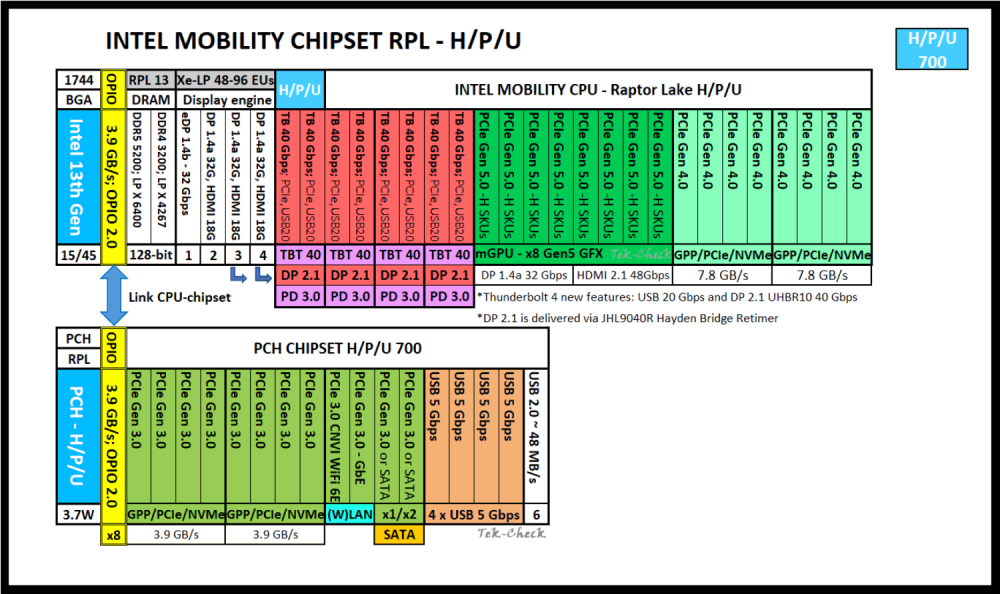
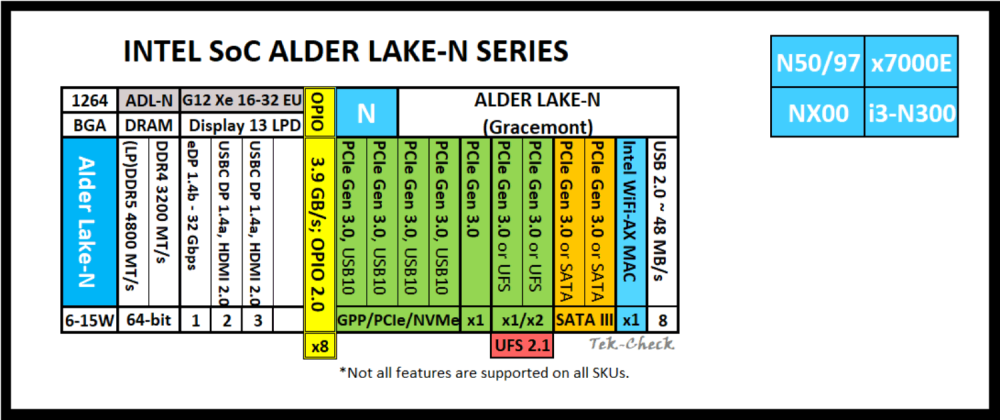
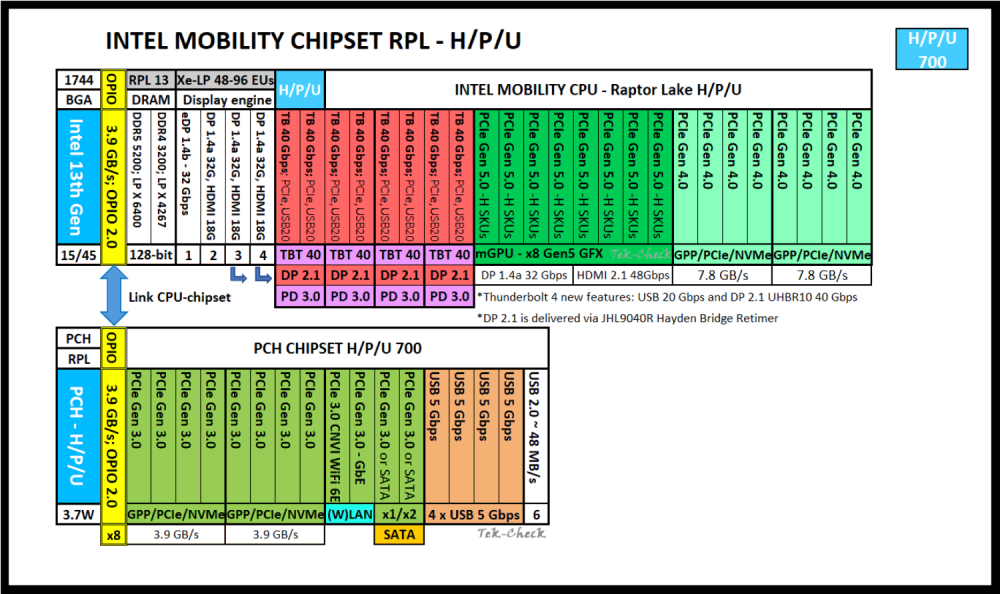
Some of us need or want a low-power NAS/server, either as a main or secondary storage device, the latter e.g. for a cheap off- or on-site backup solution. A good latest-gen Intel-based low-power DIY server/NAS build would probably be using the N series or U series CPUs (2023 and later). Most of the N-series CPUs will work with passive cooling, but will of course still need airflow to prevent thermal throttling under heavy load. CPUs (listed by year): Diagrams (via TekCheck & TechPowerUp): You get the bigger bang with the U series: with 2 memory channels and up to 96GB of RAM instead of only 32GB (or 48GB?), one performance core with hyperthreading, and a lot more PCIe lanes: 8 x PCIe 4.0 (CPU) + 12 x PCIe 3.0 (chipset). But I'm not seeing any U series boards yet, though the first ones might become available in 2024. The current N series CPUs/chipsets have 9 lanes of PCIe 3.0, two potential PCIe 3.0 slots (x2 + x1), which could be enough for a NAS board with a 10GbE NIC and seven to twelve SATA ports (2 native + 5–10 via x2+x1 PCIe to SATA controllers), if you forgo an M.2 SSD and cut back on other connections, which (I fear) most manufacturers probably won't do. You could also use the M.2 WiFi slot to add an additional NIC with an adapter card. As of EOY 2023 only one N-series board has been released as a dedicated NAS board (Changwang), but the next months or years will surely yield a lot more options, so I thought we could have a dedicated topic on N & U series boards of any form factor, whereas I think that most will come as mini ITX. However, it is definitely easier to expand a board into a basis for a home NAS/server system using the Micro ATX form factor. If you find any of these boards, and if they aren't listed yet, please post about them here. That would be awesome. Boards announced or released in 2024 & mentioned in this thread so far (listed by form factor & CPU): Boards announced or released in 2023 & mentioned in this thread so far (listed by form factor & CPU): Turnkey solutions announced or released & mentioned in this thread so far (listed by year) Starting off, it seems that Kontron will soon be releasing six industrial mini-ITX boards using the N series chips, the K3932-N series and the K3931-N series. The former comes with either the N97 (-N2, 4 cores, 12W) or the i3-N305 (-N6, 8 cores, 15W). I will ignore these two here, because they are sold "for projects only" and have a cFAST expansion slot, which would probably complicate a home NAS transformation. The more standard boards would be from the latter K3931-N series: https://www.kontron.com/en/products/k3931-n-mitx/p178833 K3931-N1: N50 (2 cores, 6W) K3931-N2: N97 (4 cores, 12W) K3931-N4: N200 (4 cores, 6W) K3931-N6: i3-N305 (8 cores, 15W) These Kontron boards have not been set up for small server/NAS use, so out of the box these come with only one SATA port. They have an internal USB Type-A port, perfect for the Unraid boot drive. (Unless you want to use eUSB via USB 2.0 header.) They have one open PCIe x4 slot, 3.0 x1 electrical, so you could actually add a 10GbE SFP+ NIC, e.g. a Mellanox MCX311A-XCAT ConnectX-3EN, but you would probably only get maximum speeds of about 600 MB/s. (Still better than the built-in 2.5GbE connection, though.) For more SATA ports, you'd have to use the three built-in M.2 slots: 2 ports with an M.2 B Key adapter (PCIe 3.0 x1) 2 ports with an M.2 M Key adapter (PCIe 3.0 x1) Note #1: these adapters should support AHCI and NCQ Note #2: apparently the M.2 Key E slot is CNVio only, so Key A+E SATA adapters won't work. That would give you 5 SATA ports in total. (Depending on the M.2 adapters, you might get this up to effectively 7 ports, if you go for HDDs.) Or you add a SATA controller card with two or four additional ports, but you would be stuck with the built-in 2.5GbE NIC. Looking forward to more boards.
-
Maybe for space reasons? You'd need an additional PCIe slot for optional IPMI. fyi: there's an industrial variant of this board (available? in the making?), the R680EA-IM-A: https://www.asus.com/networking-iot-servers/aiot-industrial-solutions/industrial-motherboards/r680ea-im-a/ datasheet incl. block diagram: https://www.asus.com/Websites/global/products/e8zjxlzraxczv2lr/pdf/wot1ujdkz9kusqdy.pdf It has the R680E chipset, which is the embedded version of the W680, i.e. the same number of PCIe lanes on the PCH (12 x 4.0 + 16 x 3.0) in addition to the CPU lanes with 16 x 5.0 + 4 x 4.0. Same DMI (4.0 x8). Main difference: 7 SATA ports, i.e. no MiniSAS. SATA port #8 is missing, because you can use the CPU-direct gen4 M.2 slot in SATA mode via the R680E and an ASM2480B. There are no gen4 M.2 slots via the PCH, but that's why you get three x4 PCIe slots in addition to the two gen5 CPU-direct slots (x16/NA or x8/x8): two PCIe 4.0 x4 open slots and one PCIe 3.0 x4 open slot, plus two legacy 32-bit PCI slots coming from a single lane of PCIe 3.0. Pretty nice, I think.
-
In a recent video on ASRock illegal warranty practices, Louis Rossmann has excoriated ASRock hardware in general, however based solely on his own experience. (But he's a hardware repair professional, so his opinion matters, at least to me.) I'll keep surveiling the market: the W680 is rather new, and I suspect we'll see a couple more ATX boards with that chipset in the future. (Currently we only have this one by ASRock Industrial, one by Asus, and one by SuperMicro.)
-
It's built-in IPMI, no extra card, right? This is nice, actually. The X13SAE-F is a really good alternate option.
-
Has anyone had any experience using 48GB DDR5 ECC UDIMMs on this MB? The W680 boards by Asus and Supermicro officially support 192GB max—the ASRock Industrial board doesn't (yet?)—, and according to Intel, the 13th generation Core CPUs do too: https://ark.intel.com/content/www/us/en/ark/products/230580.html At any rate, manufacturers seem to be slowly rolling them out, e.g. here: https://www.smartm.com/product/ddr5-udimm-ecc
-
Addendum: since you still have the CPU-direct M.2 slot with PCIe 4.0 x4, and since (as you wrote) you don't seem to need any M.2 SSDs, you could also use an M.2 to PCIe riser/extender. Then you'd be able to leave the PCH alone and have the CPU deal with the NIC directly. But I can't say if this would work… and the cable would need to be long & flexible enough, and have the right angle. Something like this (four lanes of PCIe 4.0), one of six variants: https://www.amazon.com/dp/B09C1K62PN




