





Lexvdpoel
Members
-
Joined
-
Last visited
Everything posted by Lexvdpoel
-
Great work, i used to run plex-playlist-sync only it keeps having random error's. This is running great so far Future request would be to add all playlists from a specific user
-
I'm currently using the following for anyone intrested: #!/bin/bash echo "Starting script..."; declare -a HDDArray=() for i in /dev/disk/by-id/*; do HDDArray+=("$i");done # Show status echo "Current drive status: " for drive in ${HDDArray[@]}; do sdparm -g WCE $drive; hdparm -W $drive done # Enable write caching for drive in ${HDDArray[@]}; do sdparm $drive --set=WCE; hdparm -W1 $drive done # Show status again echo "Finished running, check if the write cache was enabled!" for drive in ${HDDArray[@]}; do sdparm -g WCE $drive; hdparm -W $drive done echo "Done!"; Probably not the best method because it tries to set the setting on all the attached storage devices but it works for now
-
Wanted to thank you, just completed replacing the faulty drives (yes now i have spares) and saved my data, now running a main array of 100TB+, a NVMe cache of 12TB and some other pools. Very happy with unraid 😃 (now hoping the drive limit of 30 on the main array will expand in the near future)
-
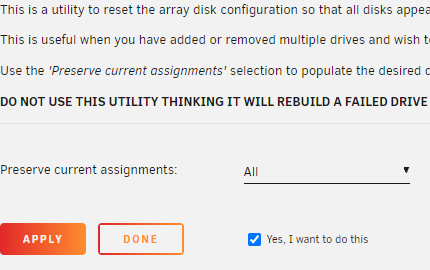
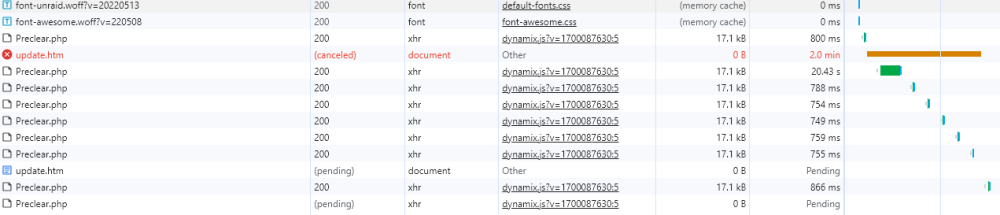
Interesting, when i follow the first step it doesnt seem to respond when i press apply If i check the inspection tool it shows me this: When i first pressed apply it gives me the "update.htm" then i waited for 2min, pressed again. Showed me a new update.htm and canceled the first request Edit: If i wait it out it gives a 504 after 3min
-
Disk 24 is dead i just entered it as unasigned because it was comlaining at the last reboot. Parity should be okay. it was running fine till this morning when i wanted to reboot the system
-
Excuse me, i have attached them. I'm talking about disk 26 in the main array that needs to be enabled. Ignore the unmounted disks (i was checking if they worked) bigboy-diagnostics-20240104-1224.zip
-
Hello all, I have a main array of 30*3tb drives running, 2 drives failed within one month and i have ordered 5*12tb as replacement and spares. As if i'm being punished, one other drive is now labled as disabled (Smart is good). Can i force unraid to re-enable the drive without reconstructing the contents and just remount the drive? (There have been no write actions to the disk since this problem) If not i cant reconstruct the 2 actualy defecitve drives Greetings,
-
Hello all, i'm new to unraid and currently loving it. (Bought the pro license) I'm now running 1 array of 17: 3TB seagate disks (7 on the way to make a total of 24), 1: 2TB nvme cache and 6: ~1TB enterpise SSD on the way for a ZFS pool for proxmox The only "dificulty" i have is that i want to enable all the write caches on the 24 seagate's. I found the following script and currently running this at the first startup of the array: #!/bin/bash # use ls /dev/disk/by-id/ to get disk id's # Drives declare -a StringArray=("scsi-35000c500ed8a1a6f" "scsi-35000c500ed8a04c3" "scsi-35000c500ed54eb6c" "scsi-35000c500ed54c967" "scsi-35000c50091b768fa" "scsi-35000c50082a1c7ef" "scsi-35000c5007ce2c2c7" "scsi-35000c50079e4545e" "scsi-35000c50078328fa7" "scsi-35000c5006752a28c" "scsi-35000c500675289ae" "scsi-35000c50065e89da1" "scsi-35000c50065e89aeb" "scsi-35000c5005367b818" "scsi-35000c5004f34906b" "scsi-35000c5003d78538c" "scsi-35000c5003d3ef109") # Show status echo "Current drive status: " for drive in ${StringArray[@]}; do sdparm -g WCE /dev/disk/by-id/$drive done # Enable write caching for drive in ${StringArray[@]}; do sdparm --set=WCE /dev/disk/by-id/$drive done # Show status again echo "Finished running, check if the write cache was enabled!" for drive in ${StringArray[@]}; do sdparm -g WCE /dev/disk/by-id/$drive done This works and does the job, is there someone with more linux experience then me that can automate the retrieval of the "scsi-" device ID's? Please do note that when running "ls /dev/disk/by-id/" i also get results with: "wwn-", "usb-" and "nvme-". The "scsi-" results also show duplicates with "-part1" at the end The best solution i think would be to filter the results bij array or pool I want to automate this process because eventualy i will need to replace some of the currently 6 years+ spinning drives, and to search te removed ID and replace them with the newly added would be time consuming i think. Maybe there are better solutions for my "problem"? Cheers, Lex

