





OmegaCrit
Members
-
Joined
-
Last visited
-
Awesome, that worked. Thanks for the help.
-
OK I clicked the unmount button and it disappeared, this is how it now looks:
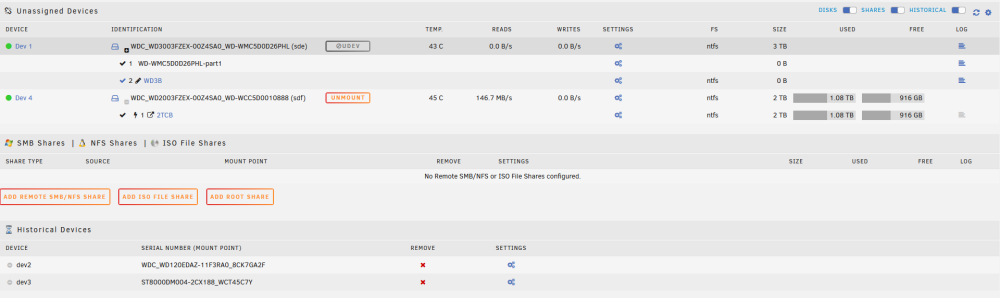
-
Here are the results: root@HTPC:~# lsblk -f NAME FSTYPE FSVER LABEL UUID FSAVAIL FSUSE% MOUNTPOINTS loop0 squashfs 4.0 15.4G 1% /lib loop1 squashfs 4.0 15.4G 1% /usr loop2 btrfs 1172f222-4c0e-425f-ad4c-6412c5bc28ac 11.3G 41% /var/lib/docker/btrfs /var/lib/docker loop3 btrfs 81e47654-4006-401c-a090-a5841a9c6fbd 904.4M 0% /etc/libvirt sda └─sda1 vfat FAT32 UNRAID 272C-EBE2 14.5G 3% /boot sdb └─sdb1 xfs f8881584-2766-4cc2-9523-bbc3d13ab694 sdc └─sdc1 xfs 69f07e3c-b74a-4897-8127-c197e8121a3f sde ├─sde1 └─sde2 ntfs WD3B 0A1800EF1800DB97 sdf └─sdf1 ntfs 2TCB 6EC0BC9AC0BC6A4B 437.9G 76% /mnt/disks/2TCB md1p1 3.5T 62% /mnt/disk1 md2p1 1.8T 1% /mnt/disk2 nvme0n1 └─nvme0n1p1 btrfs 58cc5c6e-f26a-47cb-ba53-4d69d3e76ee1 1.8T 1% /mnt/cache root@HTPC:~# mount rootfs on / type rootfs (rw,size=16385148k,nr_inodes=4096287,inode64) proc on /proc type proc (rw,relatime) sysfs on /sys type sysfs (rw,relatime) tmpfs on /run type tmpfs (rw,nosuid,nodev,noexec,relatime,size=32768k,mode=755,inode64) /dev/sda1 on /boot type vfat (rw,noatime,nodiratime,fmask=0177,dmask=0077,codepage=437,iocharset=iso8859-1,shortname=mixed,flush,errors=remount-ro) /boot/bzmodules on /lib type squashfs (ro,relatime,errors=continue) overlay on /lib type overlay (rw,relatime,lowerdir=/lib,upperdir=/var/local/overlay/lib,workdir=/var/local/overlay-work/lib) /boot/bzfirmware on /usr type squashfs (ro,relatime,errors=continue) overlay on /usr type overlay (rw,relatime,lowerdir=/usr,upperdir=/var/local/overlay/usr,workdir=/var/local/overlay-work/usr) devtmpfs on /dev type devtmpfs (rw,relatime,size=8192k,nr_inodes=4096287,mode=755,inode64) devpts on /dev/pts type devpts (rw,relatime,gid=5,mode=620,ptmxmode=000) tmpfs on /dev/shm type tmpfs (rw,relatime,inode64) fusectl on /sys/fs/fuse/connections type fusectl (rw,relatime) hugetlbfs on /hugetlbfs type hugetlbfs (rw,relatime,pagesize=2M) cgroup_root on /sys/fs/cgroup type tmpfs (rw,relatime,size=8192k,mode=755,inode64) none on /sys/fs/cgroup type cgroup2 (rw,relatime) tmpfs on /var/log type tmpfs (rw,relatime,size=131072k,mode=755,inode64) efivarfs on /sys/firmware/efi/efivars type efivarfs (rw,nosuid,nodev,noexec,relatime) rootfs on /mnt type rootfs (rw,size=16385148k,nr_inodes=4096287,inode64) tmpfs on /mnt/disks type tmpfs (rw,relatime,size=1024k,inode64) tmpfs on /mnt/remotes type tmpfs (rw,relatime,size=1024k,inode64) tmpfs on /mnt/addons type tmpfs (rw,relatime,size=1024k,inode64) tmpfs on /mnt/rootshare type tmpfs (rw,relatime,size=1024k,inode64) /dev/md1p1 on /mnt/disk1 type xfs (rw,noatime,nouuid,attr2,inode64,logbufs=8,logbsize=32k,noquota) /dev/md2p1 on /mnt/disk2 type xfs (rw,noatime,nouuid,attr2,inode64,logbufs=8,logbsize=32k,noquota) /dev/nvme0n1p1 on /mnt/cache type btrfs (rw,noatime,ssd,discard=async,space_cache=v2,subvolid=5,subvol=/) shfs on /mnt/user0 type fuse.shfs (rw,nosuid,nodev,noatime,user_id=0,group_id=0,default_permissions,allow_other) shfs on /mnt/user type fuse.shfs (rw,nosuid,nodev,noatime,user_id=0,group_id=0,default_permissions,allow_other) /mnt/cache/system/docker/docker.img on /var/lib/docker type btrfs (rw,noatime,ssd,space_cache=v2,subvolid=5,subvol=/) /mnt/cache/system/docker/docker.img on /var/lib/docker/btrfs type btrfs (rw,noatime,ssd,space_cache=v2,subvolid=5,subvol=/) nsfs on /run/docker/netns/58d2747f0c7e type nsfs (rw) /mnt/cache/system/libvirt/libvirt.img on /etc/libvirt type btrfs (rw,noatime,ssd,space_cache=v2,subvolid=5,subvol=/) nsfs on /run/docker/netns/eea61cf49e5e type nsfs (rw) nsfs on /run/docker/netns/6d7c8f8da35f type nsfs (rw) nsfs on /run/docker/netns/9697d4f9a962 type nsfs (rw) nsfs on /run/docker/netns/c8b036a3cdc0 type nsfs (rw) nsfs on /run/docker/netns/c44df795195a type nsfs (rw) nsfs on /run/docker/netns/13dff6b8eb1f type nsfs (rw) /dev/sdf1 on /mnt/disks/2TCB type fuseblk (rw,nosuid,nodev,relatime,user_id=0,group_id=0,default_permissions,allow_other,blksize=4096)
-
so I just noticed one of the partitions says its mounted, I think that changed when I plugged it in via usb but I can't see any files in it
-
Here's the screenshot
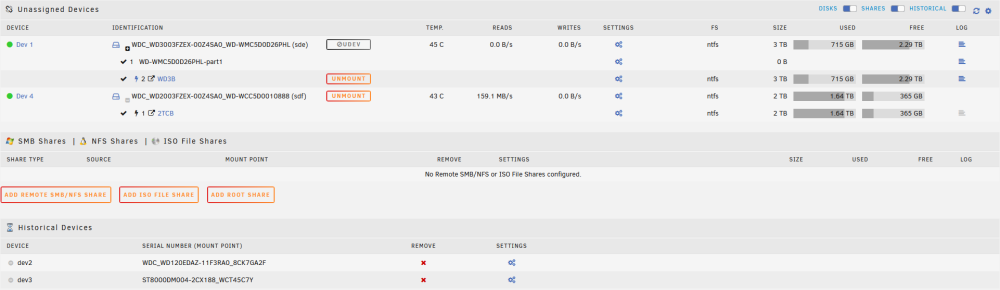
-
So I don't have the drive hooked up via USB its connect via to the same HBA that the mountable drive is connected too. I tried clicking the icon with two arrows it says success but nothing changes. I could try hooking it up via usb and seeing if that does anything. Edit 1: so hooking It up via usb did nothing
-
Added the diagnostics to my previous post but must have been to late for you to see it here is a new one I have one drive that i can mount and one that is giving me the udev error htpc-diagnostics-20230910-1654.zip
-
I'm relatively new to Unraid, having started using it just yesterday, so it's possible I made a mistake somewhere. I was using Unassigned Devices to mount some old HDDs and transfer their data. Everything was working fine until I received a notification about a new update. After updating, I've encountered an issue – I can no longer mount the drive I was using just an hour ago. Where the mount button is typically located, there's now a greyed-out "UDEV" with a crossed-out circle next to it. I'm unsure how to proceed in fixing this problem. htpc-diagnostics-20230910-1649.zip

