comatose-bloodletting2687
Members
-
Joined
-
Last visited
Everything posted by comatose-bloodletting2687
-
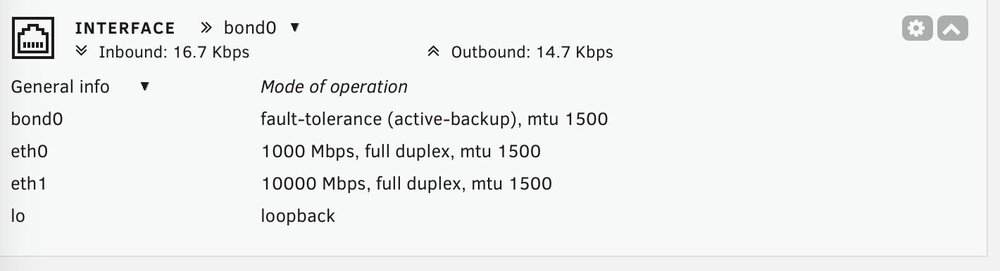
I was in the same situation w/o the Realtek plugin.. The fiber card is functional, has a link and when I pull the cord from the Realtek onboard NIC the fiber card takes over. I understand the interface-rules wont show up if multiple NIC's aren't recognized; this is not my case (I think).
-
gold-diagnostics-20250116-0604.zip
-
I too am not seeing the interface rules control section. I was on 7.0-RC2 and now on the 7.0 stable release (same issue on both) There is no network-rules.cfg in the /boot/config/ location, I've tried deleting network.cfg and rebooting yet not avail. The network interface shows both eth0 and eth1; ethtool eth1 shows the following: (below) and if I pull the cable from the onboard NIC the fiber NIC takes over, but I cannot find a way to make eth1 the primary, which I thought was done in the interface rules section. What am I missing? TIA Settings for eth1: Supported ports: [ FIBRE ] Supported link modes: 10000baseT/Full Supported pause frame use: Symmetric Supports auto-negotiation: No Supported FEC modes: Not reported Advertised link modes: 10000baseT/Full Advertised pause frame use: Symmetric Advertised auto-negotiation: No Advertised FEC modes: Not reported Speed: 10000Mb/s Duplex: Full Auto-negotiation: off Port: Other PHYAD: 0 Transceiver: internal Supports Wake-on: d Wake-on: d Current message level: 0x00000007 (7) drv probe link Link detected: yes