milo15618
Members
-
Joined
-
Last visited
-
Hello all. I've been using Binhex DelugeVPN for a few years now. I monitor it periodically and make sure the vpn is on and working. However I just recently read somewhere about other download clients and vpn binding so that if the vpn is down the client will not download anything. I've tried googling this but havent found a direct answer yet. So my question is, is the vpn in binhex delugevpn binded and will it stop downloading if the vpn disconnects for any reason. I havent had any issues with the vpn side of things so I dont have any first hand experience to say one way or the other. Is there a way I can test this as well? and what would be the best way of going about testing this.
-
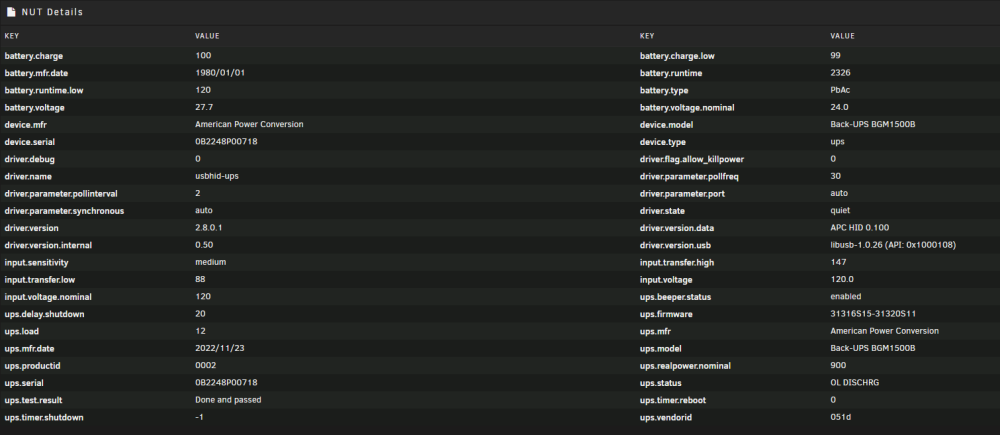
I've been fighting with this issue for a while now. I bought a APC Back-up UPS model: BGM1500B. Im on Unraid version 6.12.4. If I use Unraids built in UPS settings I always get "On Battery." I've tried the NUT plugin and I get the status "Online/Discharging" and most of the time it reads 3:00:00 for remaining time available. I have replaced the battery with a new one from APC. I've also used the usb/data cable that came with the UPS as well as another one I purchased and got the same results. I've tried changing around all the setting. If I run WinNUT-client from my windows pc it shows Online. Running through google multiple times I've gone through numerous forums and tried every solution I've come across and of course none have worked. I've also applied the syslog which shows repeated messages of the UPS being in "Online/Discharge" status as well as a picture of the NUT details. I've also found tried changing the "battery.runtime.low - 99%" by adding "ignorelb override.battery.charge.low = 25 override.battery.runtime.low = 900" to the end of ups.config and it does change to 25% but the status "Online/Discharge" stays the same. Im not sure where to go from here. Unfortunately its to late return this one for a different model but Im starting to feel like I should have bought a different one. Any help is appreciated. syslog.txt