RoyBatty
Members
-
Joined
-
Last visited
-
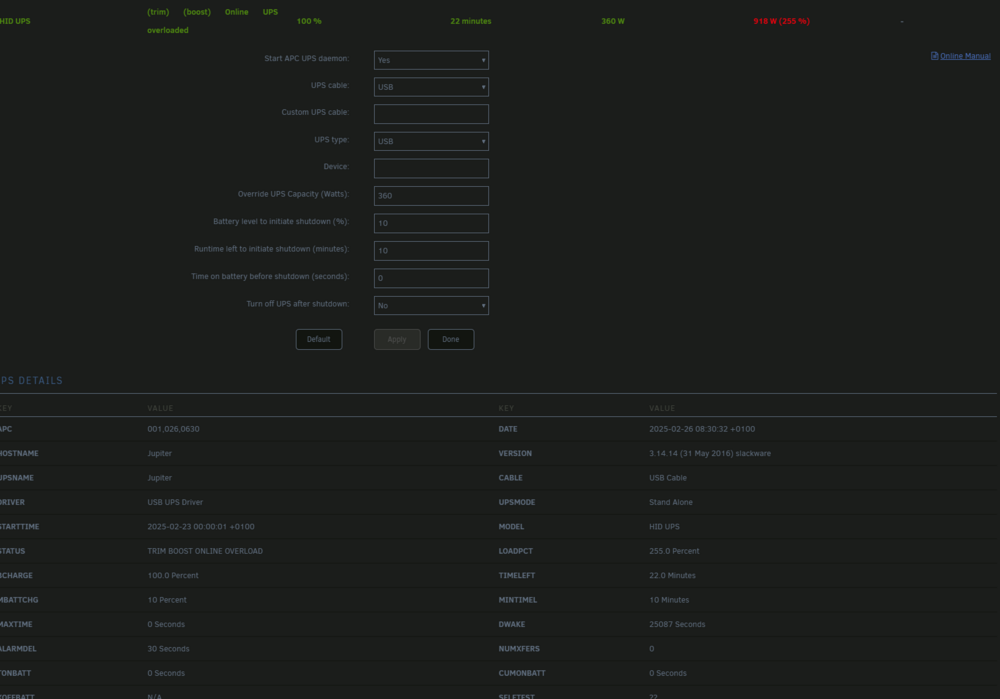
HI, Im using Unraid 7.0.1 and I recently bought a brand new BlueWalker PW UPS VI 650 LCD Schuko which should be sufficient for my unraid rig which has a 350W psu, but for some reason when Im starting the UPS HID module I get a status of consumption of 918 W which in my mind doesent make sense since the PSU cant output that kind of power Last night I also got this message in the syslog: Feb 25 21:41:10 Jupiter apcupsd[1777146]: UPS battery must be replaced. It seems to be performing as it should, but Im getting a bit worried about the messages, any suggestive actions? I ran the following in a terminal window: root@Jupiter:~# apcaccess status APC : 001,026,0630 DATE : 2025-02-26 10:48:29 +0100 HOSTNAME : Jupiter VERSION : 3.14.14 (31 May 2016) slackware UPSNAME : Jupiter CABLE : USB Cable DRIVER : USB UPS Driver UPSMODE : Stand Alone STARTTIME: 2025-02-26 09:54:13 +0100 MODEL : HID UPS STATUS : TRIM BOOST ONLINE OVERLOAD LOADPCT : 255.0 Percent BCHARGE : 100.0 Percent TIMELEFT : 22.8 Minutes MBATTCHG : 10 Percent MINTIMEL : 10 Minutes MAXTIME : 0 Seconds DWAKE : 25087 Seconds ALARMDEL : 30 Seconds NUMXFERS : 0 TONBATT : 0 Seconds CUMONBATT: 0 Seconds XOFFBATT : N/A SELFTEST : ?? STATFLAG : 0x0500002E SERIALNO : END APC : 2025-02-26 10:48:30 +0100 jupiter-diagnostics-20250226-0900.zip
-
I ended up starting the array without a parity disk and reassigned the disk to the array, so now just need to wait for the rebuild. Oh well, I guess it was time anyways

-
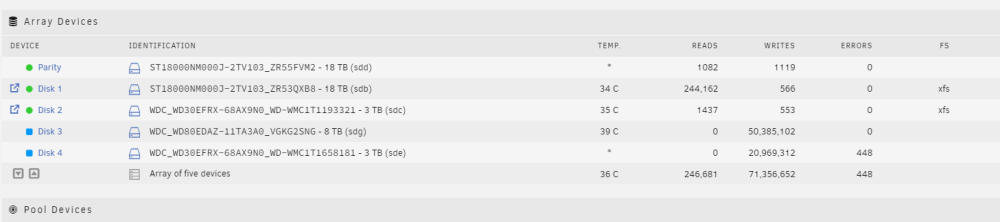
Hmm, got the array stopped but now my partity drive is disabled, will try a hardware reboot and see if that fixes the issue. edit: Nope, damn, seems like my disk1 died on me during the process.... Cant see it in the bios either.... Weird thing is, disk1 smart info reports no errors. Anything I can do about this? jupiter-diagnostics-20240418-1021.zip jupiter-smart-20240418-1027.zip
-
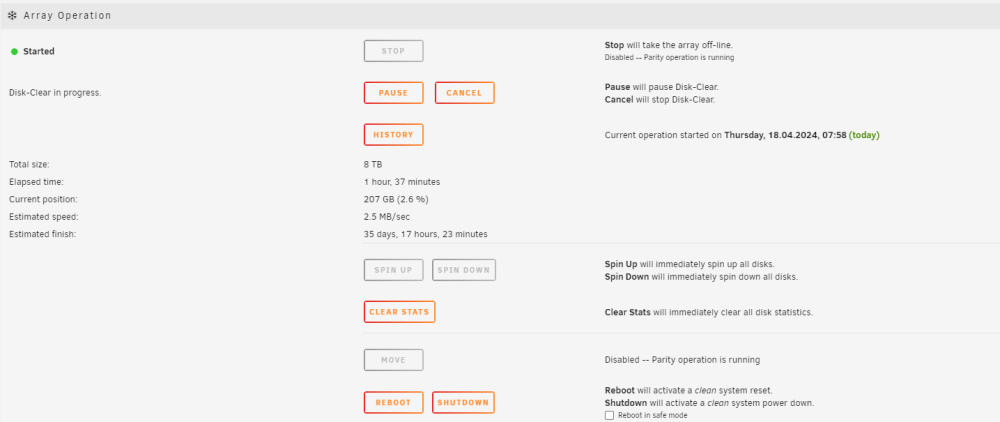
Yes,basicly what Im trying to do is add 2 drives at the same time, but I guess thats whats failing atm. To give you a perspective of what Im seeing in unraid now: Atm Im a bit stuck with deciding what to do, should I cancel the disk clear, stop the array and remove the faulty drive? Would that increase the speed of adding drive 3? edit: Adding logs from drive4: Apr 18 08:20:00 Jupiter kernel: sd 2:0:1:0: [sde] tag#0 CDB: opcode=0x8a 8a 00 00 00 00 00 09 ff b9 48 00 00 01 f8 00 00 Apr 18 08:20:00 Jupiter kernel: I/O error, dev sde, sector 167754056 op 0x1:(WRITE) flags 0x0 phys_seg 63 prio class 2 Apr 18 09:23:03 Jupiter kernel: sd 2:0:1:0: [sde] tag#0 UNKNOWN(0x2003) Result: hostbyte=0x04 driverbyte=DRIVER_OK cmd_age=0s Apr 18 09:23:03 Jupiter kernel: sd 2:0:1:0: [sde] tag#0 CDB: opcode=0x88 88 00 00 00 00 01 5d 50 a2 c0 00 00 00 08 00 00 Apr 18 09:23:03 Jupiter kernel: I/O error, dev sde, sector 5860532928 op 0x0:(READ) flags 0x80700 phys_seg 1 prio class 2 Apr 18 09:23:03 Jupiter kernel: sd 2:0:1:0: [sde] tag#0 UNKNOWN(0x2003) Result: hostbyte=0x04 driverbyte=DRIVER_OK cmd_age=0s Apr 18 09:23:03 Jupiter kernel: sd 2:0:1:0: [sde] tag#0 CDB: opcode=0x88 88 00 00 00 00 01 5d 50 a2 c0 00 00 00 01 00 00 Apr 18 09:23:03 Jupiter kernel: I/O error, dev sde, sector 5860532928 op 0x0:(READ) flags 0x0 phys_seg 1 prio class 2 Apr 18 09:23:03 Jupiter kernel: Buffer I/O error on dev sde1, logical block 5860532864, async page read Apr 18 09:23:03 Jupiter kernel: sd 2:0:1:0: [sde] tag#0 UNKNOWN(0x2003) Result: hostbyte=0x04 driverbyte=DRIVER_OK cmd_age=0s Apr 18 09:23:03 Jupiter kernel: sd 2:0:1:0: [sde] tag#0 CDB: opcode=0x88 88 00 00 00 00 01 5d 50 a2 c1 00 00 00 01 00 00 Apr 18 09:23:03 Jupiter kernel: I/O error, dev sde, sector 5860532929 op 0x0:(READ) flags 0x0 phys_seg 1 prio class 2 Apr 18 09:23:03 Jupiter kernel: Buffer I/O error on dev sde1, logical block 5860532865, async page read Apr 18 09:23:03 Jupiter kernel: sd 2:0:1:0: [sde] tag#0 UNKNOWN(0x2003) Result: hostbyte=0x04 driverbyte=DRIVER_OK cmd_age=0s Apr 18 09:23:03 Jupiter kernel: sd 2:0:1:0: [sde] tag#0 CDB: opcode=0x88 88 00 00 00 00 01 5d 50 a2 c2 00 00 00 01 00 00 Apr 18 09:23:03 Jupiter kernel: I/O error, dev sde, sector 5860532930 op 0x0:(READ) flags 0x0 phys_seg 1 prio class 2 Apr 18 09:23:03 Jupiter kernel: Buffer I/O error on dev sde1, logical block 5860532866, async page read Apr 18 09:23:03 Jupiter kernel: sd 2:0:1:0: [sde] tag#0 UNKNOWN(0x2003) Result: hostbyte=0x04 driverbyte=DRIVER_OK cmd_age=0s Apr 18 09:23:03 Jupiter kernel: sd 2:0:1:0: [sde] tag#0 CDB: opcode=0x88 88 00 00 00 00 01 5d 50 a2 c3 00 00 00 01 00 00 Apr 18 09:23:03 Jupiter kernel: I/O error, dev sde, sector 5860532931 op 0x0:(READ) flags 0x0 phys_seg 1 prio class 2 Apr 18 09:23:03 Jupiter kernel: Buffer I/O error on dev sde1, logical block 5860532867, async page read Apr 18 09:23:03 Jupiter kernel: sd 2:0:1:0: [sde] tag#0 UNKNOWN(0x2003) Result: hostbyte=0x04 driverbyte=DRIVER_OK cmd_age=0s Apr 18 09:23:03 Jupiter kernel: sd 2:0:1:0: [sde] tag#0 CDB: opcode=0x88 88 00 00 00 00 01 5d 50 a2 c4 00 00 00 01 00 00 Apr 18 09:23:03 Jupiter kernel: I/O error, dev sde, sector 5860532932 op 0x0:(READ) flags 0x0 phys_seg 1 prio class 2 Apr 18 09:23:03 Jupiter kernel: Buffer I/O error on dev sde1, logical block 5860532868, async page read Apr 18 09:23:03 Jupiter kernel: sd 2:0:1:0: [sde] tag#0 UNKNOWN(0x2003) Result: hostbyte=0x04 driverbyte=DRIVER_OK cmd_age=0s Apr 18 09:23:03 Jupiter kernel: sd 2:0:1:0: [sde] tag#0 CDB: opcode=0x88 88 00 00 00 00 01 5d 50 a2 c5 00 00 00 01 00 00 Apr 18 09:23:03 Jupiter kernel: I/O error, dev sde, sector 5860532933 op 0x0:(READ) flags 0x0 phys_seg 1 prio class 2 Apr 18 09:23:03 Jupiter kernel: Buffer I/O error on dev sde1, logical block 5860532869, async page read Apr 18 09:23:03 Jupiter kernel: sd 2:0:1:0: [sde] tag#0 UNKNOWN(0x2003) Result: hostbyte=0x04 driverbyte=DRIVER_OK cmd_age=0s Apr 18 09:23:03 Jupiter kernel: sd 2:0:1:0: [sde] tag#0 CDB: opcode=0x88 88 00 00 00 00 01 5d 50 a2 c6 00 00 00 01 00 00 Apr 18 09:23:03 Jupiter kernel: I/O error, dev sde, sector 5860532934 op 0x0:(READ) flags 0x0 phys_seg 1 prio class 2 Apr 18 09:23:03 Jupiter kernel: Buffer I/O error on dev sde1, logical block 5860532870, async page read Apr 18 09:23:03 Jupiter kernel: sd 2:0:1:0: [sde] tag#0 UNKNOWN(0x2003) Result: hostbyte=0x04 driverbyte=DRIVER_OK cmd_age=0s Apr 18 09:23:03 Jupiter kernel: sd 2:0:1:0: [sde] tag#0 CDB: opcode=0x88 88 00 00 00 00 01 5d 50 a2 c7 00 00 00 01 00 00 Apr 18 09:23:03 Jupiter kernel: I/O error, dev sde, sector 5860532935 op 0x0:(READ) flags 0x0 phys_seg 1 prio class 2 Apr 18 09:23:03 Jupiter kernel: Buffer I/O error on dev sde1, logical block 5860532871, async page read Apr 18 09:23:03 Jupiter kernel: sd 2:0:1:0: [sde] tag#0 UNKNOWN(0x2003) Result: hostbyte=0x04 driverbyte=DRIVER_OK cmd_age=0s Apr 18 09:23:03 Jupiter kernel: sd 2:0:1:0: [sde] tag#0 CDB: opcode=0x88 88 00 00 00 00 01 5d 50 a2 c0 00 00 00 08 00 00 Apr 18 09:23:03 Jupiter kernel: I/O error, dev sde, sector 5860532928 op 0x0:(READ) flags 0x80700 phys_seg 1 prio class 2 Apr 18 09:23:03 Jupiter kernel: Buffer I/O error on dev sde1, logical block 5860532864, async page read
-
Hi there after adding a couple of drives to my array I seem to have an issue with the time of pre-clear, for some reason its incredably slow, is there any way I can speed this up or should I just wait? 35 days seems like a very long time... I can see that I have some errors on the 3TB drive, but not sure why the 8TB drive is so slow: jupiter-diagnostics-20240418-0922.zip
-
Finally, after some tinkering with the drive ,it seems as if it was an ev0l Windows boot partition which was the culprate, I did away with it using dispart on the windoze comp. Removed it there and it came right up once I started the array.
-
Thats the weird thing, Windos insists that the device doesent contain anything. I'll see if I can run fdisk towards it and get it wiped that way.
-
Afraid not Just to be clear, there is no data on the drive or the array atm which I need to keep. jupiter-diagnostics-20230922-1346.zip
-
Uploading new diagsjupiter-diagnostics-20230922-1237.zip
-
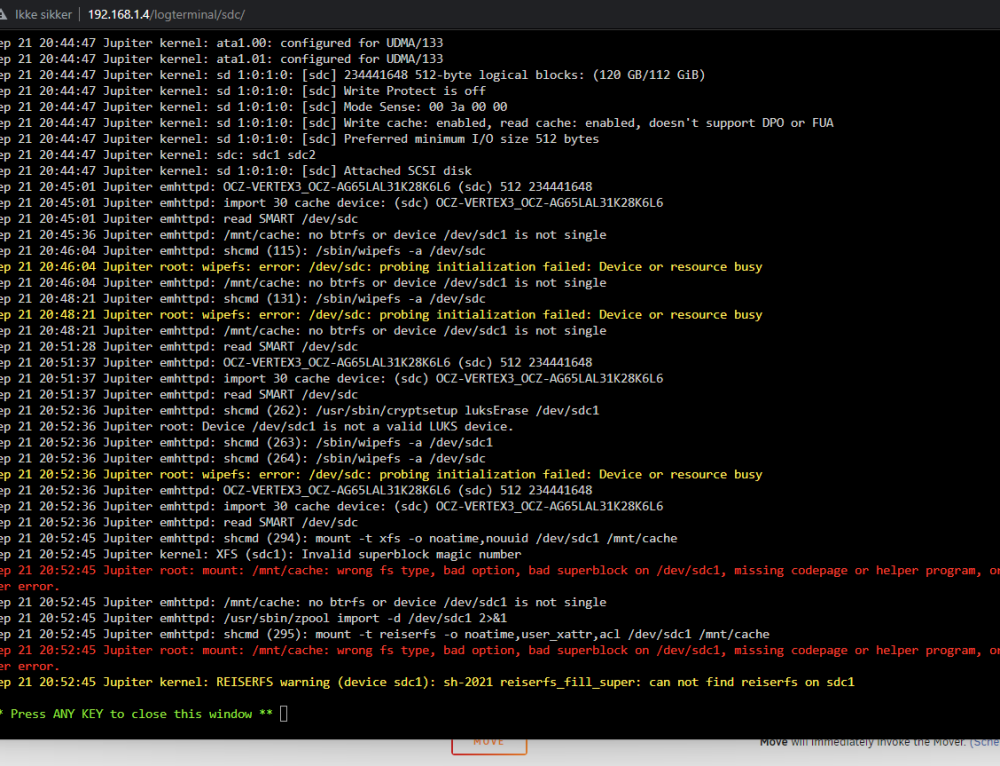
Just getting : Sep 22 12:23jupiter-diagnostics-20230922-1231.zip:33 Jupiter root: wipefs: error: /dev/sdc: probing initialization failed: Device or resource busy
-
Tried a reboot, still getting the same message, uploaded a new diagnosis jupiter-diagnostics-20230922-0943.zip
-
Getting some issues with a fresh unraid install/setup using unraid 6.12.4 and problems with the ssd cache, Ive tried different file systems on it, but regardless of what I choose Im unable to do anything with it. Weird part is that the overall Monitoring now shows everything as green and ok. Any advice moving forward? Dont want to start moving data on to this until Ive got it fixed. jupiter-diagnostics-20230922-0747.zip jupiter-smart-20230922-0755.zip