adamzetpl
Members
-
Joined
-
Last visited
-
I have another question, when using local backup so "Backup and restore" part of plugin every snapshots ever created is copied, is there a way to Prune snapshots like "Snapshot creation and pruning"? Local backup is growing fast with all snapshots (even those that were prune in "Snapshot creation and pruning").
-
I did run full backup and now everything is OK. Thank you.
-
Verision of plugin 2025.02.23 its from CA not manual install. Running backup.. CRITICAL ERROR: Target backup_hdd/zfs_backup/appdata_backup exists but has no snapshots matching with cache/appdata! Replication to target would require destroying existing target. Cowardly refusing to destroy your existing target. INFO: no snapshots on source newer than autosnap_2025-02-24_00:30:10_daily on target. Nothing to do, not syncing. INFO: no snapshots on source newer than autosnap_2025-02-24_00:30:18_daily on target. Nothing to do, not syncing. INFO: no snapshots on source newer than autosnap_2025-02-24_00:30:26_daily on target. Nothing to do, not syncing. INFO: no snapshots on source newer than autosnap_2025-02-24_00:15:23_daily on target. Nothing to do, not syncing. INFO: no snapshots on source newer than autosnap_2025-02-24_00:15:01_daily on target. Nothing to do, not syncing. INFO: no snapshots on source newer than autosnap_2025-02-24_00:15:16_daily on target. Nothing to do, not syncing. INFO: no snapshots on source newer than autosnap_2025-02-24_00:15:14_daily on target. Nothing to do, not syncing. INFO: no snapshots on source newer than autosnap_2025-02-24_00:30:01_daily on target. Nothing to do, not syncing. INFO: no snapshots on source newer than autosnap_2025-02-24_00:30:07_daily on target. Nothing to do, not syncing. INFO: no snapshots on source newer than autosnap_2025-02-24_00:15:06_daily on target. Nothing to do, not syncing. INFO: no snapshots on source newer than autosnap_2025-02-24_00:15:26_daily on target. Nothing to do, not syncing. INFO: no snapshots on source newer than autosnap_2025-02-24_00:15:08_daily on target. Nothing to do, not syncing. INFO: no snapshots on source newer than autosnap_2025-02-24_00:15:29_daily on target. Nothing to do, not syncing. INFO: no snapshots on source newer than autosnap_2025-02-24_00:15:11_daily on target. Nothing to do, not syncing. INFO: no snapshots on source newer than autosnap_2025-02-24_00:15:19_daily on target. Nothing to do, not syncing. INFO: no snapshots on source newer than autosnap_2025-02-24_00:30:20_daily on target. Nothing to do, not syncing. INFO: no snapshots on source newer than autosnap_2025-02-24_00:30:04_daily on target. Nothing to do, not syncing. INFO: no snapshots on source newer than autosnap_2025-02-24_00:30:15_daily on target. Nothing to do, not syncing. Local backup failed. Error code 2. [[rc.buddybackup finished]]
-
I have little more feedback, i removed plugin (deleted files from boot, restart unraid). After installing fresh I need to enable Buddy's Backups for cron snapshot to be created (after this I can disable it), additional error I get after Backup and restore job runs: "Local backup failed. Error code 2." It seems that everything is running fine, snapshot are created, dataset is mirrored but I get constant error "Local backup failed. Error code 2.".
-
Now everything is OK
-
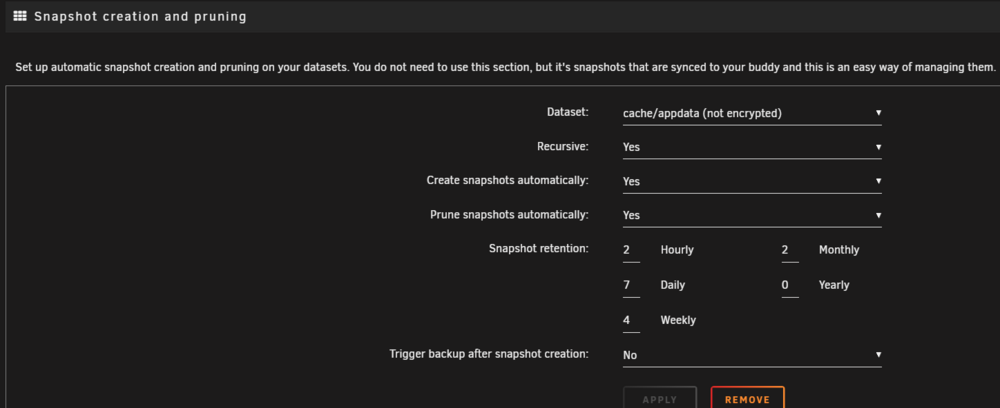
[] hourly = 0 daily = 7 weekly = 4 monthly = 3 yearly = 0 autosnap = no autoprune = yes recursive = yes [cache/appdata] recursive = yes autosnap = yes autoprune = yes hourly = 0 monthly = 2 daily = 7 yearly = 0 weekly = 4 [7bef260e] dataset="cache/appdata" recursive="yes" autosnap="yes" autoprune="yes" hourly="0" monthly="2" daily="7" yearly="0" weekly="4" trigger="no"
-
Now cron is working but I get in log: FATAL: cannot load /boot/config/plugins/buddybackup/sanoid.conf - please create a valid local config file before running sanoid! at /usr/local/emhttp/plugins/buddybackup/deps/sanoid line 917.
-
Really nice plugin but I have problem, I did set up Snapshot creation and pruning mostly like you shown in screenshot in section "Snapshot creation and pruning" but no snapshot are created. I want to backup localy, do I have to setup manual cron to run config for sanoid?