PepeSilvia
Members
-
Joined
-
Last visited
-
PepeSilvia changed their profile photo
-
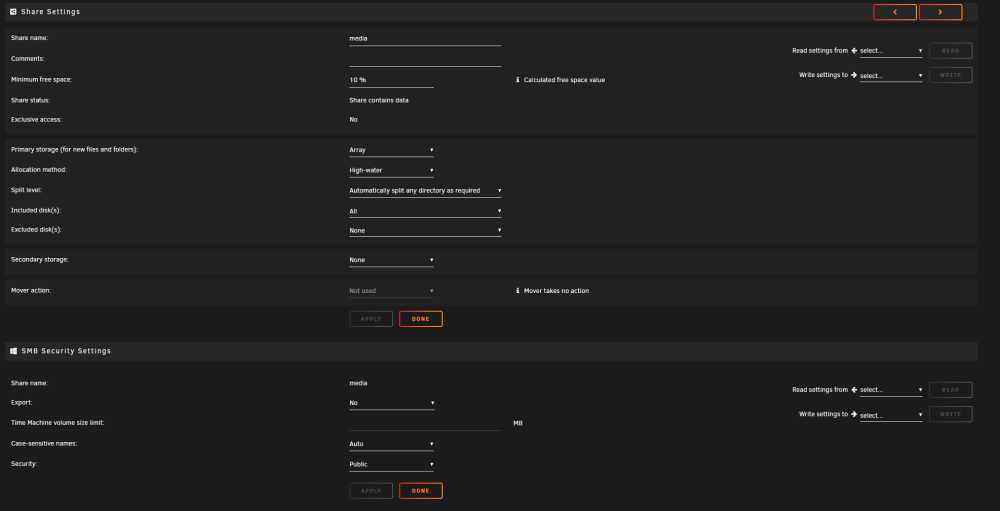
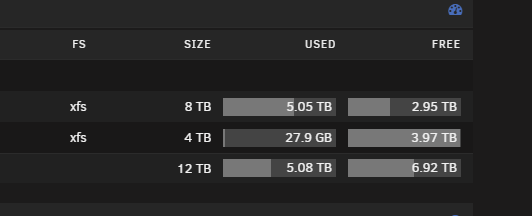
I am extremely new to the unraid scene, I've only had my unraid server up and running for maybe two months now with the help and recommendation of a friend. So go easy on me if I'm making any stupid rookie mistakes! Anyways, I'm hosting a plex server on it, using sonarr and radarr, and using two drives ("disk1" - an 8tb drive, and "disk2" - a 4tb drive) as my array, with an additional 8tb parity. My problem, as stated in the title is pretty self explanatory, as my media share fills up, its ONLY putting data on disk1 (the 8tb drive), now I assumed based on the "highwater" setting that it probably wouldn't start to fill up disk2 (the 4tb) until the 8tb drive was about halfway full. But at this point, disk1 is a little over 5tb out of 8 filled up, and nothing is spilling over into disk2, so I'm starting to get concerned why it doesn't seem to be including disk 2 in the share, like I originally (or so i thought) set it up to do. Looking for some help or direction for troubleshooting if I may have made some errors on my original setup. I'll attach the diagnostic zip file as directed here and will add in some screenshots as well... Thanks in advance for any help! dojo-diagnostics-20230928-2145 (1).zip