





marginal-firing7693
Members
-
Joined
-
Last visited
-
All, One set of my RAM was dying, or the mismatch randomly began causing several issues. Down to 1 set of RAM (3200 MT/s) and have passed 3 Parity Checks with 0 errors, as well as uptime over 6 days. Thank you all for the help. Ill Mark A Solution shortly.
-
Found that the RAM packages were two different clock speeds. While this has been the case since the initial build, I removed one set, and started the server back up. It has run for 2 days, and there have been many nvidia driver faults relating to communications, so I removed that plug-in for now. Its only being used for Plex, which is down currently due to this. With array spun up and no dockers running, system seems stable. Going to try a non-correcting parity check to see if the HBA is problematic. I might have a second one I can try swapping out for troubleshooting.
-
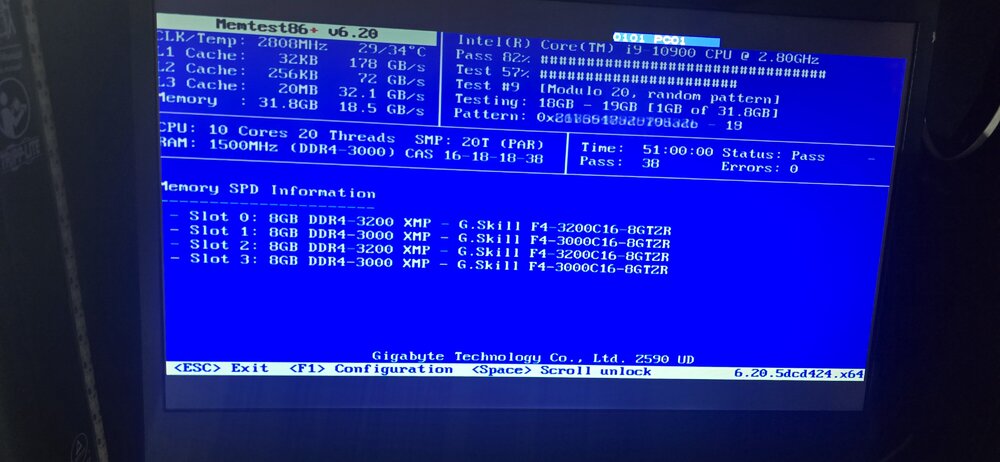
Yes. Ill post that shortly. Also, 51 hours in MemTest without a fault. See attachment. Grabbing logs now.
-
MemTest has been running for ~36 hours, with over 20 passing and 0 failing/errors. Is next step of removing all but 1 RAM module and testing stability again?
-
Understood. As of this morning, 8 passes, 0 errors. Still running. I am also going to power down and pull all modules, as memtest is claiming 2 modules are running at 3200MT/s, and two running at 3000MT/s.
-
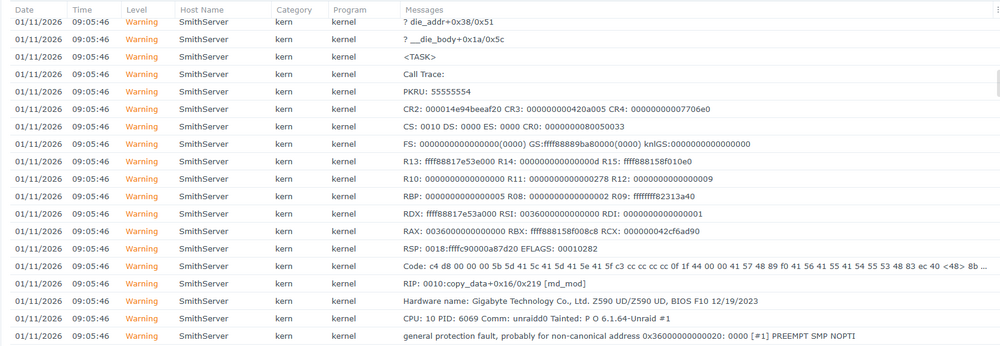
ran another parity check after the system was able to run for ~4 hours without issue, got 51% through (9.1TB). First errors reported to the remote syslog are below: Ill start a reboot with memtest now.
-
Ill run memtest tomorrow. Thank you all for the help so far.
-
Thank you all, I will hook up monitor and try booting into MemTest on next boot. I just started remote syslog server to my Synology NAS. Will the MemTest be able to give usable data if the server locks up within 1 hour?
-
Diagnostics attached. I have not tried memtest. Do you have a procedure for that? I am setting up remote persistent logs now. smithserver-diagnostics-20260110-1048.zip
-
UnRaid server keeps crashing/freezing during parity checks after booting. It seemed to remain running with array online and dockers running, as long as parity checks arent run. Short SMART self-tests dont show any failing drives. Running extended SMART self-tests now. I have not opened the case or modified anything, aside from introducing a new UPS, but powered down safely before unplugging. Might have had one unsafe power down when I had the cables hooked up incorrectly. Parity checks get to differing places before locking up entire machine. Slow and seemingly random parity sync errors, sometimes rapid, sometimes 100GB apart on parity operations. Haven't made it past 1TB without a lockup. Will work to backup shares after extended self-test completes. Any insight from anyone else on this? What files or information would you need to offer any insight? Does the symptoms tend to point to a hardware issue, or a software/file issue?

