median-symposium6528
Members
-
Joined
-
Last visited
Everything posted by median-symposium6528
-
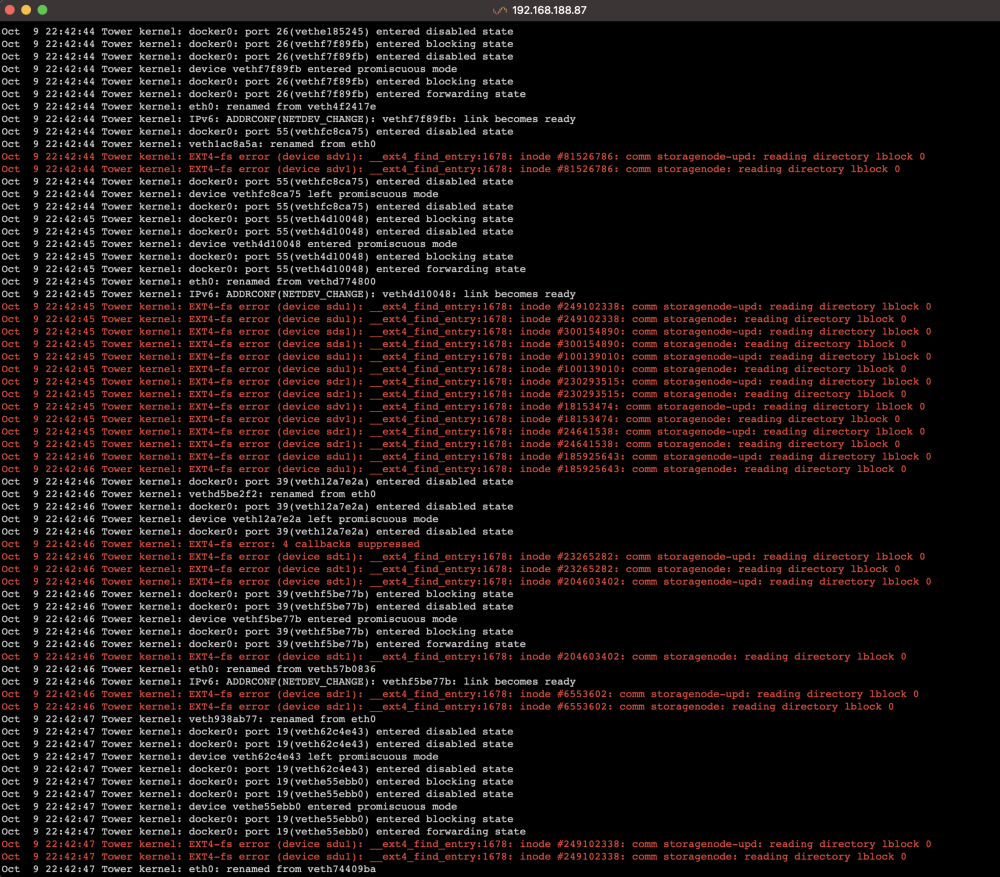
Thanks for your fast reply. I already tested different drive enclosures with different USB cables and changed the ports on the motherboard. I guess that means that the issue might be the motherboard itself. I will try to find something in the logs. Edit: It happened again. This time I saved all the syslogs: It seems like the USB enclosure got disconnected at 10:11:49: Oct 11 09:06:00 Tower monitor: Stop running nchan processes Oct 11 10:11:49 Tower kernel: usb 4-1: Device not responding to setup address. Oct 11 10:11:49 Tower kernel: usb 4-1: Device not responding to setup address. Oct 11 10:11:49 Tower kernel: usb 4-1: device not accepting address 3, error -71 Oct 11 10:11:50 Tower kernel: usb 4-1: USB disconnect, device number 3 Oct 11 10:11:50 Tower kernel: sd 13:0:0:3: [sdv] tag#0 UNKNOWN(0x2003) Result: hostbyte=0x01 driverbyte=DRIVER_OK cmd_age=0s Oct 11 10:11:50 Tower kernel: sd 13:0:0:3: [sdv] tag#0 CDB: opcode=0x8a 8a 00 00 00 00 00 d2 fc a0 40 00 00 02 40 00 00 Oct 11 10:11:50 Tower kernel: I/O error, dev sdv, sector 3539771456 op 0x1:(WRITE) flags 0x800 phys_seg 39 prio class 2 Oct 11 10:11:50 Tower kernel: EXT4-fs warning (device sdv1): ext4_end_bio:343: I/O error 10 writing to inode 257988388 starting block 442471432) Oct 11 10:11:50 Tower kernel: sd 13:0:0:1: [sdt] tag#0 UNKNOWN(0x2003) Result: hostbyte=0x01 driverbyte=DRIVER_OK cmd_age=0s Oct 11 10:11:50 Tower kernel: sd 13:0:0:1: [sdt] tag#0 CDB: opcode=0x8a 8a 00 00 00 00 00 cd 71 0e b0 00 00 00 08 00 00 Oct 11 10:11:50 Tower kernel: I/O error, dev sdt, sector 3446738608 op 0x1:(WRITE) flags 0x800 phys_seg 1 prio class 2 Oct 11 10:11:50 Tower kernel: EXT4-fs warning (device sdt1): ext4_end_bio:343: I/O error 10 writing to inode 45192797 starting block 430842326) Oct 11 10:11:50 Tower kernel: sd 13:0:0:3: [sdv] tag#0 UNKNOWN(0x2003) Result: hostbyte=0x01 driverbyte=DRIVER_OK cmd_age=0s Oct 11 10:11:50 Tower kernel: sd 13:0:0:3: [sdv] tag#0 CDB: opcode=0x8a 8a 00 00 00 00 00 cf 04 ef b0 00 00 00 08 00 00 Oct 11 10:11:50 Tower kernel: I/O error, dev sdv, sector 3473207216 op 0x1:(WRITE) flags 0x800 phys_seg 1 prio class 2 Oct 11 10:11:50 Tower kernel: EXT4-fs warning (device sdv1): ext4_end_bio:343: I/O error 10 writing to inode 257988391 starting block 434150902) and then got reconnected 20 seconds later at 10:12:09: Oct 11 10:12:09 Tower kernel: EXT4-fs warning (device sds1): dx_probe:820: inode #18153800: lblock 0: comm storagenode: error -5 reading directory block Oct 11 10:12:09 Tower kernel: usb 4-1: new SuperSpeed USB device number 4 using xhci_hcd Oct 11 10:12:09 Tower kernel: usb-storage 4-1:1.0: USB Mass Storage device detected Oct 11 10:12:09 Tower kernel: scsi host14: usb-storage 4-1:1.0 Oct 11 10:12:09 Tower kernel: EXT4-fs warning (device sds1): dx_probe:820: inode #18153800: lblock 0: comm storagenode: error -5 reading directory block This never happened before and is now happening to both enclosures with different USB cables and different motherboard ports. Is there a way to find out more about the root cause than in the syslog?
-
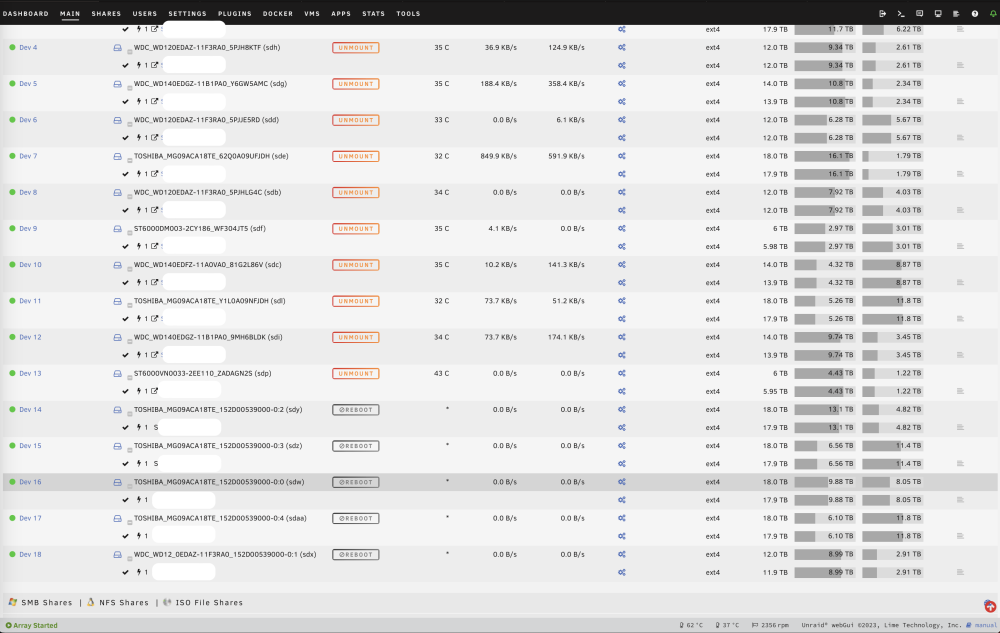
Hi, since yesterday I have issues with my drives that are connected via USB. Every few hours they become unavailable suddenly and only a reboot brings them back. After the reboot, everything is normal and works fine for a few hours. Does anyone have the same issue or an idea what could cause this? All SATA-connected drives are working fine, it's only the 5 drives that are based in a FANTEC USB enclosure. After the issue appeared for 3 times in a row, I switched the USB enclosure to another one from ICYBOX because I thought the Enclosure causes the issue, but after a few hours I had the same "Reboot" button in Unraid and the drives were inaccessible. I updated to plugin version 2023.10.08 before this started.