





ottermanuk
Members
-
Joined
-
Last visited
-
Having used the mover to move everything to the array, I have reformatted the cache pool from scratch. Many thanks for the help @JorgeB in getting it to a position to recover data, you're a lifesaver!
-
OK, mounting that in normal mode has presented files, copying to a separate disk JIC. Diags attached. At least the files are grabable and I can recreate a pool if needed now. jupiter-diagnostics-20260924-2042.zip
-
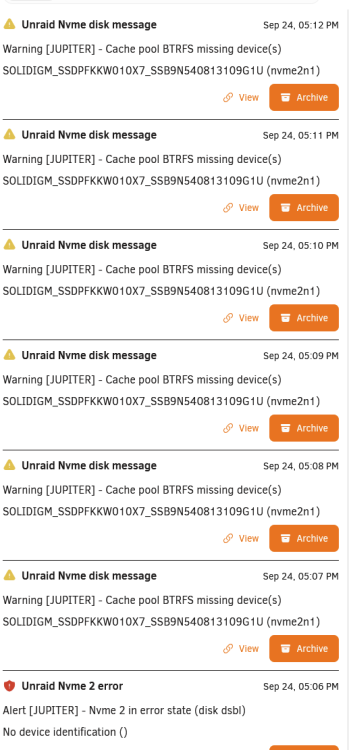
Performed as requested. Created new pool with same name, added the OTHER nvme to the one earlier, started in maint modeIt's added the second device itself (i assume that's it reading the btrfs config?), and getting warnings for pool missing device. Checking /mnt/nvme still shows nothing (other than empty system and domain dirs). root@Jupiter:~# echo 1 > /sys/block/nvme1n1/device/device/remove root@Jupiter:~# ls /mnt/nvme domains/ system/ root@Jupiter:~# ls /mnt/nvme/domains/ root@Jupiter:~# ls /mnt/nvme/system/ docker/ libvirt/ root@Jupiter:~# ls /mnt/nvme/system/docker/ docker.img Diagnostics attached as requested. Once again, thanks for looking. jupiter-diagnostics-20260924-1709.zip

-
Just to clarify, remove pool, add pool back with existing name, drop the device that was suspected cleared (nvme1n1 in this case) using the above command, then add nvme2n1 ONLY to the recreated pool of 1 disk, and start it? Or recreate the pool of 2, add both devices, drop nvme1n1 using command, and start the pool of 2 devices with nvme1n1 dropped and nvme2n1up? Just wanna be sure, TIA
-
I'm pretty sure this has happened. Is there a way to mount the single (other) drive, even degraded, so I can pull data off?
-
Presumably the second option is the same method, remove pool, create pool with same name, add single (suspect good) drive, start array, then add the second one in after? Will give it a try after work, cheers
-
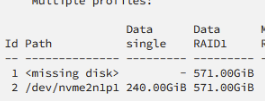
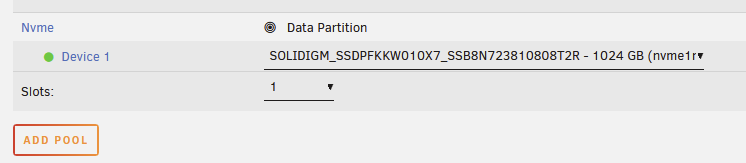
Was doing a standard restart of my system. Clean spindown, reboot, etc. Upon restart, it appeared that one of my RAID1 cache drives had died, ah bugger! I have had issues with my HBA sometimes not coming online after a reboot, a simple reboot has sorted that, so I let the cache rebuild whatever it was rebuilding (scrubbing?) then I rebooted away. This brought the second SSD back up and I assumed happy days, but it appears that the SSD that remained in the pool has somehow wiped. No docker, VMs, nothing. I immediately stopped everything, I've taken ddrescue imgs of both cache drives. Have had a look around, and especially https://forums.unraid.net/topic/155716-data-loss-on-cache-devices-btrfs-commands-complain-warning-device-2-is-missing/ but it appears that checking btrfs still shows both drives fine? (nvme1n1p1 and nvme2n1p1) root@Jupiter:~# btrfs fi sh -d Label: none uuid: c4fcab53-7205-4176-b3aa-c938d2c06f06 Total devices 1 FS bytes used 35.33GiB devid 1 size 3.49TiB used 40.02GiB path /dev/nvme0n1p1 Label: none uuid: b176ff8c-711f-4d1d-8bc3-fc708433a191 Total devices 2 FS bytes used 586.82GiB devid 1 size 953.87GiB used 781.03GiB path /dev/nvme2n1p1 devid 2 size 953.87GiB used 640.06GiB path /dev/nvme1n1p1 The cache UI is only showing one disk, and if I try to add the correct disk to the pool, it complains (I HAVE NOT ADDED+STARTED this back!) So, in my non existent understanding of btrfs - I assume it's somehow wiped the drive it still thinks is in the pool, serial ending 8T2R, I am hoping there is still data on the other disk? Does unraid still think pool b176ff8c-711f-4d1d-8bc3-fc708433a191 exists? I honestly have no idea how the pool (which even when degraded had my data on), scrubbed then wiped itself. Any advice very appreciated - diagnostics attached but as I say, system has been rebooted jupiter-diagnostics-20260923-0155.zip

-
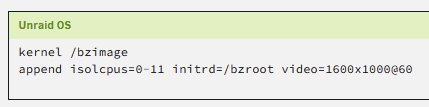
After another 1.5hrs of searching I finally managed to stumble across some more info, from user "frr" on superuser https://superuser.com/questions/570110/how-to-make-the-linux-framebuffer-console-narrower It really is as simple as adding video=<hres>x<vres>@<refresh> to the sysconfig! e.g. video=1600x1000@60 Leaving this hoping to help someone else in future as this took me forever! Unraid version 6.12.9.
-
This being the line in dmesg - is there a way to restrict this to lower? [ 19.776727] Console: switching to colour frame buffer device 512x135
-
Hi All, long time user first time asker I have a new system I am testing out using the Intel ManageEngine KVM. This requires a dummy plug to see any display, which I have obtained. The issue is that the dummy supports "up to 4K" which of course Unraid is selecting 4K as the best available resolution for the console once it has booted, leaving unreadably small text on the KVM. I have been scouring the forums and all I seem to find is people with the inverse problem, their console being too low of a resolution, and thus requiring modifying the syslinux, loading a nvidia driver, or booting to UEFI, none of which I believe apply to this. Is there a way to limit the upper resolution of the console at all? I can't really modify the EDID of the dummy plug, and attempting to set syslinux to vga=6 failed. Connecting the system to a 1280x1024 monitor for booting, THEN plugging in the dummy, kept the KVM res at the same 1280x1024, but then rebooting the box returned it back to best-available 4K. Thanks in advance!



