





allied-encumbrance5583
Members
-
Joined
-
Last visited
-
In a strange turn of events, I went to perform this operation yesterday only to find that my disk transfer rate has increased from 30MB/s to 200MB/s. Is there some sort of settling in phase for zfs disks? I've not rebooted or physically touched the machine in the meantime, the only other thing I could put it down to is that there were a few docker image updates that happened yesterday (I've got them set to automatically update), I've moved a bit of data around on the main array too, by which I mean I've deleted a few files and added a few more. I'm glad that the speed is back and that I can now leave it as is but I'm confused as to what's caused to speed up suddenly. Perhaps a new diagnostic file will help you to investigate the ongoing zfs issues. monster-diagnostics-20231123-0739.zip
-
Wouldn't I lose data if I remove the parity disk then add it as the main disk?
-
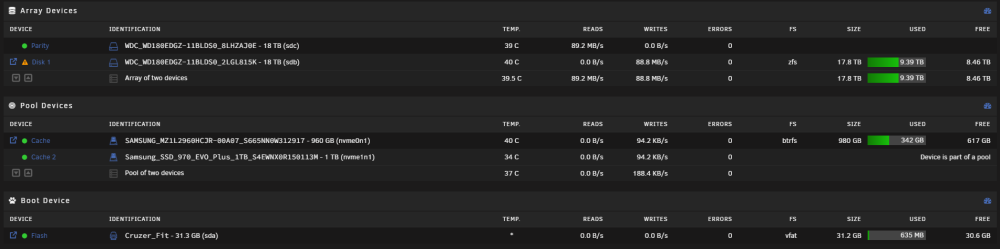
I was referring the the bug relating to zfs writes, this seems to be making the reconstruction extremely slow That's what I was referencing in the first sentence, if it's something that's likely to be fixed in the upcoming weeks I guess I could wait but I can't live with this long term I'm not sure if I'm not quite understand what you wrote or if I didn't explain my setup well to begin with, here's a screenshot of my main disk setup...
-
I currently have 2x 18tb hdds, one is parity, the other is zfs disk1. Disk 1 is currently emulated and the parity check is going to take around 2 months apparently due to the single zfs in array bug. All writes to disk are incredibly slow (30meg) where I was previously getting a fully saturated gigabit connection when using xfs. All of my dockers now run really slow when accessing the array too. During my switch to ZFS I messed up and had a very painful 4 day (9tb) file copy operation across a gigabit connection to restore all of my data which is something I'm trying to avoid, the first time I did this operation to an xfs array it took roughly 24hrs. My current theory is that with disk1 being emulated, I could do the following 1 stop the array 2 remove that disk from the array 3 add single disk as a pool and format it to xfs 4 copy all data back to the new xfs pool 5 reformat the array to xfs 6 copy everything back to the array 7 destroy the new pool and add that disk back to the array Am I thinking along the right lines or am I likely to lose everything again this way? Am I also correct in assuming that current write operations are being written to the parity disk and not disk1 since it hasn't yet finished a parity check? Diagnostics attached monster-diagnostics-20231121-0821.zip
