M8harry
Members
-
Joined
-
Last visited
-
THANK YOU!!
-
Hello folks, Im requesting a little assistance please. I have tried searching the forum and reading documents on the webpage but im a little confused and thought i would reach out here. I have a 12tb hdd that is overheating and starting to have smart errors. I have reached out to the vendor and they are giving me a refund. I have a new drive the same size on order. My question is, how do i go about replacing the failing drive with the new one. I dont want to lose the data on the drive (it works very well but small issues now = huge issues later) and ideally i would just like to copy the content from one drive to another but i dont have the connectivity in my server to plug in the new one with the old one. (i plan to resolve this with my server next). I have a 12tb parity drive (single) 2 x 10tb drives. both have nil errors with smart checks 1 x 12tb drive. shows smart errors and heat warnings. Thank you all for your assistance.
-
Hello Brains Trust. My system is nearly at capacity for file storage and i have no more system SATA ports on the motherboard. I read that using a HBA card is the way to go with unraid. The system i have is running unraid only, I7 cpu and 32g of ram. Motherboard is a Gigabyte Technology GA-Z97-HD3(rev. 2.0) I was looking at this bundle on amazon and I was wondering if i purchased it, would i need to do anything to it or just plug it in and plug up the drives? https://www.amazon.com.au/Logic-LSI00344-9300-8i-PCIE3-0-Controller/dp/B00ZUC5GEI/ref=rvi_d_sccl_5/355-0226762-7653132?pd_rd_w=zHe1X&content-id=amzn1.sym.27aa7904-0762-4d7d-89ab-5c11fd177d32&pf_rd_p=27aa7904-0762-4d7d-89ab-5c11fd177d32&pf_rd_r=K1RQ6H6C4N54KR0Y382P&pd_rd_wg=VXSlW&pd_rd_r=9178647e-cb0b-4bed-aa74-a8896f5d53f9&pd_rd_i=B00ZUC5GEI&psc=1 Thank you for your very valuable time and consideration.
-
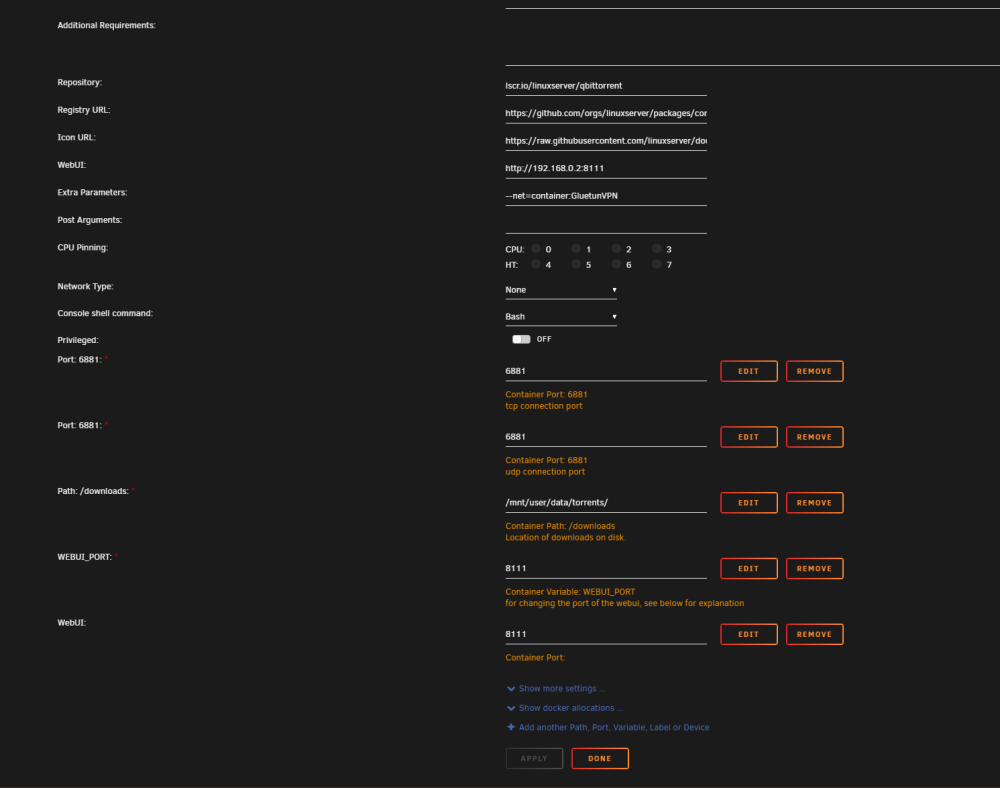
As a last ditch effort, i removed the container, deleted all associated folders in the appdata folder for qbittorrent. I have re-installed the same container via the same template and boom its working. No settings have been changed, i used the same ports and setting as the previous install. Im not sure why its working now. but it is.
-
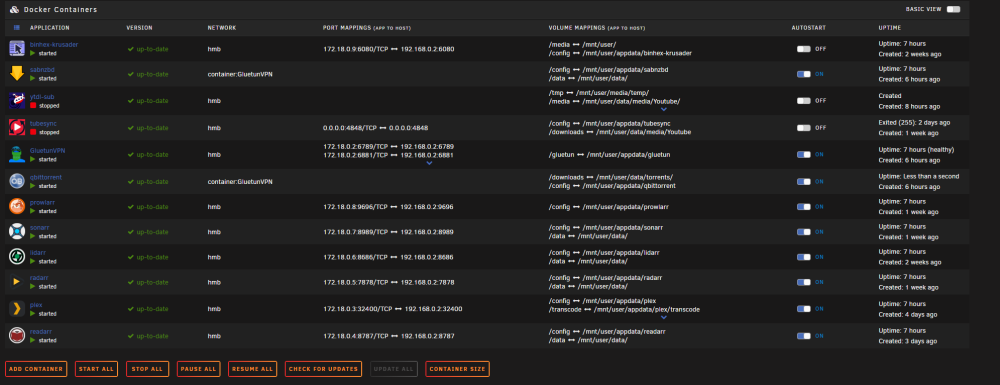
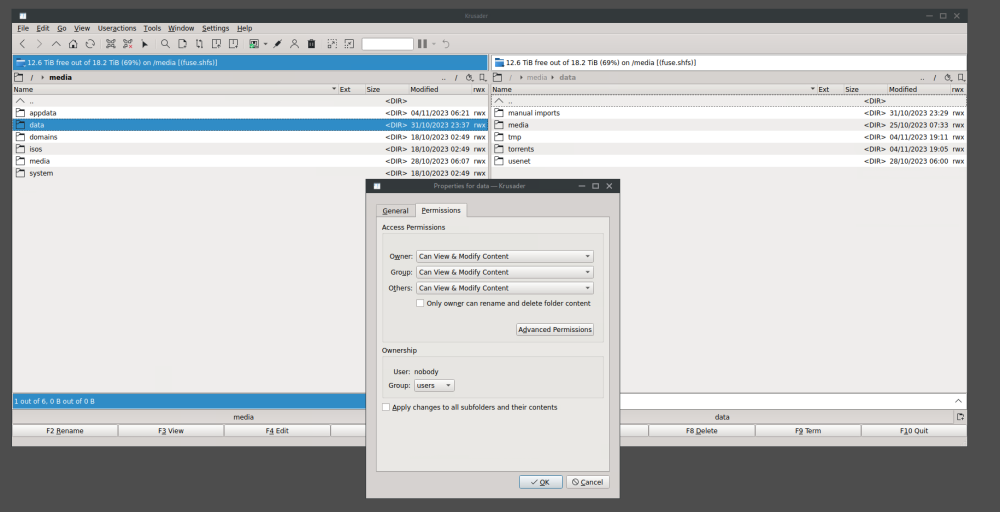
Hello everyone. Im a new unraid user requiring some help. Sorry in advance for the wall of text but i feel if i can give as much context it may help. Unraid version: Version 6.12.4 2023-08-31 After setting up my unraid setup (i mostly followed the Ibracorp video see link, i was using the following setup. GluetunVPN providing VPN for Qbittorrent (using the hotio's repository qbittorrent set up template in the docker store) Prowlarr Sonarr/Radarr were all configured and it was working ok. I did not use a vpn qbittorrent setup template because for the life of me i could not figure out how to configure it with NORD vpn and i got gluetun working (confirmed via ipleak.net) and SpaceInvaderOne had a great video on how to make one docker container use another container's vpn. So i did that and all was working fine I then tried to install SABnzbd but i was having port conflicts, i countnt get it to work on different ports as 8080 was being used by qbittorrent. after much stuffing about i changed qbittorrents port to free up 8080. The reason i ended up going this way was it made life easier if SABnzbd was using 8080, if i recall correctly it had something to do with setting up the vpn, I honestly dont remember but i know once it was on 8080 things got easier and worked so i left it. I was having some permissions issues initally but i fixed them by using the "Fix common problems" app from the app store as well as running "Docker safe New Perms" which i believe comes with the fix common problems app. That sorted out all my issues so far. I set my profiles to prefer usenet and fall back to torrents if the "arr" apps couldnt pull from usenet. My problem is qbittorent wont download files, they just error out. The error is as follows from my log "(W) 2023-11-05T11:29:44 - File error alert. Torrent: "< Torrent name>". File: "/data/torrents/< Torrent name>". Reason: < Torrent name> file_open (/data/torrents/< Torrent name> error: Permission denied" Nearly everything in the log is in red except for 3 torrents in black with no error but they dont download. I opened my share where my appds store their downloads in Krusader and checked that read and write was set for all folders and subfolders. I am happy to provide any screenshots or logs i just dont know what would be helpful to move forward.