arvinman
Members
-
Joined
-
Last visited
-
Ok, yeah it seem the problem drive is actually empty to begin with. I think I'm good to go now. Thanks for help! JorgeB
-
Here's the new diag log. allmind-diagnostics-20250303-2349.zip
-
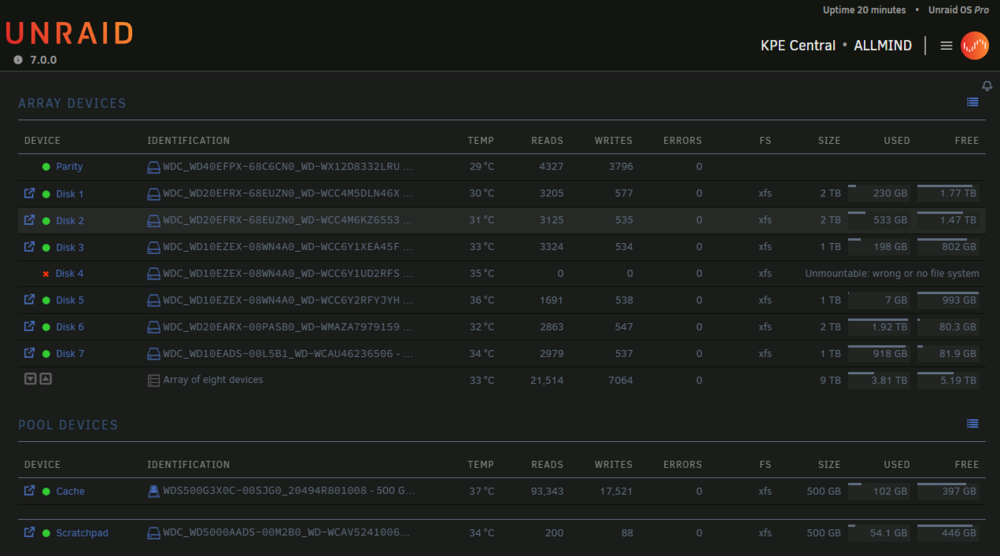
I'm assuming the 'fix' button is the same with running xfs_repair without -n. So I pressed it and it's now show Phase 1 - find and verify superblock... Phase 2 - using internal log - zero log... ERROR: The filesystem has valuable metadata changes in a log which needs to be replayed. Mount the filesystem to replay the log, and unmount it before re-running xfs_repair. If you are unable to mount the filesystem, then use the -L option to destroy the log and attempt a repair. Note that destroying the log may cause corruption -- please attempt a mount of the filesystem before doing this. This time the button is change to something like clear the log so I'm assuming the button will do the xfs_repair -L. So I pressed it and now the log show Phase 1 - find and verify superblock... Phase 2 - using internal log - zero log... ALERT: The filesystem has valuable metadata changes in a log which is being destroyed because the -L option was used. - scan filesystem freespace and inode maps... clearing needsrepair flag and regenerating metadata sb_fdblocks 243523005, counted 244071373 - found root inode chunk Phase 3 - for each AG... - scan and clear agi unlinked lists... - process known inodes and perform inode discovery... - agno = 0 - agno = 1 - agno = 2 - agno = 3 - process newly discovered inodes... Phase 4 - check for duplicate blocks... - setting up duplicate extent list... - check for inodes claiming duplicate blocks... - agno = 0 - agno = 1 - agno = 3 - agno = 2 Phase 5 - rebuild AG headers and trees... - reset superblock... Phase 6 - check inode connectivity... - resetting contents of realtime bitmap and summary inodes - traversing filesystem ... - traversal finished ... - moving disconnected inodes to lost+found ... Phase 7 - verify and correct link counts... Maximum metadata LSN (1:3493) is ahead of log (1:2). Format log to cycle 4. done But when I try stop and start the array again. It show drive as "Device is disabled, content emulated"
-
Here's the result Phase 1 - find and verify superblock... Phase 2 - using internal log - zero log... ALERT: The filesystem has valuable metadata changes in a log which is being ignored because the -n option was used. Expect spurious inconsistencies which may be resolved by first mounting the filesystem to replay the log. - scan filesystem freespace and inode maps... sb_fdblocks 243523005, counted 244071373 - found root inode chunk Phase 3 - for each AG... - scan (but don't clear) agi unlinked lists... - process known inodes and perform inode discovery... - agno = 0 - agno = 1 - agno = 2 - agno = 3 - process newly discovered inodes... Phase 4 - check for duplicate blocks... - setting up duplicate extent list... - check for inodes claiming duplicate blocks... - agno = 0 - agno = 1 - agno = 3 - agno = 2 No modify flag set, skipping phase 5 Phase 6 - check inode connectivity... - traversing filesystem ... - traversal finished ... - moving disconnected inodes to lost+found ... Phase 7 - verify link counts... No modify flag set, skipping filesystem flush and exiting. File system corruption detected. --- Edit: the log above I got from stop and start array in maintenance mode. The go through problem disk and run the "Check Filesystem Status". I see the "fix" button after ran the check. So in this case this button will fix the file system and make it mountable again without any data lost. Am I correct?
-
Hello, Today I just found out 1 of my disks (sdg) suddenly show as unmountable in array. I'm assuming no data lost at this point. But unsure what is the best option to proceed. Can anyone help guide me here? Regards, diag log attached. allmind-diagnostics-20250303-1620.zip