





Holt
Members
-
Joined
-
Last visited
-
I can also add the disk log of the missing one Disk_log
-
Yes I have a 550W PSU and a low power CPU with only three disks, I think that the PSU is not the problem. Moreover when I change the SATA socket and then I power on the server the disk goes online with no issues... Maybe it's the disk damaged, but when it's online it does not give me any errors.
-
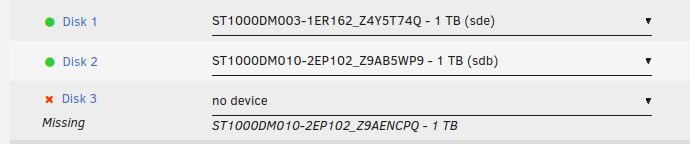
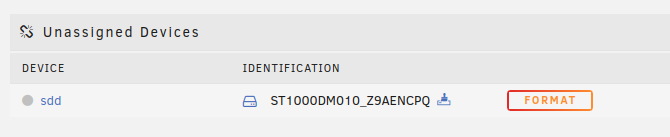
Hello guys, I have a small NAS with three disks and I usually turn it off when I go to sleep. Every time I turn it on again tho, one of the disks keeps getting labeled as missing and the array can't be started. When this happens I see the disk in the "Unassigned devices" section of the Main page of the GUI. To be able to make my NAS to recognize this disk, when it's still turned off I have to plug out the SATA from the motherboard and plug it in another socket. In this way when I turn the NAS on it recognizes the disk. When the disk is recognized, I have no issue at all until I shutdown the server. tower-diagnostics-20231108-2150.zip
-
Try the Hotio's Plex docker, it's very easy to setup and I have not had any issues since I have installed it. In the template you can easly modify the external port by just changing its default value (32400) to whatever you want.
-
I managed to solve my issue by disabling the static IP association in my router/modem settings and by modifying the network.conf file as follows: # Generated network settings USE_DHCP="no" IPADDR="192.168.1.120" NETMASK="255.255.255.0" GATEWAY="192.168.1.1" BONDING="yes" BRIDGING="yes" DNS_SERVER1="192.168.1.104" DNS_SERVER2="192.168.1.104" where: IPADDR is the static IP I chose for my UnRAID machine; DNS_SERVER1 and DNS_SERVER2 are both equal to the IP address of my Pi-Hole, otherwise they could be set to the same IP of the gateway or DNS provider.
-
Hello everyone, I'm really new to UnRAID and I'm having some issues related to the network connection of my NAS. The main problem is that when I reboot or shutdown and power on my NAS it can't connect to my network anymore. If I go to my router/modem settings I cannot see my UnRAID machine. However if I try to recreate from scratch the USB and import back my trial key, at the first boot, it get assigned an IP address and I can connect with no issues to the GUI. I see from the network.conf file that the DHCP option is set to "yes" so it should get an IP address as soon as it boots up. That's what I see in the network.conf file: # Generated network settings USE_DHCP="yes" IPADDR= NETMASK= GATEWAY= BONDING="yes" BRIDGING="yes" What should I do? Thanks!
