





AngelAbaddon
Members
-
Joined
-
Last visited
-
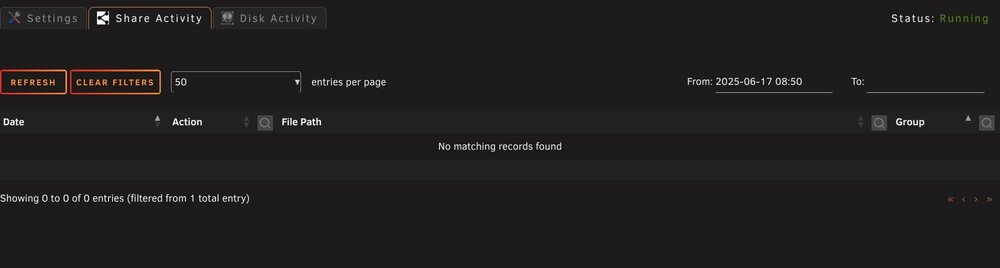
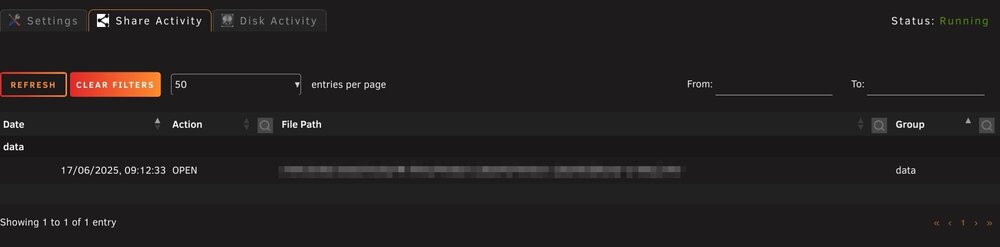
Sorry about the lack of info, shouldn't try to diagnose stuff when I'm tired, but glad that's not an issue. I was thinking that was causing me problems as I couldn't get anything to show, but I've discovered it's actually an issue with the filters and the start date being set by default - no matter what I try, the date filter will not show any info. As soon as I clear it, my activity appears. I've attached screenshots showing what I'm seeing.
-
Having an error flag up in the logs whenever I try to access the file list, it looks like /usr/local/emhttp/plugins/file.activity/locales/en_GB.json is missing - navigating it looks like there's no language file for those of us with our location set to UK.
-
Within the main mover tuning settings there's an option for "clean empty folders". In my case, that was set to Yes. My "Backup" share was overriden from 70% to 0%, so everything had been moved to the array and left that share empty on the cache. This meant that the "clean empty folders" process deleted the folders off the cache all the way to the root (/mnt/cache_data/backup/ in my case), so when the mover next ran, it didn't find the share at all on cache and threw up the following error in the logs: /mnt/cache_data/backup does not exist. Is the share still used? Consider removing /boot/config/shares/backup.cfg if not. If the share isn't empty after it ran, it may be something else causing the issue, just was very similar to my case.
-
I had this problem with the override not reverting, check that the folder removal hasn't deleted the overriden shares root from the cache, that caused it to skip the reverting stage for me.
-
I've updated my initial post, but it looks like it's linked to the folder deletion, the override breaks down and doesn't revert if the main share folder is missing on cache.
-
Just done the update, looks like CTIME is fixed. I think the folder thing is likely going to take some time to find a graceful solution to if one is possible, in my case it's still deleting some of the empty usenet folders (/mnt/cache_data/data/usenet/incomplete for example), but I'm happy to stick with the placeholder file for now, but thanks for working on it. Bigger issue I've discovered is Share overrides aren't reverting to global settings: Aug 15 15:00:40 Cerebro move: ------------------------------------------------------------- Processing backup share ----------------------------------------------------------- Aug 15 15:00:40 Cerebro move: Settings override: Aug 15 15:00:40 Cerebro move: ------------------ Aug 15 15:00:40 Cerebro move: Using share moving threshold: 0 % Aug 15 15:00:40 Cerebro move: Using share freeing threshold: 0 % Aug 15 15:00:40 Cerebro move: Age: no = 0 ; daysold: Aug 15 15:00:40 Cerebro move: ------------------------------------------------------------------------ ----------------------------------------------------------------------- Aug 15 15:00:40 Cerebro move: Primary storage: cache_data - size: 932GiB - used: 70 % (649GiB) Aug 15 15:00:40 Cerebro move: Secondary storage: user0 Aug 15 15:00:40 Cerebro move: /mnt/cache_data/backup does not exist. Is the share still used? Consider removing /boot/config/shares/backup.cfg if not. Aug 15 15:00:40 Cerebro move: => Skipping Aug 15 15:00:40 Cerebro move: ------------------------------------------------------------- Processing cloud share ------------------------------------------------------------ Aug 15 15:00:40 Cerebro move: Primary storage: cache_data - size: 932GiB - used: 70 % (649GiB) Aug 15 15:00:40 Cerebro move: Secondary storage: none Aug 15 15:00:40 Cerebro move: Share Information: Name: cloud - Path: /mnt/cache_data/cloud Aug 15 15:00:40 Cerebro move: Mover action: no action, only cache_data used (cache:only). Aug 15 15:00:40 Cerebro move: => Nothing will be moved. Share usage is taken into account in the calculation of the threshold for other shares. Aug 15 15:00:40 Cerebro move: Calculating share usage... (can take a moment) Aug 15 15:00:40 Cerebro move: cache_data/cloud used: 380MiB Aug 15 15:00:40 Cerebro move: -------------------------------------------------------------- Processing data share ------------------------------------------------------------ Aug 15 15:00:40 Cerebro move: Primary storage: cache_data - size: 932GiB - used: 70 % (649GiB) Aug 15 15:00:40 Cerebro move: Secondary storage: user0 Aug 15 15:00:40 Cerebro move: Share Information: Name: data - Path: /mnt/cache_data/data Aug 15 15:00:40 Cerebro move: Moving threshold: 0% (0B) ; Freeing threshold: 0% (0B) Aug 15 15:00:40 Cerebro move: Mover action: cache_data->user0 (cache:yes). Pool is above moving threshold percentage: 70% >= 0%. Aug 15 15:00:40 Cerebro move: => Will smart move old files from cache_data to user0. Nothing will be moved from user0 to cache_data My global threshold settings are 70%, but the backup share overrides that to 0% (I want this moved every run regardless). In the prior version, once the backup share was run, it would revert the settings to the global ones so data is set back to 70% (can actually see this in the log from the live run that occured earlier this morning), but it looks like thats being missed as data is treating the threshold as 0% still. Edit: Just noticed the backup folder does not exist - guessing it's to do with the folder deletion as I didn't have a placeholder in there. I'll get this set back up and drop one in and see what happens. Edit 2: Looks like the share folder getting deleted was the cause, now that I've locked it with a placeholder, the global settings are getting reapplied. It also helped me notice the placeholders were getting treated in the same way as normal files, "Ignore all hidden files and folders" didn't work, but adding the placeholder name (minus the .) to the "ignore file types" does look to have sorted it.
-
No worries, absolutely love the new features, has some major ones I've been after for a long while now. Nice idea on the placeholder, that should hold things together for now.
-
Just moved from the deprecated version and running into a few issues - firstly I've looked back and it looks like it was meant to be fixed, but the CTIME option seems to still be having issues with special characters: sh: -c: line 1: syntax error near unexpected token `(' Leaving it as MTIME works as expected. My other issue is the deleting of empty directories is causing an issue as my main share holds both my media and usenet folders - since the usenet folders should be structured but empty unless it's processing downloads, when the mover is deleting the folders it's causing sabnzbd to freak out since they no longer exist.
-
That makes sense, thought it mioght be something like that but worth just double checking. Regarding the share, no additional options, I essentially wanted it to bypass all the tuning settings and follow the default mover - as you put it, no different to pressing the "Mover share now" button.
-
Not sure if I'm missing something, but is there a way to override the cache threshold setting at a share level? I've got my main mover set to move when the cache is over 70% and files are 40 days old, but I have a backup share that I want moved daily - I've set the share to override the Mover Tuning age settings, but threshold isn't one of the options, and on testing it looks like thats global - if I leave it at 70% then no move occurs, but set it to 0% and backup moves as intended while my "data" share is untouched.
-
Hi all. I've just built my first Unraid server as a replacement for a media server that was just a PC running Windows and an external USB drive. I've got to the point of building the array and just wanted to check my plan I've got together from reading around would be the best route. The setup is currently 3x10TB data drives and I plan to shuck my existing in-use 18TB external HDD and use that as the parity, with a 1TB SSD cache drive as well. I first need to get the existing data off the 18TB onto the array - am I right in thinking that the most efficient way to do this is: 1. Start the array with just the 3x10TBs as the primary in the share. 2. Copy the data off the 18TB to the array. 3. Once that's complete shuck the 18TB and add it as the parity. 4. Set the SSD cache as Primary and Array as Secondary. Alongside this, I've been figuring the best way to get the data off the USB to the array. I've got Unassigned Devices setup (currently preclearing the 10TB drives) and was originally thinking moving everything through Krusader, but on review I only have USB2.0 ports on the Unraid system. Would it be quicker to connect the drive to a USB3 port on my Windows PC and copy over the network (all 1gb connections)? With the plus being I'd be able to add a verify step to the copy, as I'll be wiping the source for the parity drive.



