





tomume
Members
-
Joined
-
Last visited
Everything posted by tomume
-
hi, nope i always had 1 parity and 2 hd for data, one cache ssd and the usb for os. the Unassigned Disk Devices was there just because i wanted to try to follow trash guides on how to automate thing but got discouraged. dont remember mounting it even less adding it to the pool
-
thx here it is tomiserver-diagnostics-20250214-1317.zip
-
Hi, i updated my plugins as i do as usual. For the first time, i get a message from disk location to go to system and do a force smart + db. after that, i can go back to dashboard and and main. I go to docker, and when check update i realize that version is not available. I go to share and see that almost all my shares are missing. What happened ? It's the first time something like that happens after more that 1 year of use. can anyone help me ? thx a lot. PS: fix common problem says : Errors FoundSuggested Fix Unable to write to cacheDrive mounted read-only or completely full. Begin Investigation Here
-
sorry, i misunderstood the faq. here is solution for anyone wondering. Cache => Array then move. it's the only thing that i was missing. sorry. here is full faq: How do I replace/upgrade my single cache device? (unRAID v6.2 and above only) This procedure assumes that there are at least some dockers and/or VMs related files on the cache disk, some of these steps are unnecessary if there aren't. Stop all running Dockers/VMs Settings -> VM Manager: disable VMs and click apply Settings -> Docker: disable Docker and click apply For v6.11.5 or older: Click on Shares and change to "Yes" all cache shares with "Use cache disk:" set to "Only" or "Prefer" For v6.12.0 or newer: Click on all shares that are using the pool you want to empty and change them to have the pool as primary storage, array as secondary storage and mover action set to move from pool to array Check that there's enough free space on the array and invoke the mover by clicking "Move Now" on the Main page When the mover finishes check that your cache is empty (any files on the cache root will not be moved as they are not part of any share) Stop array, replace cache device, assign it, start array and format new cache device (if needed), check that it's using the filesystem you want For v6.11.5 or older: Click on Shares and change to "Prefer" all shares that you want moved back to cache For v6.12.0 or newer: Click on Shares and change the mover action to move from array to pool for all shares that you want moved back to cache On the Main page click "Move Now" When the mover finishes re-enable Docker and VMs
-
hi, thx, here it is. i stopped the docker. set all the shares to array and invoked the mover. PS i'ts probably a noob issue tomiserver-diagnostics-20240807-1751.zip

-
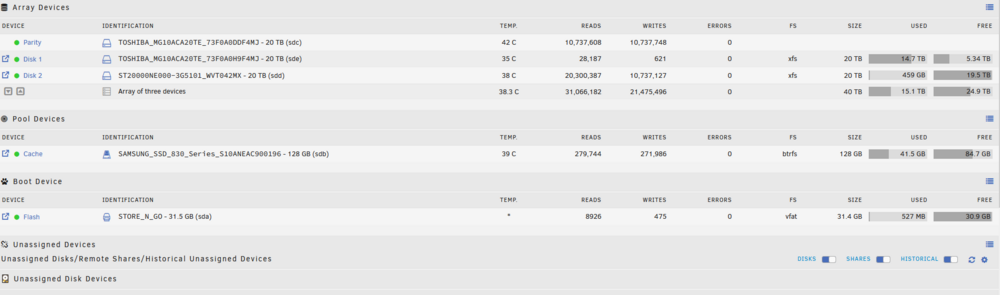
Hi, so i found this tutorial. I follow the steps: but when i change the shares to array (I have no other pool, only 1 array 1 cache and 1 flash boot device) I cannot invoke the mover as it does nothing. I suppose it will write new fils on the array, but for the old one already written what should i do ? This is my setup: this is the shares (untouched): I can post other pics if needed. thx a lot. PS: can you add the new cache disk to the cache pool, copy the files from the old to the new one, and remove the old one ? looks a bit barbaric

-
thanks a lot. It's working. OMG formatting and parity check takes forever on a 20tb drive ...
-
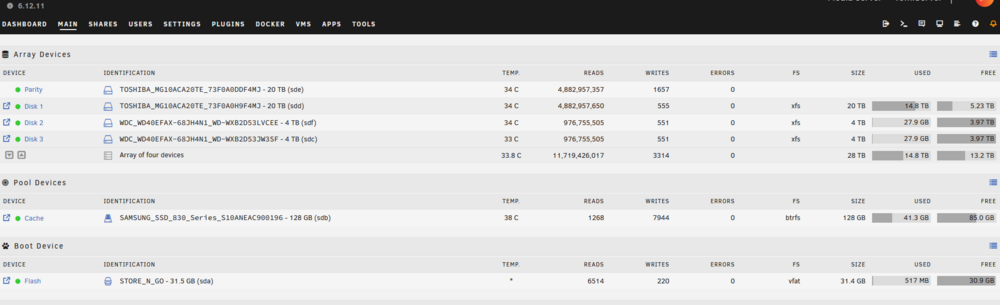
Hi all, sorry if this has already been answered. I have 2x4gb WD disks and I want to remove them from the array. The goal is to add another 20TB seagate disk in the array. (apparently you'd save energy cost with less disks) I think i found a good tutorial on youtube: https://www.youtube.com/watch?v=Oa_3FApcxAs for replacing on failed disk with a new one. Thing is, i got 2 disks to remove and add juste one (a bigger one). I also found this video but it's much older and honestly i don't understand it all... https://www.youtube.com/watch?v=nV5snitWrBk here is my setup: thanks in advance and have a good day ! can someone enlighten where i should look to have more infos ?
-
Hi thx ! I think I saw that mb on another post that's why I created this topic. Mostly because I want to add more hdd. And the thing is anyway I think I need a previous gen processor I don't have to update it for 13100.?!? Also about Asus Pro H610T D4-CSM. I would use the m2 port to add more sata drives. Problem is that the lan port is only 1gb...:( and there is no pci e port to add an 10gb internet card ASRock Z690M-ITX/ax Mini ITX LGA1700 Motherboard pro would be the cheapest on the list, need bios update Gigabyte B760I AORUS PRO DDR4 Mini ITX LGA1700 Motherboard a bit more expensive than the previous one but doesn't need bios update. Asus ROG STRIX Z690-I GAMING WIFI Mini ITX LGA1700 Motherboard this one also looks good. to be honest i don't need the wifi on any of these cards. MSI MPG B760I EDGE WIFI Mini ITX LGA1700 Motherboard this one is a little bit too expensive. I just wonder which of these is good at idle power consumption. I also found this. I just wonder if it's doable and better than the 13100. 13500h https://fr.aliexpress.com/item/1005006144634993.html?spm=a2g0o.productlist.main.19.5d03s5fws5fw1s&algo_pvid=f87bcd74-c055-4d95-844f-9ac4e5f632ae&algo_exp_id=f87bcd74-c055-4d95-844f-9ac4e5f632ae-9&pdp_npi=4%40dis!CHF!508.75!508.75!!!4070.00!4070.00!%402103146c17193424135171341ee86e!-1!sea!CH!0!AB&curPageLogUid=Qy100IaLTn6M&utparam-url=scene%3Asearch|query_from%3A
-
Hi everyone, So I bought I new computer recently and I decided to use my old computer as a nas unRAID server. My old rig is an old Intel 3570 with a Asus motherboard, 32gb ram and around 30to storage (20tb parity, 20tb hdd and 2x4tb) I could stay like this because this cpu has integrated graphics but it has difficulties playing or 3 hd movies at the same time and apparently draw power could be better with new gear. So I ve been reading a bit around and found a few options as I don't want to buy a powerhouse that consumes a lot of energy (electricity is expensive here). i want to be able to add a few storage disks if needed. So i would need a few extra sata slots or 2 m2(to sata). here are the options ive found (trying to look for cheap and efficient): N305: https://shorturl.at/xvuvd 225 chf 1215u I read it was efficient but hard to come by. 13100: apparently a bit better than the n305. But also draw more power and more expensive. 145 chf Would you have an idea for The motherboards contestants? ASROCK Z690 PG Riptide, Intel Z690 has all i need. But i dont know about power draw. 144 chf MB ASUS PRO H610T D4-CSM (MB ASUS PRO H610T D4-CSM) 120 chf => how to update bios without 12 gen proc ? What about cases and psu? I only use it for Plex use with my family. Thx a lot Tom
-
sweet, thx for the answer. do you have a tutorial i can follow? So if i understand properly, plex offer a sort of inbuilt vpn or some sort that allows you to not have a domain and still beeing able to give credentials and access to your media library externaly from you local server ? => so if i use plex, i woulnd't need wireguard nor nginx nor cloudflare etc ?!!? PS: for plex i think it's this : https://support.plex.tv/articles/200289506-remote-access/ PS: can i use nginx and duckdns so i don't need to pay for domain ? is it secure enough ? (i really like jellyfin over plex, but if it's too complicated nevermind)
-
hi everyone. That's my first post and i've been using unraid trial trail since 29 days without an issue. So i installed unraid a few weeks back and i only used it locally. I've been using it untilnow just for jellyfin locally and that was the only app i installed. thing is, i wish i could access my jellyfin library from my parents,sister place or when i'm on hollidays in another country, so i can watch movies while i'm abroad for example. I'm a little worried because i know that i don't know that much and it can be risky to expose things on the internet. FYI my nudes are on a external usb drive and not on the nas itself... jajajajaj that being said, i followed today this tutorial and it seems to work well with duckdns and the opened port: what what i sould do next ? how does my sister access my media files from her jellyfin client ? well thx for everything and take care PS:1 should i use tailscale ? it seems to be easier ?!? PS:2 in the vpn settings it recommends me this: Remark: ensure the peer network is different from 192.168.1.0/24 => i don't understand what it is ... PS3: at my place, so where the server is, i still wanna be able to access jellyfin locally => i think i made it to work, i just need to run the duckdny to make it work PS4: when a client connects to my nas from jellyfin, should he enter the server name http://MySERVERNAME.duckdns.org ? => but then, should i create an user in unraid with credentials ? I only want my sister to access my library from jellyfin. So i can avoid unexpeted deletes... tomiserver-diagnostics-20231125-2000.zip



