





ivangoetelek
Members
-
Joined
-
Last visited
-
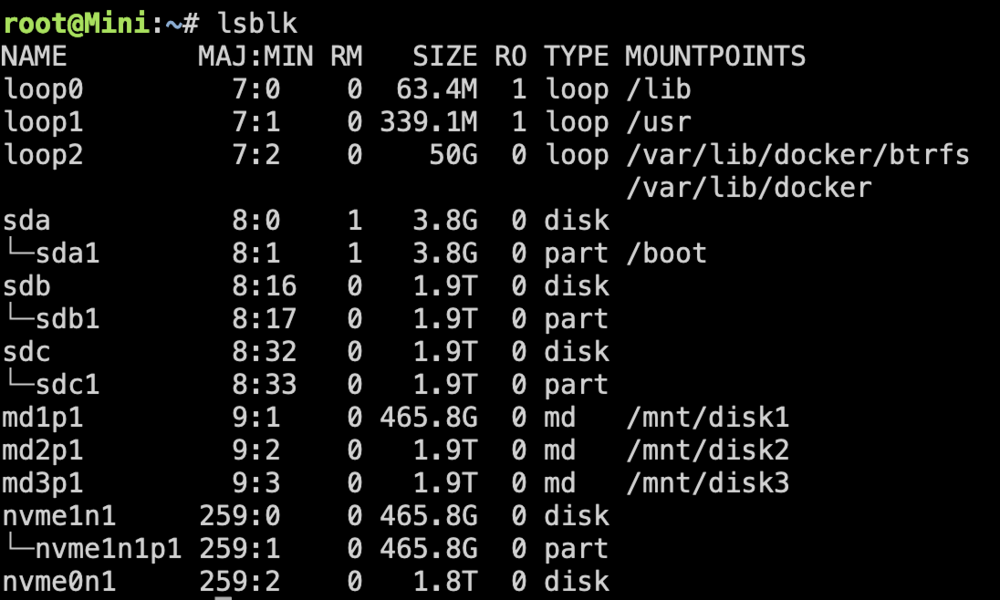
I think I am literally shitting myself.... The new disk is 1.8TiB while the old was 1.9TiB... this is so stupid. Do you guys have a recommendation for a non shitty nvme disk, that has at least 1.9TiB?
-
Hi, I have had some issue with my parity drive as discussed in this thread: I have since bought a different, better one. Verbatim --> Samsung 990 Evo.... Now I want to replace the failed Parity drive, but it tells me, that the Parity Drive is too small: Both drives are spec'd to be 2TB.... Please help!


-
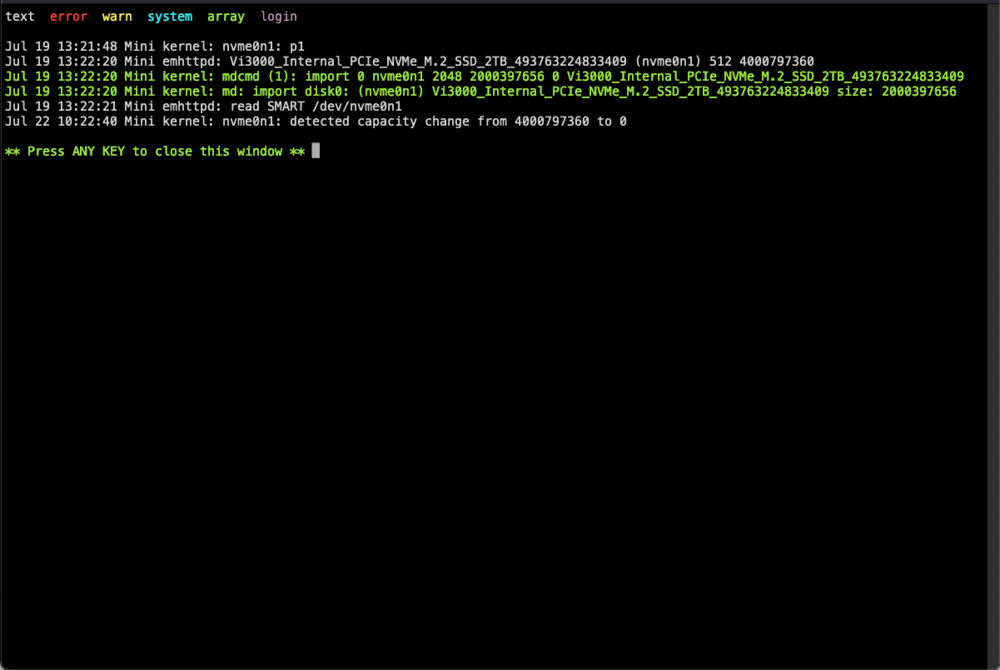
Alright then - 3 Weeks into the RMA'ed drive, it failed again. I am 100% sure, that it is not a Temp Issue, I have installed the most beefed up NVMe Cooler that I could afford. Temps were always below 70°C. Writes also don't seem too off. Sadly I can no longer get a SMART report of the drive, but I took one 1 week back. If you see something say something, but this seems way off! Vi3000_Internal_PCIe_NVMe_M.2_SSD_2TB_493763224833409-20240715-1058.txt From one moment to the next, it was just gone. I am totally lost on what to do next... It seems that the Drive is hardcore garbage. So RMA'ing it again, and facing the same issue in just 4 weeks won't cut it. Can you please help me if it has anything to do with my configuration? This can't be right.... I have not rebooted the system - so it is in the exact state when the drive failed 20 mins back. So let me know if there is any diagnostics I can do now?! Thanks so much for your help!
-
So I RMA'd the faulty drive - let's see what tehy say/do - also I have ordered a beefed up NVMe Cooler - maybe that helps. But seriously - is it possible that the syslog is responsible for huge write effort? Other than that I cannot imagine much write at all. Is there any recommendation when it comes to e.g. appdata? to keep it away from the parity drive?
-
But Parity Check in general is rather a read intensive part instead of a write intensive part - which in turn means to me: Heat was the issue, not the TBW - what do you think?
-
I do hava that enabled - could this be the cause for the parity failing? I have found the section where the drive died - but I can't make much of it... Syslog_nvme_dying.log
-
hmpf - okay, so I'll just try again with the next Vi3000, and if that fails again in some months, I shall revive this topic... Is there anything I can do when it comes to logging / diagnostics, so if the next device fails, I can easily isolate the actual problem? I understood that rebooting after the drive failed didn't help much.
-
I feel that this can't be the solution Verbatim Vi3000 2TB - just some garbage NVMe - not much of anything, but it was cheap In general I do not write that much of data to the array... I feel that I could write a lot more I can't really figure out the SMART Reports - so I have no idea how much data I have actually written... Temps were up to 85°C - 90°C while doing the parity check. No parity also seems like a non option, any downtime is just a huge pain in the behind. Isn't there anything I can do? Is it possible that I had 2 consecutive Bad Devices - sounds like a challenge for high school statistics class
-
Indeed, I power cycled the machine. I have issued an RMA, but I have no idea how to behave differently so i won't end up with another bricked NVME in 2mo... Any Idea?
-
There you go Thanks! mini-diagnostics-20240701-1544.zip
-
So the Idea Would be to always have spinning rust as the parity? I wanted to get a low energy box, so spinning rust was out of the picture. Is there anything i could do to avoid spinning rust? The total write amount wasn't too high - but the read was high
-
Hi All, I wanted to get some guidance to a nasty problem I am facing. I have an all flash unraid box. 2x2TB SSDs, 2xNVMe (1x500GB, 1x 2TB). I have the bigger NVMe assigned as the Parity Drive. The Parity Drive failed for the second time now, within 4Months. (1st Failure after 1-2Months, got it replaced by the vendor, 2nd Failure now occured.) Is there something fundamental that I am missing when using NVMe Parity Drives? I assumed that I fried the first NVMe because it was mounted beneath the MoBo - hence I moved it to a CPU-Cooler Exposed position with the second. Is a NVMe Heatsink a must? Are there other things I am missing? Thanks for your help!
-
So - so far no issues - seems to have worked!
-
Yeah - how would I test if your solution is correct (not that I distrust it, but i consider it best practice)
-
@JorgeB you wouldn't by any chance know how to provoke the initial error? I would like to test the setup now after the update But the speed of your answer leads me to believe that you know what you're talking about - is this a known issue?


