





ivangoetelek
Members
-
Joined
-
Last visited
Everything posted by ivangoetelek
-
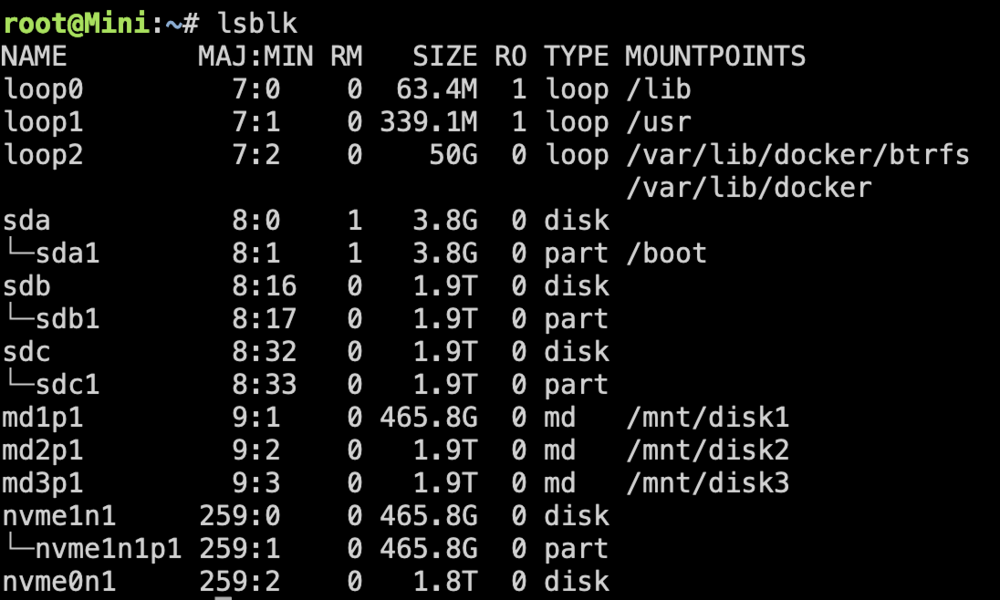
I think I am literally shitting myself.... The new disk is 1.8TiB while the old was 1.9TiB... this is so stupid. Do you guys have a recommendation for a non shitty nvme disk, that has at least 1.9TiB?
-
Hi, I have had some issue with my parity drive as discussed in this thread: I have since bought a different, better one. Verbatim --> Samsung 990 Evo.... Now I want to replace the failed Parity drive, but it tells me, that the Parity Drive is too small: Both drives are spec'd to be 2TB.... Please help!


-
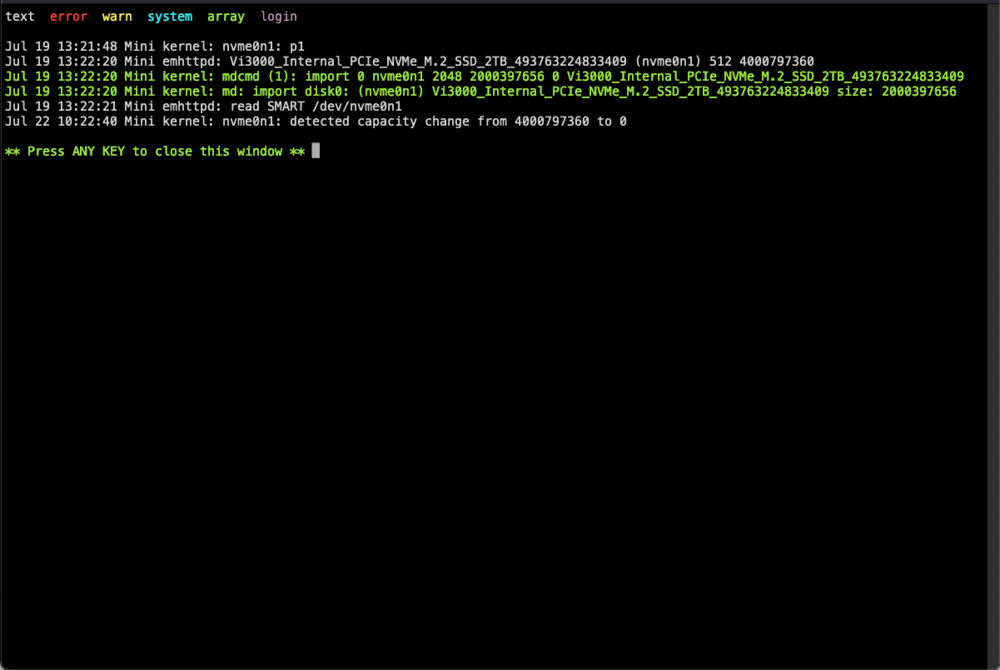
Alright then - 3 Weeks into the RMA'ed drive, it failed again. I am 100% sure, that it is not a Temp Issue, I have installed the most beefed up NVMe Cooler that I could afford. Temps were always below 70°C. Writes also don't seem too off. Sadly I can no longer get a SMART report of the drive, but I took one 1 week back. If you see something say something, but this seems way off! Vi3000_Internal_PCIe_NVMe_M.2_SSD_2TB_493763224833409-20240715-1058.txt From one moment to the next, it was just gone. I am totally lost on what to do next... It seems that the Drive is hardcore garbage. So RMA'ing it again, and facing the same issue in just 4 weeks won't cut it. Can you please help me if it has anything to do with my configuration? This can't be right.... I have not rebooted the system - so it is in the exact state when the drive failed 20 mins back. So let me know if there is any diagnostics I can do now?! Thanks so much for your help!
-
So I RMA'd the faulty drive - let's see what tehy say/do - also I have ordered a beefed up NVMe Cooler - maybe that helps. But seriously - is it possible that the syslog is responsible for huge write effort? Other than that I cannot imagine much write at all. Is there any recommendation when it comes to e.g. appdata? to keep it away from the parity drive?
-
But Parity Check in general is rather a read intensive part instead of a write intensive part - which in turn means to me: Heat was the issue, not the TBW - what do you think?
-
I do hava that enabled - could this be the cause for the parity failing? I have found the section where the drive died - but I can't make much of it... Syslog_nvme_dying.log
-
hmpf - okay, so I'll just try again with the next Vi3000, and if that fails again in some months, I shall revive this topic... Is there anything I can do when it comes to logging / diagnostics, so if the next device fails, I can easily isolate the actual problem? I understood that rebooting after the drive failed didn't help much.
-
I feel that this can't be the solution Verbatim Vi3000 2TB - just some garbage NVMe - not much of anything, but it was cheap In general I do not write that much of data to the array... I feel that I could write a lot more I can't really figure out the SMART Reports - so I have no idea how much data I have actually written... Temps were up to 85°C - 90°C while doing the parity check. No parity also seems like a non option, any downtime is just a huge pain in the behind. Isn't there anything I can do? Is it possible that I had 2 consecutive Bad Devices - sounds like a challenge for high school statistics class
-
Indeed, I power cycled the machine. I have issued an RMA, but I have no idea how to behave differently so i won't end up with another bricked NVME in 2mo... Any Idea?
-
There you go Thanks! mini-diagnostics-20240701-1544.zip
-
So the Idea Would be to always have spinning rust as the parity? I wanted to get a low energy box, so spinning rust was out of the picture. Is there anything i could do to avoid spinning rust? The total write amount wasn't too high - but the read was high
-
Hi All, I wanted to get some guidance to a nasty problem I am facing. I have an all flash unraid box. 2x2TB SSDs, 2xNVMe (1x500GB, 1x 2TB). I have the bigger NVMe assigned as the Parity Drive. The Parity Drive failed for the second time now, within 4Months. (1st Failure after 1-2Months, got it replaced by the vendor, 2nd Failure now occured.) Is there something fundamental that I am missing when using NVMe Parity Drives? I assumed that I fried the first NVMe because it was mounted beneath the MoBo - hence I moved it to a CPU-Cooler Exposed position with the second. Is a NVMe Heatsink a must? Are there other things I am missing? Thanks for your help!
-
So - so far no issues - seems to have worked!
-
Yeah - how would I test if your solution is correct (not that I distrust it, but i consider it best practice)
-
@JorgeB you wouldn't by any chance know how to provoke the initial error? I would like to test the setup now after the update But the speed of your answer leads me to believe that you know what you're talking about - is this a known issue?
-
Alright - I switched to ipvlan - I don't quite understand the difference. Will it come with any sideeffects (besides not crashing )? Do you know why the macvlan is standard instead of the ipvlan, if one is more stable than the other? Will update to 6.12.4 then and will let you know tomorrow if it stayed intact or not. Thanks so far
-
Hi All, about 3 Months back or so, I tried updating to 6.11 - my machine became unstable as many others are describing it here. It works all fine after a clean startup, and after a finite amount of time (usually between 0.5h to 3h) it is just gone. I enabled syslog back then, but didn't feel like doing anything about it, so to regain stability I downgraded to 6.10.3 My machine was up again for 3 Months then (stable - no issues). Today I decided to update yet again - this time to 6.12.4 Same story: The update and the machine were all good and fine - and after an uptime of about 1.5h it was gone again. Thankfully I knew what I needed to do: I downgraded to 6.10.3 again. I have the syslog and the diagnostics attached. From what I was able to gather from it, I think it might have to do with the following segment: Sadly I have no Idea what any of that means, but it feels like an issue with the Docker br0/macvlan network Any help is highly appreciated! Thanks for your support! syslog-127.0.0.1.log mini-diagnostics-20231106-1724.zip


