




Skip to content
View in the app

A better way to browse. Learn more.

Unraid

A full-screen app on your home screen with push notifications, badges and more.

To install this app on iOS and iPadOS
  1. Tap the Share icon in Safari
  2. Scroll the menu and tap Add to Home Screen.
  3. Tap Add in the top-right corner.
To install this app on Android
  1. Tap the 3-dot menu (⋮) in the top-right corner of the browser.
  2. Tap Add to Home screen or Install app.
  3. Confirm by tapping Install.

NSX

Members
  • Joined

  • Last visited

  1. I think things resolved on a reboot. There wouldn't be anything on my network causing issues or blocking Internet access. I saw this on reboot and Frigate seems to be able to detect the TPU w/o an issue

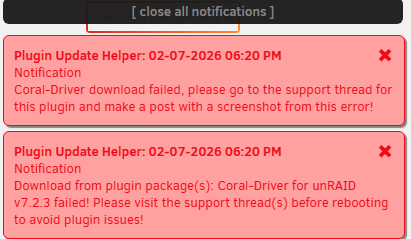
  2. I'm updating from 7.1.4 to 7.2.3 and I received the following 2 messages from Plugin Update Helper Coral-Driver download failed, please go to the support thread for this plugin and make a post with a screenshot from this error! Download from plugin package(s): Coral-Driver for unRAID v7.2.3 failed! Please visit the support thread(s) before rebooting to avoid plugin issues! I've been unable to find any additional information in Unraid as to what the actual error is and how I might resolve it prior to rebooting.
Account

Navigation

Search

Search

Configure browser push notifications

Chrome (Android)
  1. Tap the lock icon next to the address bar.
  2. Tap Permissions → Notifications.
  3. Adjust your preference.
Chrome (Desktop)
  1. Click the padlock icon in the address bar.
  2. Select Site settings.
  3. Find Notifications and adjust your preference.
