




Skip to content
View in the app

A better way to browse. Learn more.

Unraid

A full-screen app on your home screen with push notifications, badges and more.

To install this app on iOS and iPadOS
  1. Tap the Share icon in Safari
  2. Scroll the menu and tap Add to Home Screen.
  3. Tap Add in the top-right corner.
To install this app on Android
  1. Tap the 3-dot menu (⋮) in the top-right corner of the browser.
  2. Tap Add to Home screen or Install app.
  3. Confirm by tapping Install.

doshbox

Members
  • Joined

  • Last visited

  1. EDIT: DISREGARD! My share's minimum free space was set too high, and I was unable to add anything else to it, causing the issue. Would you be able to go into more detail about how to do that? I tried updating the endpoint in the wg0.conf but was unable to connect after doing so. Please let me know if there is anything else I can provide.
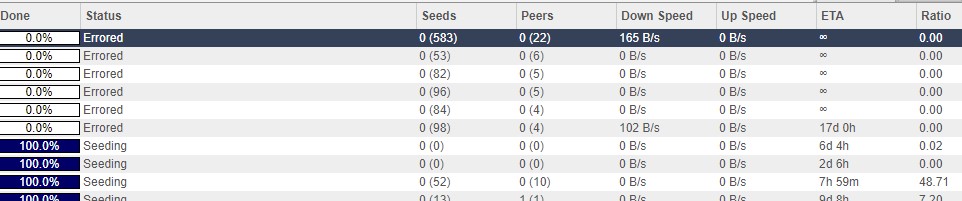
  2. Sometime today, my QBitTorrent started erroring on all new torrents immediately after being added. Torrents that were already finished and seeding are still working fine. I have tried reinstalling, rebooting, and updating to the newest docker container but am still having this issue. Attached are my docker logs. The share still has over 2 TB of empty space. dockerLog.txt
Account

Navigation

Search

Search

Configure browser push notifications

Chrome (Android)
  1. Tap the lock icon next to the address bar.
  2. Tap Permissions → Notifications.
  3. Adjust your preference.
Chrome (Desktop)
  1. Click the padlock icon in the address bar.
  2. Select Site settings.
  3. Find Notifications and adjust your preference.