




Skip to content
View in the app

A better way to browse. Learn more.

Unraid

A full-screen app on your home screen with push notifications, badges and more.

To install this app on iOS and iPadOS
  1. Tap the Share icon in Safari
  2. Scroll the menu and tap Add to Home Screen.
  3. Tap Add in the top-right corner.
To install this app on Android
  1. Tap the 3-dot menu (⋮) in the top-right corner of the browser.
  2. Tap Add to Home screen or Install app.
  3. Confirm by tapping Install.

NamiZoa

Members
  • Joined

  • Last visited

Everything posted by NamiZoa

  1. @alturismo das hatte ich bereits versucht, aber es ging nichts mehr auf der Seite, die war quasi eingefroren
  2. @DataCollector danke dir für deine Hilfe, das war tatsächlich die Ursache des Fehlers 🤦‍♂️ bin noch neu im Thema Unraid-Server und lerne steht's dazu 😁
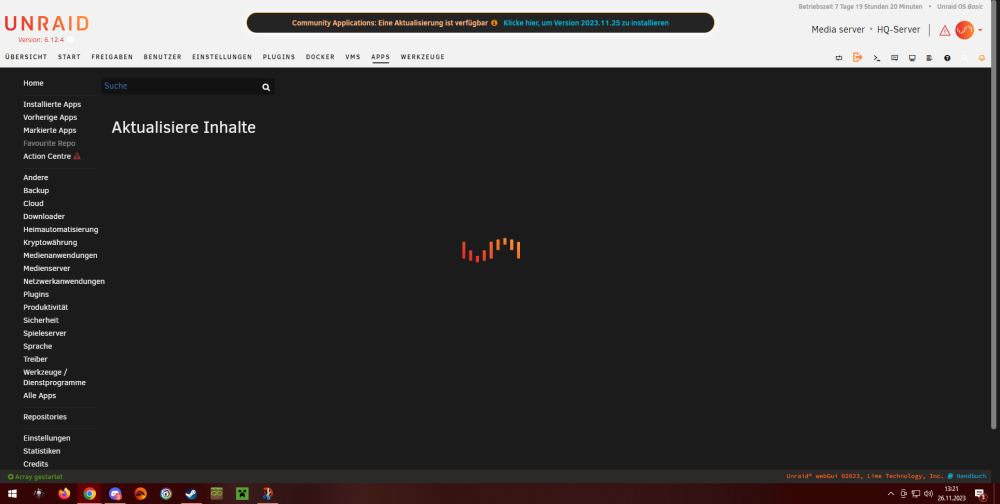
  3. Haay hoo, ich habe folgenden Fehler: wenn ich auf die Community Applications Seite gehe fängt diese wie gewohnt an zu laden, hört jedoch nicht mehr auf und reagiert auf keine Eingabe, quasi freezed. Oben im Header steht das die Version 2023.11.25 verfügbar ist, jedoch lässt sich der Link nicht ausführen, wie alles andere auf der Seite.... Hat damit jemand Erfahrung und kann mir weiterhelfen? Vielen Dank im Voraus
Account

Navigation

Search

Search

Configure browser push notifications

Chrome (Android)
  1. Tap the lock icon next to the address bar.
  2. Tap Permissions → Notifications.
  3. Adjust your preference.
Chrome (Desktop)
  1. Click the padlock icon in the address bar.
  2. Select Site settings.
  3. Find Notifications and adjust your preference.