





norma_567
Members
-
Joined
-
Last visited
-
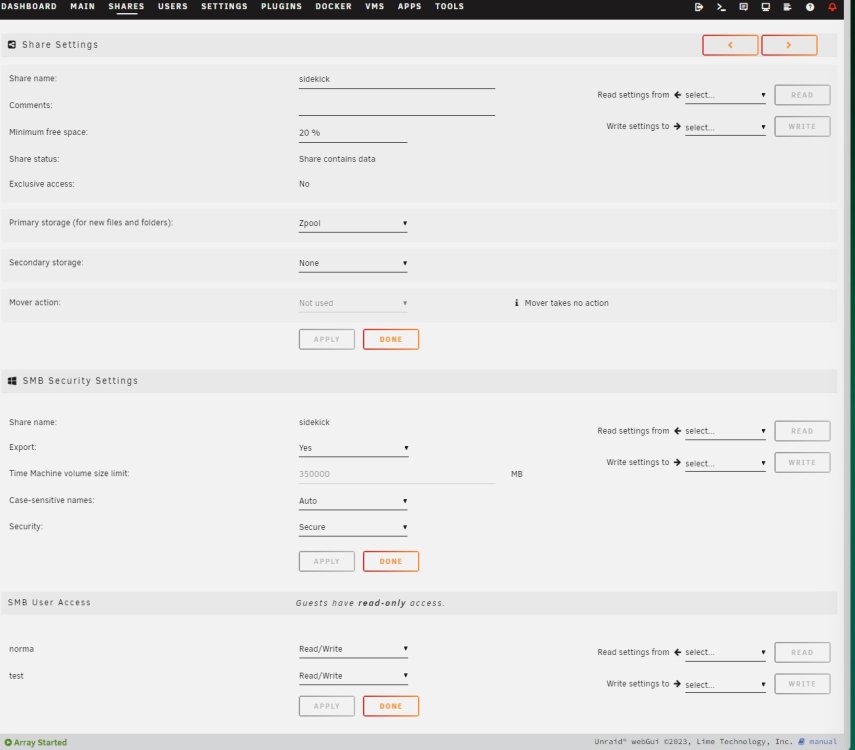
Hello fellow Unraid users I have several shares, some on a traditional array with an xfs filesystem and some on a zfs zpool. All of which are giving me the same issues. Within each share, I have the following set for SMB Security Settings: - Export: yes - Case-sensitive names: Auto - Security: Secure ISSUE: SMB User Access is set to Read/Write for every user. However, states that Guests have read-only access. ls - l shows that they all have read write access, the shares on a Window PC have read write access but the shares don't on a Home Assistant OS server (linux based). The first bit of code shows the output of ls -l on the unraid server. The second bit shows the ls - l of the frigate share on the Home Assistant OS server. What could be causing the issue? I need full read/write access on the Home Assistant OS Server. The frigate share on Home Assistant is using a user created on unraid that has been given read/write permissions. How do I get downstream linux devices to have read/write access? root@normasraid:/mnt/user# ls -l total 94 drwxrwxrwx 1 nobody users 12 Sep 19 17:56 appdata/ drwxrwxrwx 1 nobody users 5 Dec 2 15:10 domains/ drwxrwxrwx 1 nobody users 66 Dec 10 15:28 frigate/ drwxrwxrwx 1 nobody users 2 Aug 22 17:42 isos/ drwxrwxrwx 1 nobody users 11 Dec 10 15:33 normashoard/ drwxrwxrwx 1 nobody users 5 Aug 27 17:40 plex/ drwxrwxrwx 1 nobody users 5 Aug 27 17:40 sidekick/ drwxrwxrwx 1 nobody users 6 Dec 10 17:23 slayer/ drwxrwxrwx 1 nobody users 4 Aug 22 17:42 system/ drwxrwxrwx 1 nobody users 4 Sep 24 15:06 timemachine/ ➜ ~ cd /media ➜ /media ls -l total 4 drwxr-xr-x 4 root root 4096 Dec 11 17:21 frigate ➜ /media
-
I ran a variation of commands to get the info you are looking to see, had to run zpool status. After work today, my secondary array will finish it's parity sync. I am tempted to just copy everything over and start this zpool from scratch but would rather learn the correct way to do things. Thank you for your continued help on this! root@normasraid:~# zpool import no pools available to import root@normasraid:~# zpool export zpool cannot unmount '/mnt/zpool/system': pool or dataset is busy root@normasraid:~# zpool status pool: zpool state: ONLINE scan: scrub repaired 0B in 03:41:58 with 0 errors on Tue Nov 28 00:23:48 2023 config: NAME STATE READ WRITE CKSUM zpool ONLINE 0 0 0 raidz1-0 ONLINE 0 0 0 sdd1 ONLINE 0 0 0 sde1 ONLINE 0 0 0 sdc1 ONLINE 0 0 0 cache sdb ONLINE 0 0 0 errors: No known data errors root@normasraid:~#
-
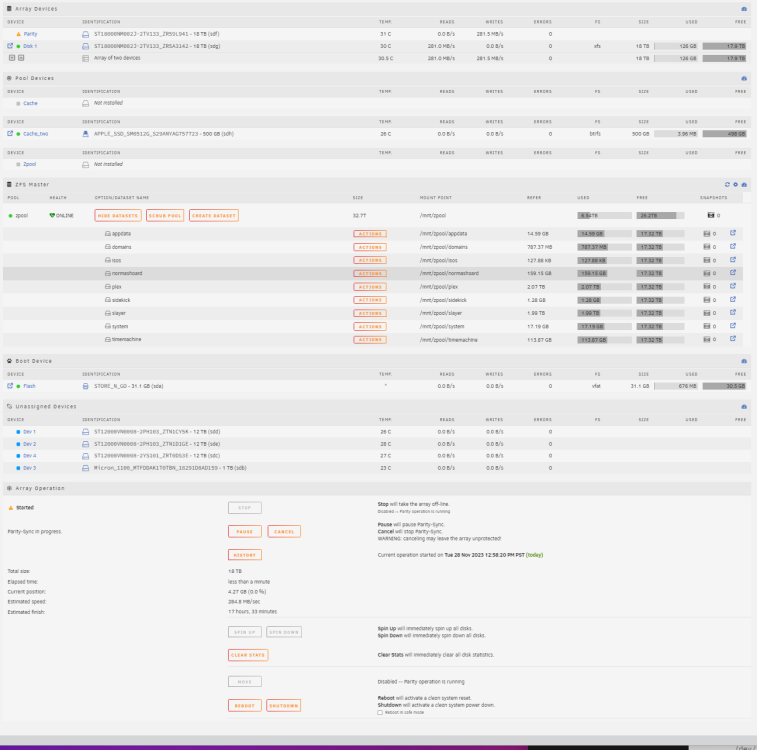
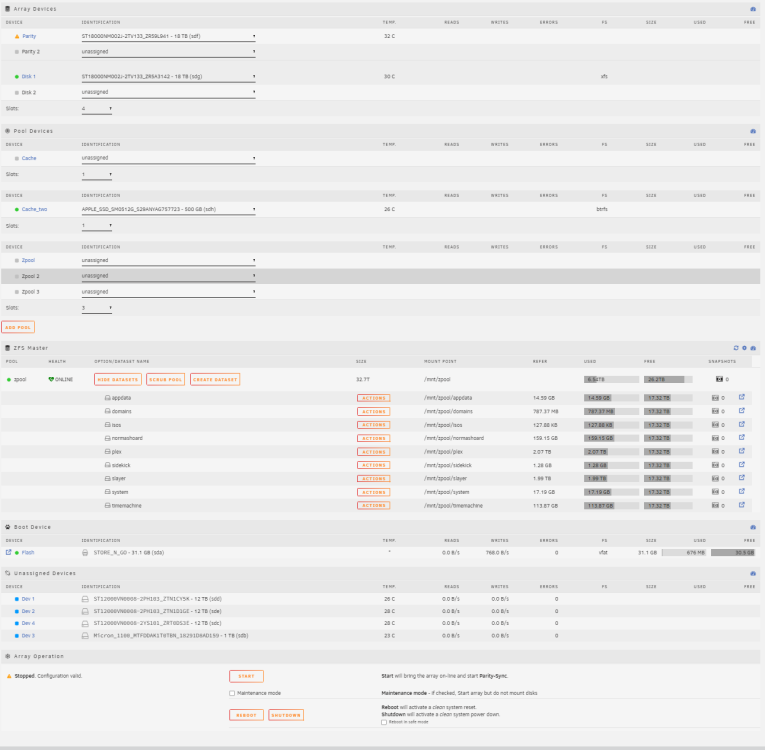
I am looking at those steps but something isn't lining up as I am still seeing Unmountable: Unsupported or no file system Below you will see the exact steps I did from the forum post referenced and actions/observations taken Steps done: when all the vdev(s) are added to the pool stop the array, now you need to re-import the pool they are all already added correct(didnt need to do anything)? stopped array via GUI unassign all pool devices removed all drives for the cache and zpool via GUI start array (check the "Yes I want to do this" box) "Yes I want to do this" box is not present when array is stopped, it only shows up once I start it. Then it shows up due to my new drives under a standard array actually need formatting, did this then went to next step screenshot when array is stopped screenshot when array is started stop array clicked stop array after stopping parity sync for the drives in the main array re-assign all pool devices, including the new vdev(s), assign all devices sequentially in the same order as zpool status shows, and don't leave empty slots in the middle of the assigned devices. added all zpool drives back to their orginal slots and the cache drive via the GUI start array started array in maintenance mode and it doesnt show Unmountable: Unsupported or no file system but when out of maintenance mode it shows up again - I feel like I am missing something simple here? Do I need to change anything under the device settings? I have been forcing it to pick zfs as the file system instead of auto and setting the drives to never spin down to fully utilize the benefits of zfs. - Could it also be the cached drive? Do I need to remove it from the zpool entirely? Then add it back? If so, how do you do that? normasraid-diagnostics-20231128-1513.zip
-
Thanks for the reply! I noticed in bullet 3 of that link that it wants me to reformat the array. Won't I loose my data? I am wondering if I need to back up all the data to a different set of drives before doing this. The data is accessible via CLI and could be moved to a different drive. Thoughts?
-
i ran the following command: zpool import zpool and all my shares are mounted, but I am now seeing: Unmountable: Unsupported or no file system any idea how to correct?
-
I noticed the drive sdg is different that the output of the cache text above with sdb. opened up my server and noticed that drive had become unplugged. plugged it back in and the correct cache is in that slot. new zpool import results below ~# zpool import pool: zpool id: 15075536597851971656 state: ONLINE action: The pool can be imported using its name or numeric identifier. config: zpool ONLINE raidz1-0 ONLINE sdd1 ONLINE sde1 ONLINE sdc1 ONLINE cache sdb
-
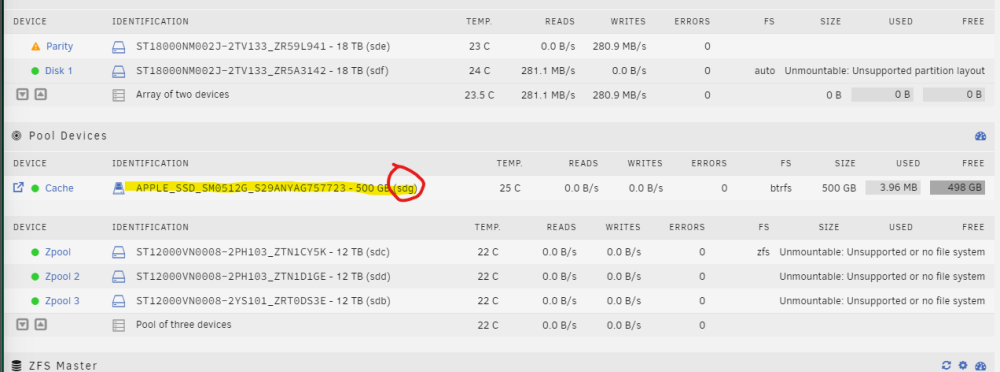
I had a cache drive used before, could that be it? It looks like my cache drive got relabeled as sdg. Output of zpool import ~# zpool import pool: zpool id: 15075536597851971656 state: ONLINE status: One or more devices contains corrupted data. action: The pool can be imported using its name or numeric identifier. see: https://openzfs.github.io/openzfs-docs/msg/ZFS-8000-4J config: zpool ONLINE raidz1-0 ONLINE sdc1 ONLINE sdd1 ONLINE sdb1 ONLINE cache sdb
-
Hi all, Hoping to get some expert advice here. I created a New Config under Tools to swap out a single drive that was in my Array Devices. I swapped out this single drive to two new, 18 TB drives. I already had a running Zpool with three 12 TB drives formatted as zfs. The New Config was started and the two 18 TB drives are expectedly reporting Unmountable: Unsupported partition layout as they are new drives. However, the big issue is that my active zpool now shows as Unmountable: Unsupported partition layout. It would be great to not have to reformat the zpool as I have data I really would like to not lose. Thanks in advance!normasraid-diagnostics-20231126-2031.zip


