Jogeta316
Members
-
Joined
-
Last visited
-
MAM59 - thank you so much!! I used your wisdom as a starting point and managed to get things working! Unplug and disable motherboard's built in 1Gbe card on the PC Set the IP4 settings on the 2.5Gbe adaptor on PC to "Obtain automatically" for both IP and DNS Set the 1Gbe port on John (Unraid server) to eth0 and the 2.5Gbe card to eth1 On the Interface eth0 settings in Unraid I turned off bonding but enabled bridging Both eth0 and eth1 are set to be members of "br0" Waited a few moments for my router to assign IP addresses and DNS to Unraid, and then everything came to life!! This will help immeasurably when it comes to archiving important family events. I have virtually no photos of my late mother and father, so getting this working properly was super important to me! Please DM me so I can zap over your reward If you're not comfortable using it yourself then please pass it along to someone in need or in your family
-
Hello! I've run into an issue that has gotten the better of me, and am posting a bounty to whomever provides the piece of advice that enables me to fix it. Hopefully this is allowed on the forums! What I'm trying to accomplish is to have John, my Unraid server, use the 2.5Gbe PCIE adaptor to communicate with the 2.5Gbe PCIE adaptor in my Windows 11 PC. The make and model of both adaptors is TP-link TX201 The 1GBe adaptor built into John's motherboard seems to work fine by itself, although not straight out of the box as you'll see in the video Both 2.5Gbe cards work in the Windows 11 PC when connected to my network switch, which leads me to think that it is not a hardware issue I've deleted the network.cfg and network-rules.cfg files many times as I've tried different iterations of what I have read on here and on Reddit Really hope that one of you knows what is going on here :') About the £25 bounty - DM me and I'll zap you the dough via PayPal \m/ john-diagnostics-20231206-2058.zip
-
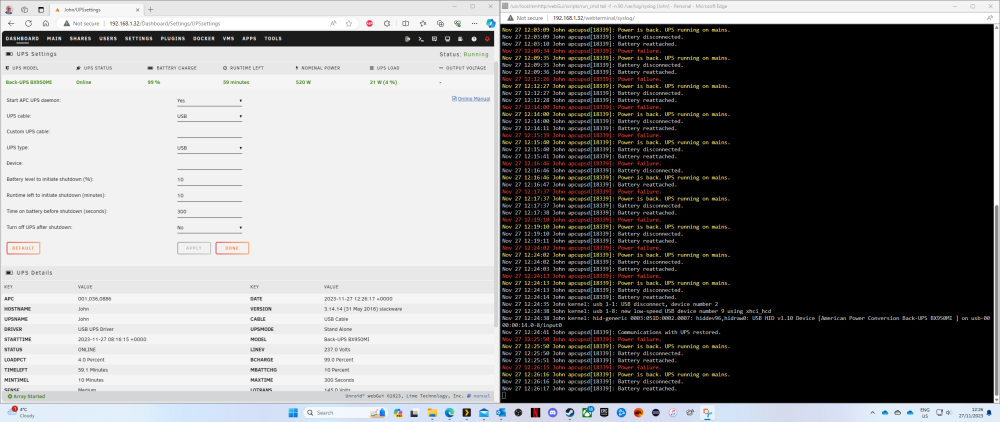
Hello, good people of the Unraid Forums As a new user, might I borrow your collective knowledge and wisdom? An APC BX950MI-IEC is now connected to my lovely Unraid server "John" via the included USB cable These recurring messages are filling up the logs: Nov 27 12:17:37 John apcupsd[18339]: Power failure. Nov 27 12:17:37 John apcupsd[18339]: Power is back. UPS running on mains. Nov 27 12:17:37 John apcupsd[18339]: Battery disconnected. Nov 27 12:17:38 John apcupsd[18339]: Battery reattached. Nov 27 12:19:10 John apcupsd[18339]: Power failure. Nov 27 12:19:10 John apcupsd[18339]: Power is back. UPS running on mains. Nov 27 12:19:10 John apcupsd[18339]: Battery disconnected. Nov 27 12:19:11 John apcupsd[18339]: Battery reattached. Nov 27 12:24:02 John apcupsd[18339]: Power failure. Nov 27 12:24:02 John apcupsd[18339]: Power is back. UPS running on mains. Nov 27 12:24:02 John apcupsd[18339]: Battery disconnected. Nov 27 12:24:03 John apcupsd[18339]: Battery reattached. The messages continue after changing USB ports: Nov 27 12:24:35 John kernel: usb 1-1: USB disconnect, device number 2 Nov 27 12:24:38 John kernel: usb 1-8: new low-speed USB device number 9 using xhci_hcd Nov 27 12:24:38 John kernel: hid-generic 0003:051D:0002.0007: hiddev96,hidraw0: USB HID v1.10 Device [American Power Conversion Back-UPS BX950MI ] on usb-0000:00:14.0-8/input0 Nov 27 12:24:41 John apcupsd[18339]: Communications with UPS restored. Nov 27 12:25:50 John apcupsd[18339]: Power failure. Nov 27 12:25:50 John apcupsd[18339]: Power is back. UPS running on mains. Nov 27 12:25:50 John apcupsd[18339]: Battery disconnected. Nov 27 12:25:51 John apcupsd[18339]: Battery reattached. Nov 27 12:26:15 John apcupsd[18339]: Power failure. Nov 27 12:26:16 John apcupsd[18339]: Power is back. UPS running on mains. Nov 27 12:26:16 John apcupsd[18339]: Battery disconnected. Nov 27 12:26:17 John apcupsd[18339]: Battery reattached. And the same thing happens if I disconnect mains power from the UPS, before a shutdown is initiated: Nov 27 12:40:55 John apcupsd[18339]: Running on UPS batteries. Nov 27 12:41:03 John apcupsd[18339]: Battery disconnected. Nov 27 12:41:05 John apcupsd[18339]: Battery reattached. Nov 27 12:41:57 John apcupsd[18339]: Battery disconnected. Nov 27 12:41:58 John apcupsd[18339]: Mains returned. No longer on UPS batteries. Nov 27 12:41:58 John apcupsd[18339]: Power is back. UPS running on mains. Nov 27 12:41:58 John apcupsd[18339]: Battery reattached. Nov 27 12:41:58 John apcupsd[18339]: Power failure. Nov 27 12:41:58 John apcupsd[18339]: Battery disconnected. Nov 27 12:42:03 John apcupsd[18339]: Battery power exhausted. Nov 27 12:42:03 John apcupsd[18339]: Initiating system shutdown! Nov 27 12:42:03 John apcupsd[18339]: User logins prohibited Nov 27 12:42:03 John root: /usr/local/sbin/powerdown has been deprecated Nov 27 12:42:03 John init: Switching to runlevel: 0 Nov 27 12:42:03 John init: Trying to re-exec init Nov 27 12:42:04 John apcupsd[18339]: Battery reattached. Nov 27 12:42:04 John apcupsd[18339]: Running on UPS batteries. Nov 27 12:42:05 John kernel: mdcmd (36): nocheck cancel Nov 27 12:42:06 John emhttpd: Spinning up all drives... Nov 27 12:42:06 John emhttpd: read SMART /dev/sdb Nov 27 12:42:06 John emhttpd: read SMART /dev/nvme0n1 Nov 27 12:42:06 John emhttpd: read SMART /dev/sda Nov 27 12:42:06 John emhttpd: Stopping services... Have we any ideas what the issues might be? I have searched the forums but have not been able to find the same issues mentioned before. Thank you in advance for your insight!! Kindest regards, Joseph Syslog.txt john-diagnostics-20231127-1542.zip