Emuexport
Members
-
Joined
-
Last visited
-
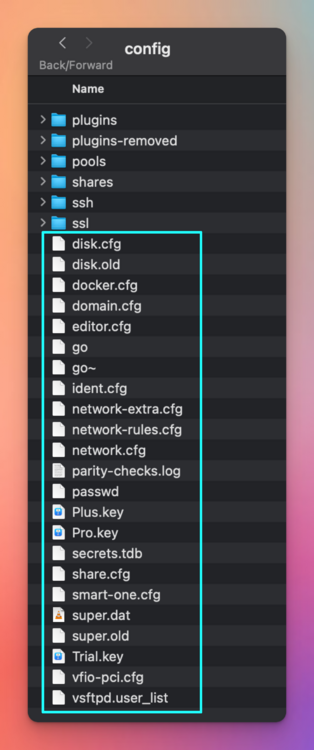
Well done @trurl that worked. Unfortunately, I am not sure which one of your ideas worked! But I did the following, and now it is back up and running: removed the .old files removed the other licence files removed the vfio-pci.cfg
-
I have been busy trying different permutations of adding my config files back to a stock image part by part. All the folders (plugins, pools, shares, ssh, ssl) I tired removing and them one-by-one had no effect. The issue must be in these folders (in blue box), as swapping them out for stock files gets me to the boot screen successfully. 3. I have also tried to swap the disk.cfd and super.dat for their old counterparts. This did not work at all, and i got stuck at the same spot. Does anyone have any other ideas on what could be locking the system up? Cheers.
-
Thanks for the recommendation, I tried that exact process (number 7. on my list of attempts to fix). ------- @trurl 1. Yes it was with the original licensed thumb drive. All troubleshooting was with the original drive, besides point 3. 2. Sadly I have lost the original boot drive files, as I naively thought the Unraid Connect backup would be sufficient, this is good to know for future reference. I will have a dive into those files, and cast my eyes over for anything obvious. If i cant see anything, i might have to ask for further help.
-
Emuexport changed their profile photo
-
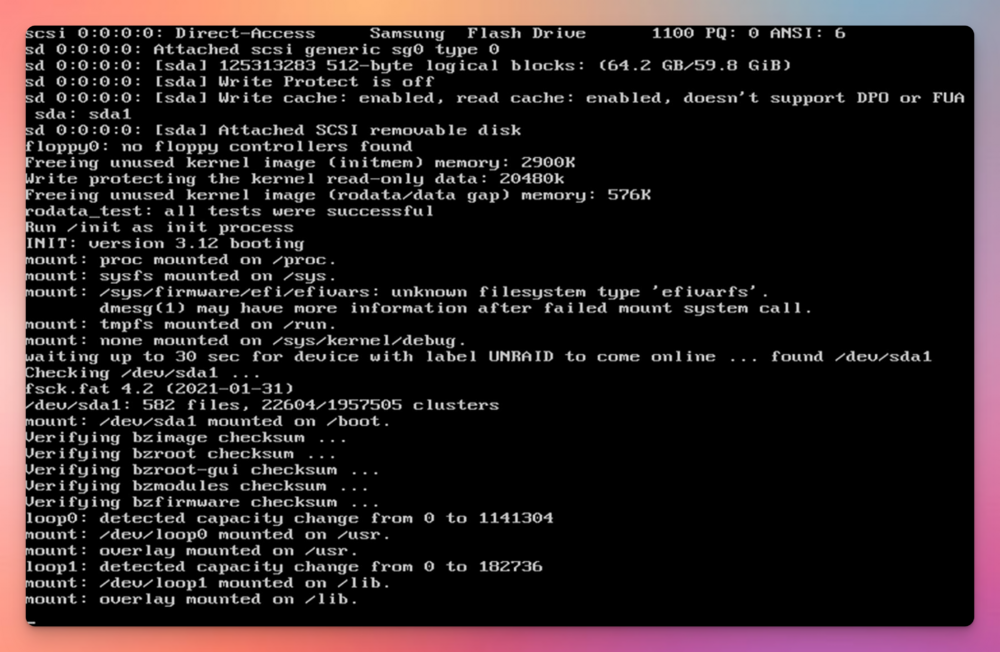
I have been stuck on this boot screen for a day of troubleshooting now. (long-time listener, first time caller.. etc..) Cause: I did a controlled shutdown on the server to move my UPS around. When I attempted next start up i first saw the below screenshot. Server info: UNRAID 7.0.1 Running on bare metal 4HDD, 2 SDD (as cache pool) Attempted fixes thus-far: Safe boot with no plugins - Same Issue Restore from working back up (1 day old) from Unraid Connect - Same issue Restore from working back up (1 day old) from Unraid Connect on a NEW USB Drive- Same issue Removed all peripherals and drives - Same issue Download fresh install of Unraid 7.0.1 - The Server fires up to a new UNRAID instance (This is positive) Partial replacement of new "bz" files to my old USB back up - Same issue Attempted a new UNRAID image with just the config files copied across - Same issue Any Ideas on how to bring the server back form the dead?