Skip to content
View in the app

A better way to browse. Learn more.

Unraid

A full-screen app on your home screen with push notifications, badges and more.

To install this app on iOS and iPadOS
  1. Tap the Share icon in Safari
  2. Scroll the menu and tap Add to Home Screen.
  3. Tap Add in the top-right corner.
To install this app on Android
  1. Tap the 3-dot menu (⋮) in the top-right corner of the browser.
  2. Tap Add to Home screen or Install app.
  3. Confirm by tapping Install.

terrorc0j

Members
  • Joined

  • Last visited

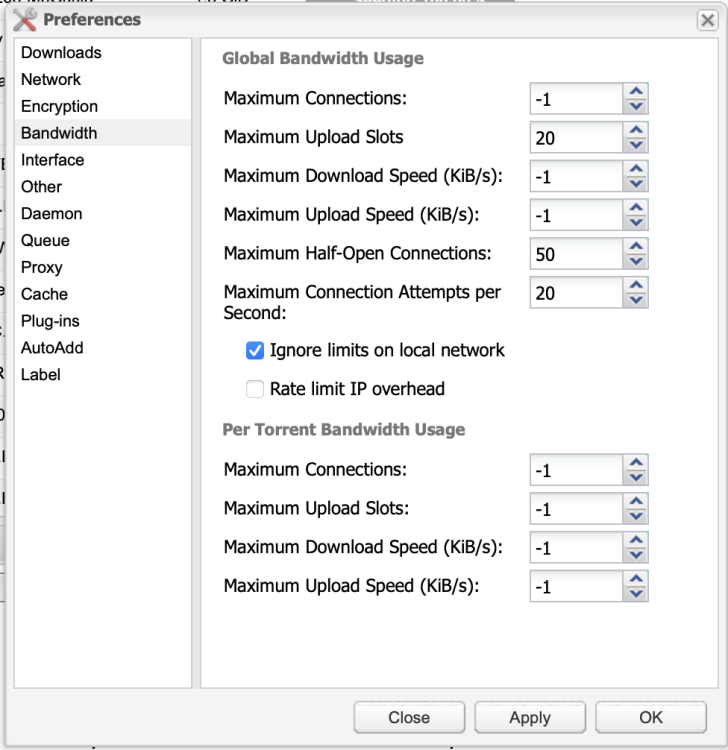
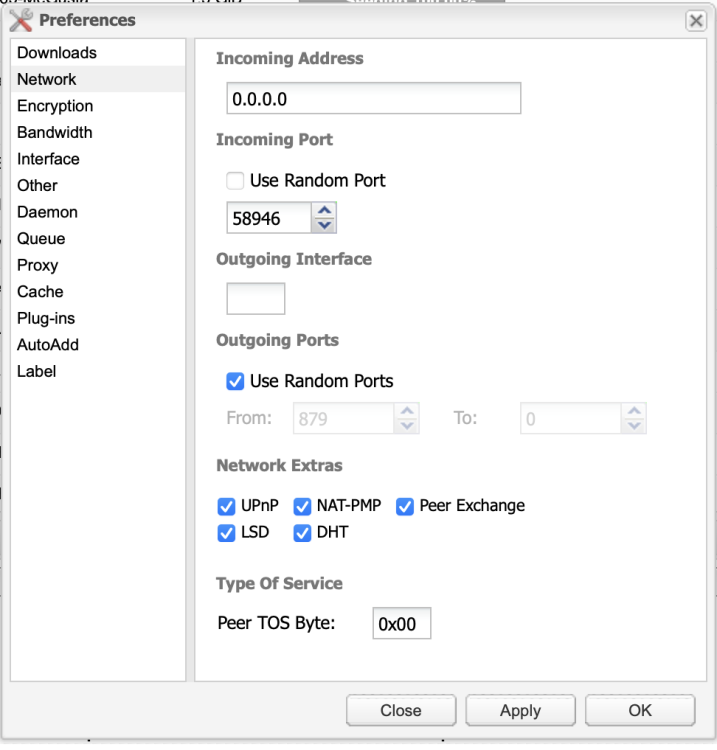
  1. Hi These are my settings
  2. Hey Guys not sure if this is the right place to post or not, but I have been using the BinHex version of deluge for a few weeks/months now and its been working absolutely fine. Though over the last few days its stopped downloading any files, no matter from any trackers. I haven't changed any of the config so I'm not sure what's happened, there's no errors in the error log either. I have reinstalled the docker image and of course rebooted Unraid as well. Any help would be greatly appreciated.

Account

Navigation

Search

Search

Configure browser push notifications

Chrome (Android)
  1. Tap the lock icon next to the address bar.
  2. Tap Permissions → Notifications.
  3. Adjust your preference.
Chrome (Desktop)
  1. Click the padlock icon in the address bar.
  2. Select Site settings.
  3. Find Notifications and adjust your preference.