bulbur
Members
-
Joined
-
Last visited
-
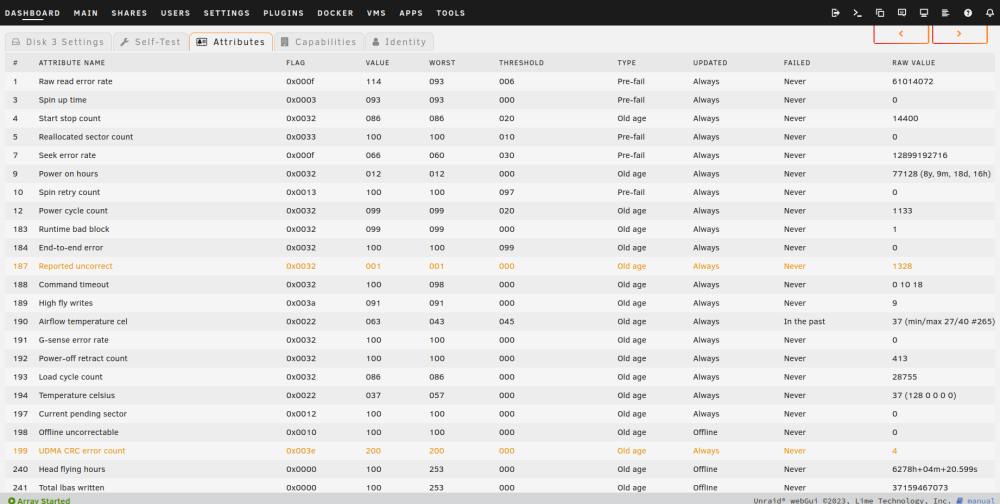
Hi, I've started yesterday to test out unraid and see if it fits my needs, so I'm pretty new here I have created an array of 3 disks and have no parity disk yet. The disk that should become the parity disk at the moment has all the data and I am trying to move it to to the array. The first problem is that copying from the unassigned disk (toshiba) to the array is really slow. Especially since I have a lot of small files. It took the whole day copying four folders that sum op to this: Total occupied space: 399 GB in 263,127 folders and 1,024,819 files I have copied the folders to a user share called Backup. The location of the share is disk3. I did expect it to be slow, so maybe that is normal. But what bothers me more is what occurred when I investigated: Calculating the size by clicking the "Calculate" button in the web file browser (it seems to use rsync -stats in the background) takes ages on the user share. Calculate on the source drive (toshiba) takes circa 15 seconds. Calculate on Main->disk3 also takes circa 15 seconds Calculate on the share in Shares-> User Shares doesn't finish in a reasonable time (I've canceled it after maybe 10 minutes). According to top rsync uses 15% cpu and shfs 75% My hardware is Mainboard: ASRock J3455-ITX CPU: Intel® Celeron® CPU J3455 @ 1.50GHz Memory: 12 GiB DDR3 Drives (hdd connected using SATA): 2x Seagate Barracuda 7200.14 (array disk2+3) 3TB 1x Western Digital Red 4TB (array disk1) Toshiba MG06ACA 8TB SSD as cache (usb) Has anyone an explanation for this? I am glad for every help 😃 Edit: directly after writing the post I noticed that there are some SMART errors on the device. I have attached the error log and a screenshot of the smart attributes. I did a SMART short self-test which completed without error. error_log.txt