





cgillette44
Members
-
Joined
-
Last visited
-
crg-diagnostics-20231204-1003.zip
-
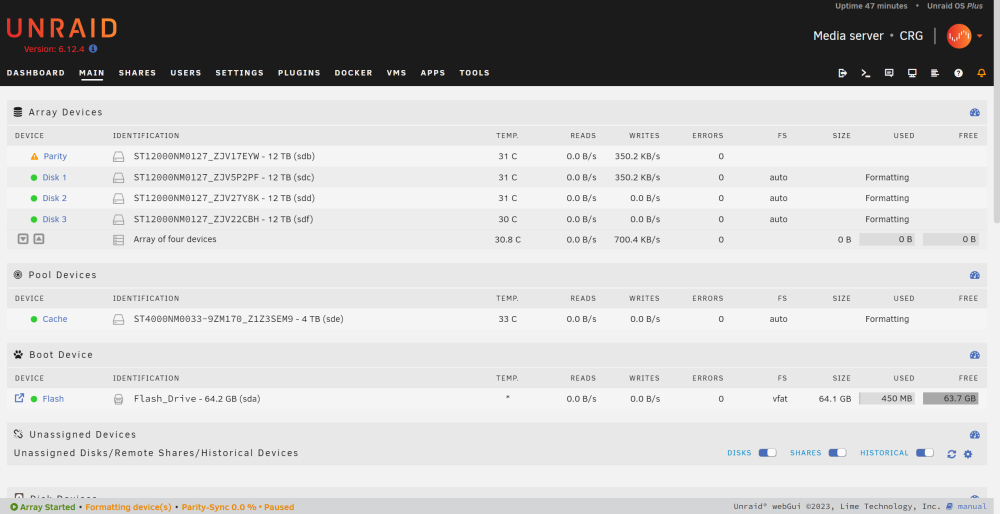
I'll try a different one as soon as I can I guess. After swapping the controller all read/write speeds are still very slow. I can't even get the disks to format to use the array
-
Swapped parity drives and I'm getting a similar result, 14 MB/sec. Before I canceled the "Parity-Sync in progress" it only made it to 3% after 14 hours. I'm getting a different Adaptex ASR-7805 6Gbps SAS 1GB Raid Controller today, hopefully swapping that out could help?
-
crg-diagnostics-20231201-1921.zip
-
cgillette44 joined the community
-
I just built my first home server and I'm in the process of setting up unraid. I installed my drives, precleared, assigned, formatted, and I'm now doing a Parity-Sync. I'm using Seagate ST12000NM0127 Exos 12TB 7200RPM SATA 6Gb/s 256MB LFF Drives and getting speeds under 20 MB/sec. Running Fix Common Problems reported "Write Cache is disabled" on all my drives and I was able to enable them but didn't see any speed increase. Is there anything else I can do to increase my speed?
