nohuhu
Members
-
Joined
-
Last visited
-
JonathanM, Thanks! This seems like a good idea, I'll try that.
-
Tried to back up some of the data from the failed disk, the few files I copied seem to be not corrupted so there's a chance that parity is actually correct.
-
itimpi, Thanks for replying. Yes disk5 is disabled with contents emulated, which suggests that it might or might not be recoverable from parity. Unfortunately I forgot to enable scheduled parity checks and although parity shows as clean, the last time it ran was almost a year ago. Lessons learned here... I realize there might not be an easy-peasy way out of this, I guess what I was asking is if there's a relatively non-painful way to do that. I'm proficient with low level Unixy stuff (pre-Linux even) if that's a consideration. Assuming the parity is correct, can the new disk (disk6) be cleared to zeros while in array? That way I guess I could take it out without ill effects and then swap it for the failed disk and rebuild data on it from parity. I should also add that the data on disabled disk is not über valuable and I can tolerate partial or total loss. What I'm concerned with at this point is not losing parity entirely in case another disk fails soon. That failed 14TB Seagate is one of the batch of 6 that was acquired and installed less than a year ago, not exactly reassuring. I've also attached the diagnostics in case that helps. plex-diagnostics-20241120-1503.zip
-
Hi folks, I have recently added a new disk (disk6) to my Unraid v6.12.5 array. The disk was precleared before adding, and formatted to XFS after adding it; no data was written to it since. Now I have another disk (disk5, XFS) failing with `scsi error badly formed scsi parameters` error, and that disk is full with data. Is there a relatively painless way to take out disk5 and have the newer disk assigned in its slot to rebuild the data from parity? I realize I could have done that with a precleared disk, if only I waited another week before adding it to the array... Now unsure how to proceed, halp.
-
Oh wow, thanks for such a quick reply! If I could suggest an improvement in error messaging, it would be great to have the Unassigned Devices plugin mentioned in the error. As it is now, it's very confusing and can be easily interpreted as the need to have unassigned devices. Works like a charm now.
-
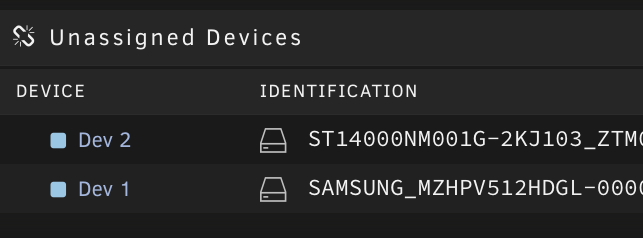
Hi dlandon, I can't install the plugin on my brand new Unraid build, it shows the error message: ``` Requirements not met The requirements for this upgrade have not been met on your system This application has additional requirements Unassigned Devices installed ``` This is despite having two unassigned devices listed on the Dashboard: What can be wrong here? Thanks in advance.