




Skip to content
View in the app

A better way to browse. Learn more.

Unraid

A full-screen app on your home screen with push notifications, badges and more.

To install this app on iOS and iPadOS
  1. Tap the Share icon in Safari
  2. Scroll the menu and tap Add to Home Screen.
  3. Tap Add in the top-right corner.
To install this app on Android
  1. Tap the 3-dot menu (⋮) in the top-right corner of the browser.
  2. Tap Add to Home screen or Install app.
  3. Confirm by tapping Install.

Armaell

Members
  • Joined

  • Last visited

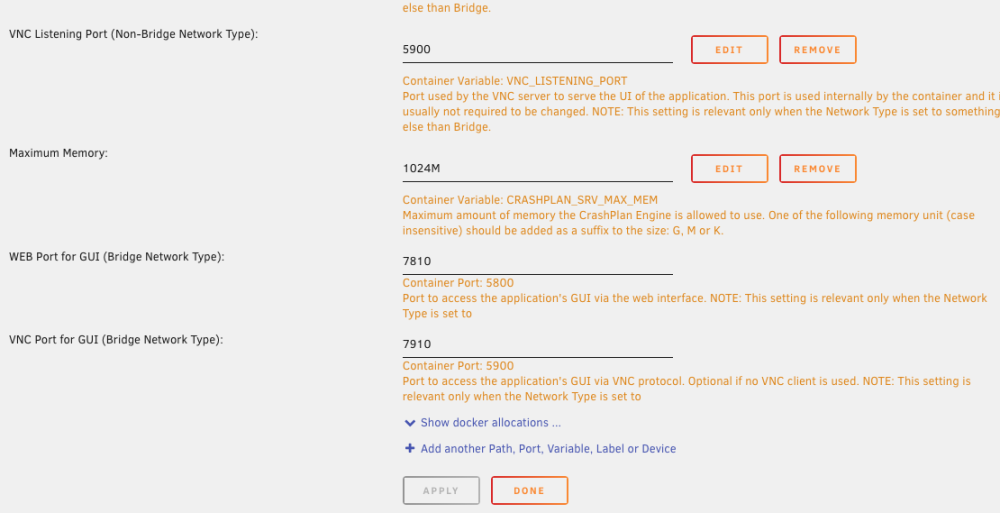
  1. Here, on the two "Bridge Network Type" there is no remove button.
  2. Armaell joined the community
  3. Hi, I created a custom network and set up my reverse proxy to route to the Non-Bridge ports. Now I would like to remove the Bridge ports to prevent access directly from the local network without going through the reverse proxy. The problem I have is that there is no [Remove] button beside the fields of the two Bridge ports. I also tried to just empty the fields but when I save, the fields are filled back with the default value. Would it be possible to get those two fields unlocked ? Thanks

Account

Navigation

Search

Search

Configure browser push notifications

Chrome (Android)
  1. Tap the lock icon next to the address bar.
  2. Tap Permissions → Notifications.
  3. Adjust your preference.
Chrome (Desktop)
  1. Click the padlock icon in the address bar.
  2. Select Site settings.
  3. Find Notifications and adjust your preference.