






jrsphoto
Members
-
Joined
-
Last visited
Everything posted by jrsphoto
-
say for instance I have a windows share \home with \home\user1, \home\user2 .... folders within. Is there anyway to make it so if user1 goes to \\unraidserver\home that he would only see his \home\user1 folder and nothing else?
-
I've got Homebox installed and using a custom interface on one of my vlan subnets. All that works fine, but I'd like it to listen on port 80 rather than 7745. I've tried everything I can think of but nothing seems to work. Is this something that I can change?
-
Just a quick question for clarity. I have two raidz1 pools of 5 drives each. Today I brought the server down (power off) for matainance but when I brought it back up, the array didn't start on its own because one of the sas drives in the 5-drive "saspool" had failed. I was presented with the option to click a check-box to start the array without the missing drive, in a degraded state of course. I guess my though was that the array would have started by itself, in the degraded mode, but It seems that this is an incorrect assumption? Its not a huge deal, the drive is being replace but I was just caught off guard. I've attached my diagnostics for the curious. cortex-diagnostics-20240801-2326.zip
-
As always, thanks JorgeB, I think you've answered all my question on these forums so far Your answer is as I suspected. Are you aware of any videos or posts here that talk about when it might make sense to change these to the physical disk path? Trying to do a deep dive on some of these edge cases.
-
Sure, I get that. I guess my question is really regarding the docker vdisk and appdata locations in settings (and VM settings too) I seems to me that I don't need to change these because they are just links to what ever location the share points? make sense?
-
I've seen this asked so many times here but I wanted to be sure I understand it, I've got a fresh install of 7.0.0-beta.2 with no array drives and everything in zfs pools. two raidz pools of 5 drives each two 2tb NVMe drives in zfs mirror Docker or VMs have not been turned on yet because I want to get the appdata and vdisk locations set first. For dockers, It's my understanding that in settings/docker, I leave vDisk and appdata locations at their defaults (/mnt/userr/system/docker/docker.img and /mnt/user/appdata respectively). and then set the share itself to the cache drive as the primary with a secondary of one of the pools. Its also my understanding that I do the same for settings/VM Manager leaving Libvirt / VM storage path / Iso storage path to their defaults and and setting the shares primary as CACHE or what ever I would want them to be. The way I understand it is that /mnt/user/domains, /mnt/user/isos, /mnt/user/system and /mnt/user/appdata are then links to where ever I have the share primary storage location pointed to. Is this correct? Thanks guys.
-
It does NOT seem to work in 6.12.1. Diags are attached. I didn't create any shares or pools, as they are already configured for 7.0.0 and I didn't really want to wipe that. I can if needed, but the results from dmesg look identical. tower-diagnostics-20240712-1231.zip
-
I just knew I was going to get asked that I'll make a boot disk and test it, hold my beer.
-
I got the above nic recently and its not coming up with either 10g fiber or 10g ethernet modules. Getting lots: [bnx2x_open:12488(eth3)]Recovery flow hasn't been properly completed yet. Try again later. If you still see this message after a few retries then power cycle is required. and others like this: [bnx2x_fw_dump_lvl:794(eth2)]\x013MCP PC at 0xffffffff [ 1862.322189] bnx2x: [bnx2x_fw_dump_lvl:815(eth2)]Trace buffer signature is missing. connection from this card is to a Ubiquiti 10g Aggregation Switch. Motherboard is an ASROCK X570D4U with 5950x and 64G ram I see others have had simular issues with this or other Broadcom 10g cards, but I didn't see any real solution. I would be greatful if someone could take a look at the diags and point me in the right direction even if that's back to ebay, lol. -j tower-diagnostics-20240712-0102.zip
-
ok, you are correct. My striped mirror is indeed up and running. Thank you @JorgeB!
-
@JorgeB I'm sure I'm likely doing something wrong but, here's what I've done in the gui (7.0.0-beta.1) Create a pool with 4 drives, with file system type set to zfs / mirror / 2 groups of 2 devices. hit apply This changes the Filesystem type back to raidz / 1 group of 4 devices Click done. At this point, if I start the array, the pool won't mount because I have to format it, which I can do, and it will format it as raidz / 1 group of 4 devices. If I choose not to format it and stop the array, go back to the pool config and choose mirror / 2 groups of 2 devices, and hit apply, it just goes back to raidz I see no way to get it to create the striped mirror set? what am I missing?
-
Thanks JorgeB. I love these forums, lots of people willing to help. I did see that and I'll give that a try again. I've got no data on these drive so its just fun testing things out, and getting a better understanding of how ZFS works within Unraid. In my very unscientific testing so far, it does seem that I'm getting better write performance with ZFS than with an Unraid array (though not if I'm using the NVME as primary and Unraid array as secondary )
-
ok, it does look like the command like method does indeed create the poll, it just automatically mounts it to /poolname. It still seems that pools created via command line are not reflected in the web gui however. Again, my lack of knowledge here is likely more of the problem -John
-
I came here looking for this question @BelowStudios. I see the same thing so good to know its being corrected. I also tried creating a 4-drive striped mirror set from the shell with: zpool create mypool mirror /dev/sde /dev/sdb mirror /dev/sdc /dev/sdd This command worked and zpool status shows: pool: mypool state: ONLINE config: NAME STATE READ WRITE CKSUM mypool ONLINE 0 0 0 mirror-0 ONLINE 0 0 0 sde ONLINE 0 0 0 sdb ONLINE 0 0 0 mirror-1 ONLINE 0 0 0 sdc ONLINE 0 0 0 sdd ONLINE 0 0 0 errors: No known data errors However, this pool never shows up in the web gui. I know little about ZFS (which is why I'm playing with this now) so I'm likely missing something but thought maybe you might give it a try and see if you get different results.
-
Just wanted to reply that the FAQ thread that @trurl posted seems to have solved my AMD Ryzen 9 3900x unraid server locking-up problem. Specifically I believe it was setting "Power Supply Idle Control" to "typical current idle" in BIOS, that solved it. I've had no lock-ups in a little over 48 hours so I think I'm good. Thank you @trurl
-
ok, based on that FAQQ link you sent, I've set the following: 1) in BIOS, Power Supply Idle Control set to "typical current idle" My ram is 4x ddr4-2133 corsair single-rank, clocked at 2133, well under the DDR4-2933 so that should be ok. I'll let this run overnight and see how it goes. If this still locks up, as per the FAQ, I'll completely disable c-states and try that for another 24 hours.
-
Thanks for this. my gut was telling me it was likely something with AMD, so this helps me figure out what to look for in the bios. my CPU is a 3rd gen Ryzen 9 3900x and I believe I'm running 4 singlel rank non-ecc ddr4 sims (ill double check that). I'll check the c-states as well.
-
new diags: tower-diagnostics-20240208-1623.zip
-
output between the two looks the same to me?
-
here ya go. It didn't ask for the -n option: Phase 1 - find and verify superblock... Phase 2 - using internal log - zero log... - scan filesystem freespace and inode maps... - found root inode chunk Phase 3 - for each AG... - scan and clear agi unlinked lists... - process known inodes and perform inode discovery... - agno = 0 - agno = 1 - agno = 2 - agno = 3 - process newly discovered inodes... Phase 4 - check for duplicate blocks... - setting up duplicate extent list... - check for inodes claiming duplicate blocks... - agno = 0 - agno = 1 - agno = 3 - agno = 2 Phase 5 - rebuild AG headers and trees... - reset superblock... Phase 6 - check inode connectivity... - resetting contents of realtime bitmap and summary inodes - traversing filesystem ... - traversal finished ... - moving disconnected inodes to lost+found ... Phase 7 - verify and correct link counts... done
-
ok, here are the diags again. Array is up and running. tower-diagnostics-20240208-1613.zip
-
um, not sure. I can rerun diagnostics and post
-
Output from the Check filesystem: Phase 1 - find and verify superblock... Phase 2 - using internal log - zero log... - scan filesystem freespace and inode maps... - found root inode chunk Phase 3 - for each AG... - scan (but don't clear) agi unlinked lists... - process known inodes and perform inode discovery... - agno = 0 - agno = 1 - agno = 2 - agno = 3 - process newly discovered inodes... Phase 4 - check for duplicate blocks... - setting up duplicate extent list... - check for inodes claiming duplicate blocks... - agno = 0 - agno = 2 - agno = 1 - agno = 3 No modify flag set, skipping phase 5 Phase 6 - check inode connectivity... - traversing filesystem ... - traversal finished ... - moving disconnected inodes to lost+found ... Phase 7 - verify link counts... No modify flag set, skipping filesystem flush and exiting.
-
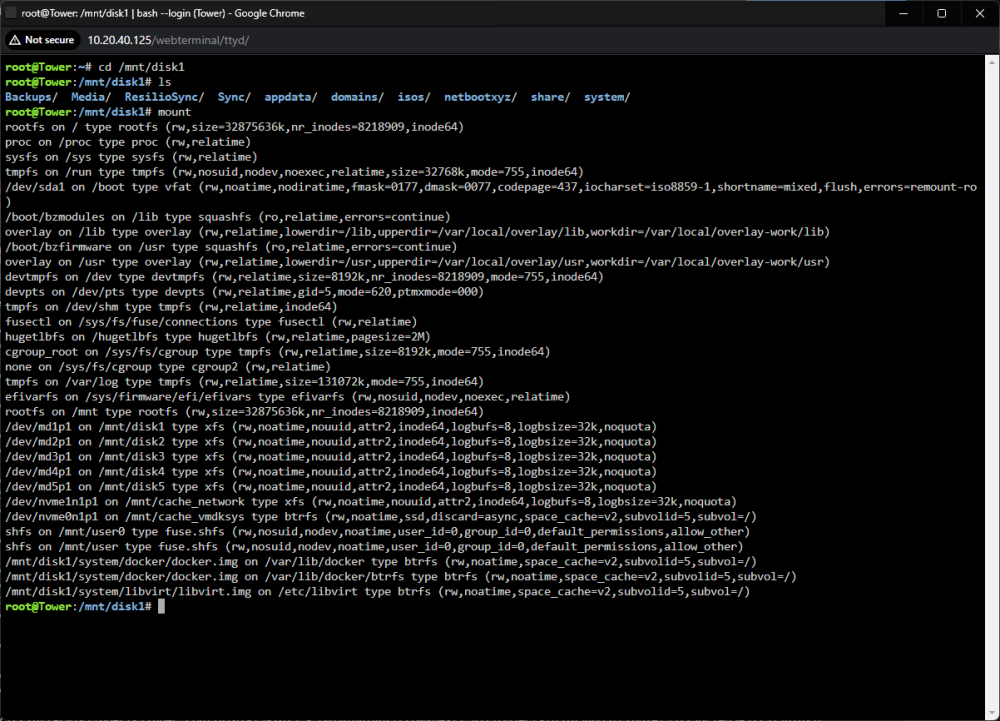
Disk1 us unmountable? From the shell /mnt/disk1 appears to be mounted: and "ls" in that directory shows my files. I'll put the array in maintenance mode and run the the Check filesystem
-
Hi @trurl, thanks for the feedback. No real indication it was needed really, just trying anything that seems reasonable and minimally invasive at this point. I've attached the diagnostics and remote syslog file. The freezes seem to happen roughly within 24 hours of being up, and both the console (attached hdmi monitor and keyboard) and web ui are frozen. syslog_unraid.zip homeserver-diagnostics-20240125-1924.zip


