





Chelun
Members
-
Joined
-
Last visited
Everything posted by Chelun
-
Here it is nasty-diagnostics-20240219-1223.zip
-
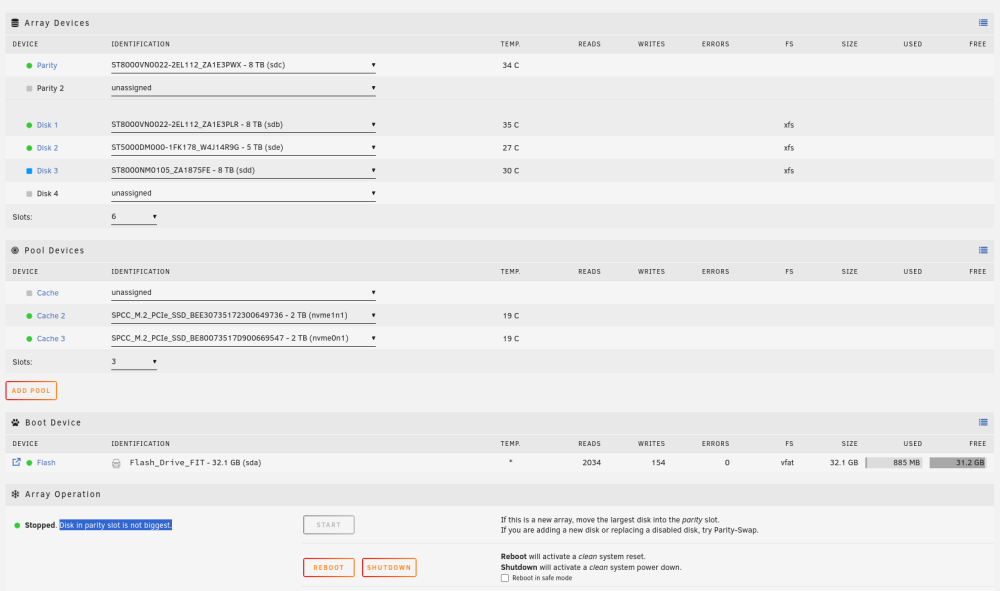
Hello all, I am pretty new with Unraid, the truth is that it has been running for years without issues. When I originally installed it I had it with a bunch of different dirves, (2) 8TB, (1) 5TB, (1) 4TB and (1) 2TB. Worked perfect but I have no need for that many drives so I decided to replace the 5,4 and 2 for a new 8TB drive that I removed from another host. I already removed the 2 and 4 TB with out issues, but the 5 has some data that I want to move to the new 8TB, So I left it in place for now. My issue is the new 8TB is recognized but I can not add it as a Data drive, it only let me add it as Parity 2 drive. Can anyone help me on setting it up as a Data drive? Here is some screenshots of my setup. Thank you in advance!
-
+1, this will be very helpful!
