b0rsch
Members
-
Joined
-
Last visited
-
is there any user friendly guide how to setup podfetch correctly on unraid?
-
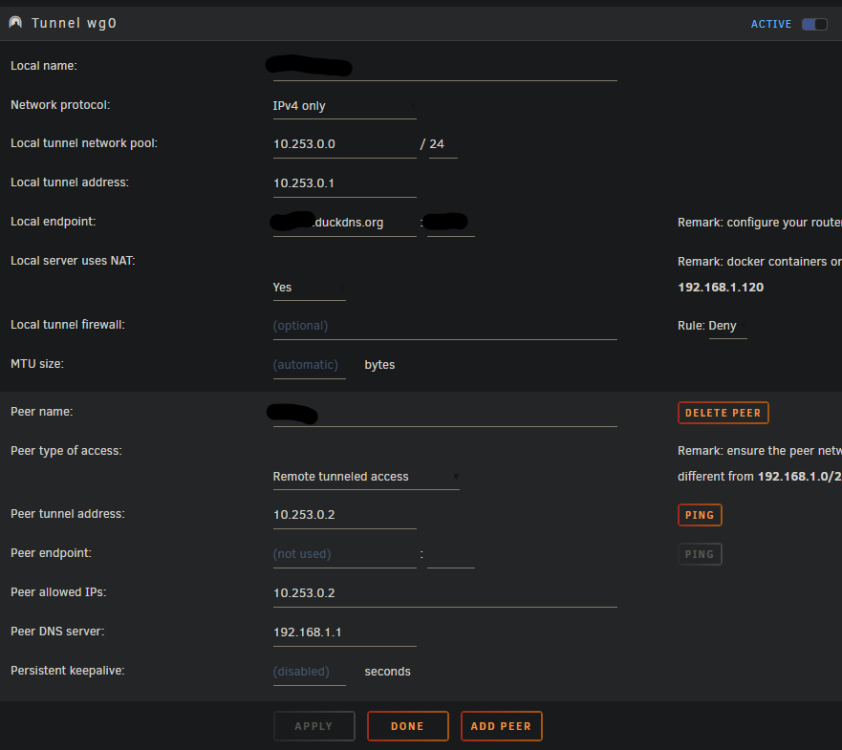
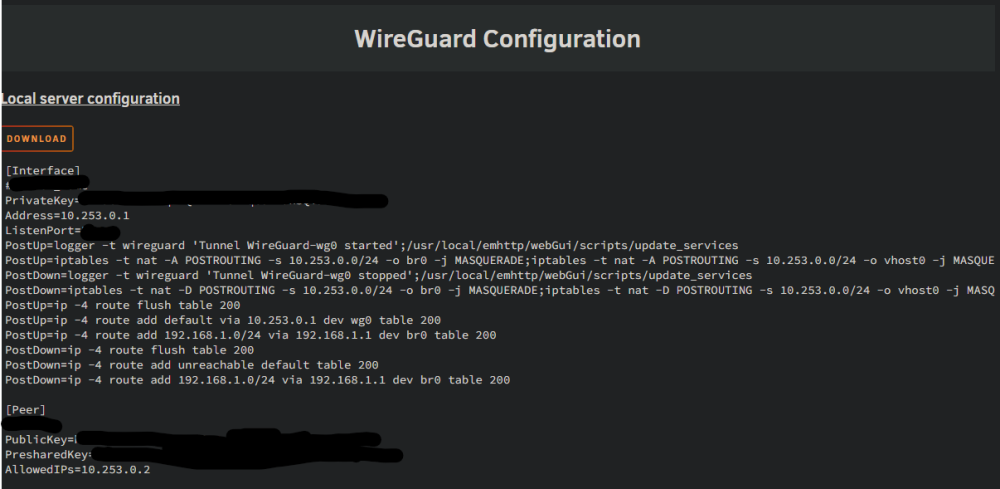
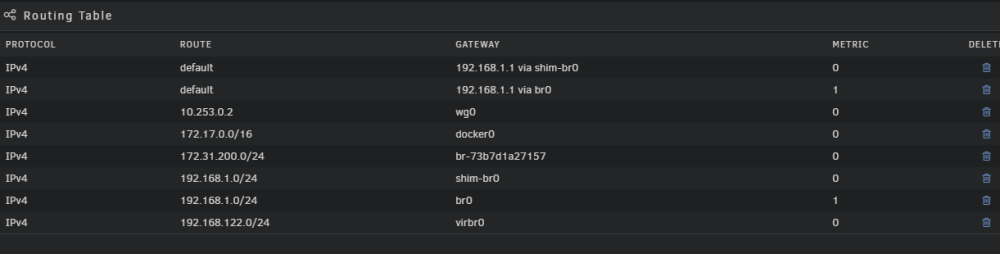
Habe ja nichts absichtlich modifiziert was den Zugang unterbinden sollte. Einstellungen rückgängig machen würde bedeuten das Unraid komplett neu aufzusetzen nachdem ich sehr viel Zeit in die Einrichtung investiert habe. Hatte gehofft anhand der bereigestellten Screenshots (WG Configs + Routing tables; das sollten ja eigntlich die relevanten Settings sein.) sieht jemand einen Fehler oder hat einen Ansatz was man nochmal alles checken könnte.
-
Hallo, habe gestern frisch mein erstes UNRAID aufgesetzt. Habe einige Tutorials usw. befolgt und bis jetzt funktioniert soweit alles sehr gut! Habe auch einen VPN aufgesetzt mit duckdns und Remote tunneled Access, da ich möchte dass mein Handy außerhalb des heimischen W-LANs sich mit dem VPN Server verbindet und ich sowohl auf lokale Ressourcen (z.B. SMB-Shares) azugreifen kann, als auch der Internet-Traffic über zu Hause läuft (Ad-Guard ist geplant und soll auch von unterwegs mit dem Handy nutzbar sein) . Der Witz ist: Es hat nach der initialen Einrichtung funktioniert!!! Ich konnte mit mobilen Daten mit Wireguard connecten. Meine öffentliche IP entsprach die meines Providers und ich konnte sogar SMB Shares aus dem LAN im Handy hinzufügen, genau so wie es wollte! Habe viele weitere Apps usw. installiert und auf einmal funktioniert das VPN nicht mehr richtig. Ich bekomme nach wie vor einen Handshake und sehe auch Traffic (Port Fowarding etc. funktioniert). Aber weder kann ich Seiten im Internet erreichen, noch die (lokalen) SMB-Shares. Wireguard am Handy mit einem externen VPN Anbieter funktioniert nach wie vor. Ich vermute dass irgendeine Einstellung, Fix Common Problems, eine App oder meine Dummheit mir das Routing zerschossen hat o.ä.. Weiß jemand Rat? Tunnel: Routing Table: Besten Dank!