





linksta7
Members
-
Joined
-
Last visited
Everything posted by linksta7
-
Ah I see, I thought the formatting would take place as part of the array building process. I will format then now that preclear is complete and all the disks have been added to the array then. Thank you
-
Diagnostics if needed chowdertower-diagnostics-20231223-1327.zip
-
Yea all new disks. Three of them were new in packaging (had zero power on hours) and one of them (a 6tb data drive) was taken from a prebuilt (5 power on hours iirc)
-
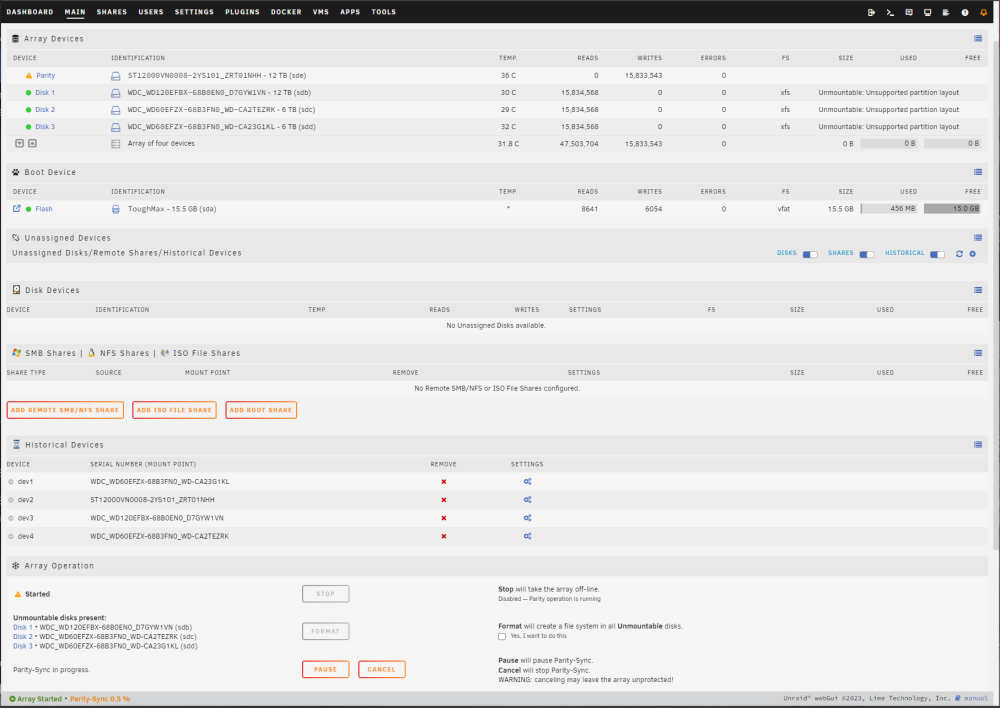
So my preclear finished this morning. I went ahead and assigned the disks to the array, explicitly specified xfs as the data drives format, and clicked start array. I wasn't prompted to confirm formatting the drives. It appears that it still wants me to format, but you guys made it pretty clear that I should not explicitly format the drives via the format button or it will erase the preclear signature. Should the drives appear as formatted after the parity sync is complete? As it stands, it doesn't appear as though they will be formatted.
-
Ok thank you, appreciate your help
-
I see, glad I checked then. I'll make sure to just let Unraid do its thing when its building the array then. Thanks for making it simple and clear. One last is, now that I've already started erase and clear process last now (all disks are now in erase step), is it ok to stop the process and re-run by just using clear disk? Or should I just let them run the rest of the erase and clear process?
-
Makes sense, thank you Last night, I already began the erase and clear disk process before getting this reply. The disks are now on the erase step, is it safe to just stop the process and re-run a new clear-only run? Or should I just let it do its thing and complete the entire erase and clear process? As well, do I need to explicitly format my drives after the preclear process is complete or will unraid format them for me when I build the array for the first time?
-
Sorry if this is a noob question, but with a new disk in a new build, which preclear option should I be choosing? I assume "Erase and Clear Disk" since I want it zeroed by erasing and signed by clearing, but the definition "disk to be discard" in the original post is throwing me off as I'm not exactly sure what that means. Thank you!
