





dromeiro
Members
-
Joined
-
Last visited
-
The issue seems to occur when I access the WebGUI from my iPhone. I have stopped accessing from my phone and the error/warnings have stopped.
-
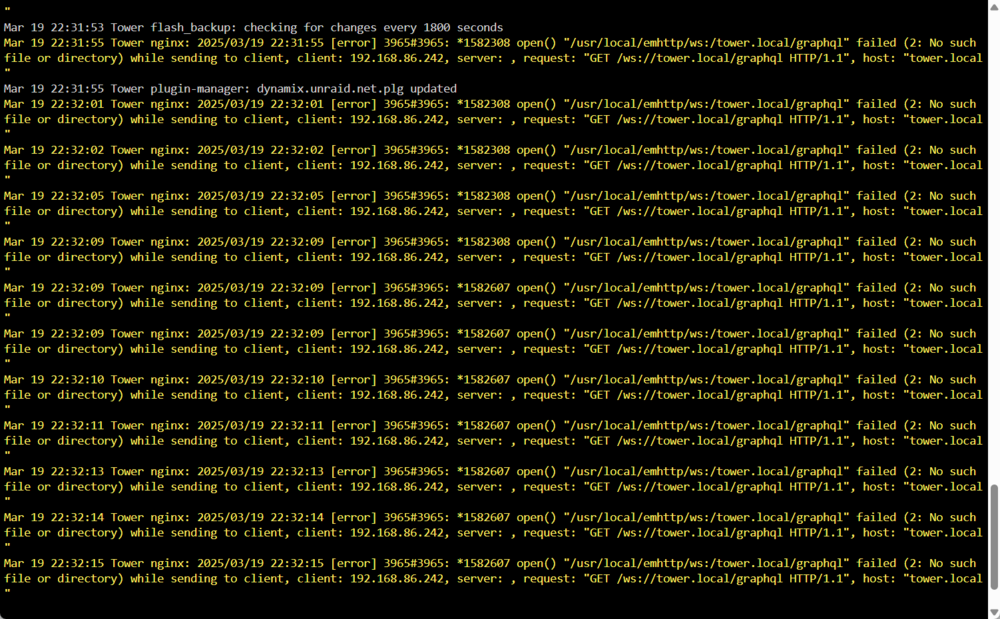
There is a warning in my system log that keeps populating. I have tried to find resources on how to correct this warning but so far I have not found a solution. If anyone could review and assist me with how to resolve this warning, I would greatly appreciate it! tower-diagnostics-20250321-0838.zip
-
Thank you all for your suggestions and insight. I went ahead and tried to add the new drive again only this time I noticed that after I added the drive, the read order in which each bay/drive within the enclosure changes. Once I moved the drives around to the new bay reading as that drives individual disk in unraid, I was able to start my array again with no issues and complete the pre-clear on the new drive I added.
-
Hey Everyone, About a month and a half ago, I tried adding a new drive to my array. I followed the process outlined HERE from the Unraid Documentation Guide and upon starting up my array after adding the new disk, my existing Disk 2 went unmountable with the reason showing as Unsupported or no file system. I immediately stopped the array, shut everything down, took the new drive out of the array, and then turned the system back on and started my array again but my Disk 2 was still showing as unmountable. I was able to run the xfs_repair to fix the file system but some of the data that had been on the drive was lost. I finally got the disk back to normal with the data that was lost, but I still want to add the new drive to the array however I am nervous about going through the whole process of fixing the dive and losing data again. I currently have 3 Drives (1 4TB Parity Disk and 2 4TB Data Disk) in a 5 Bay Enclosure and as far as I can tell everything is working perfect with them now, I only run into issues when I am trying to add this new disk (same exact 4TB Disk as the others). My system and setup is also new, with all brand new drives and equipment setup this past December. Of course, back when the issue happened, I was so frantic to get my data back that I never gabbed a Diagnostic report from the event. I am hoping someone can give some pointers or explain why I may be running into this issue so I can try to add the new disk again hopefully successfully this time. Any insight or help would be greatly appreciated! Thanks!
-
Thank you, I will have to follow up with my friend who has similar setup to see why his does not run this slow Nope, the sync should be the only thing being processed currently
-
Hello Everyone, First time unraid user here. I just put together my first setup based on recommendations from a friend that uses unraid currently. I have my array started and processing the Parity Sync however its running very slow. From prior research, it sounds like this should run in about 8 hours for my 4tb Parity Drive but I'm currently running at an estimated 3 days! Estimated speed is consistent at about 13 MB/sec. Its been running for about 18 hours now. I have a total of 12tb (3x 4tb Hard Drives) using one as the Parity. I definitely feel like something is not running properly. Any insight or suggestions would be greatly appreciated. I attached my Diagnostics file but please let me know if there is any more information I can provide! Thanks tower-diagnostics-20231223-0825.zip
