





ginch
Members
-
Joined
-
Last visited
-
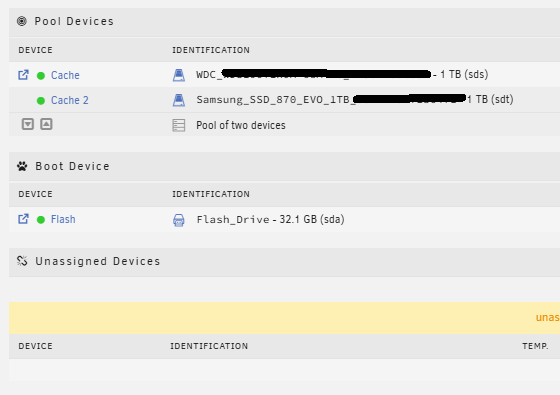
Odd behaviour with this cache drive but I think I figured it out. I've marked the original solution you proposed as fixed. I was unable to select anything as the first cache drive from the drive selection dropdown box, and it remained in the unassigned devices with the [POOL] button greyed out. I started the array in maintenance mode, then stopped it. The Cache#1 dropdown box then became populated with the drive that was listed in the Unassigned Devices section. I chose the drive (WDC...) as Cache#1 and got the warning that the contents would be overwritten, and I proceeded. I started the array again, not in maintenance mode, and it's appearing as a cache pool now (Image attached). I don't think I'll need to post a follow-up help for the cache drive issue, but is there any way I can verify that Cache#1 actually equals Cache#2? I suppose because there's only one button to browse /mnt/cache that should be enough to verify? Either way, I've got lots of alerts to fix things, my Nerdpack and NUT addons appear to have broken throughout this. Aside from having a pro license to support the Unraid community, how can I show my appreciation for your help?
-
The array had been started in maintenance mode in order to rebuild the original failed drive in the data array. I have stopped the array and unfortunately clicking the POOL button doesn't appear to do anything. It appears to be greyed out. Array is currently in stopped state.
-
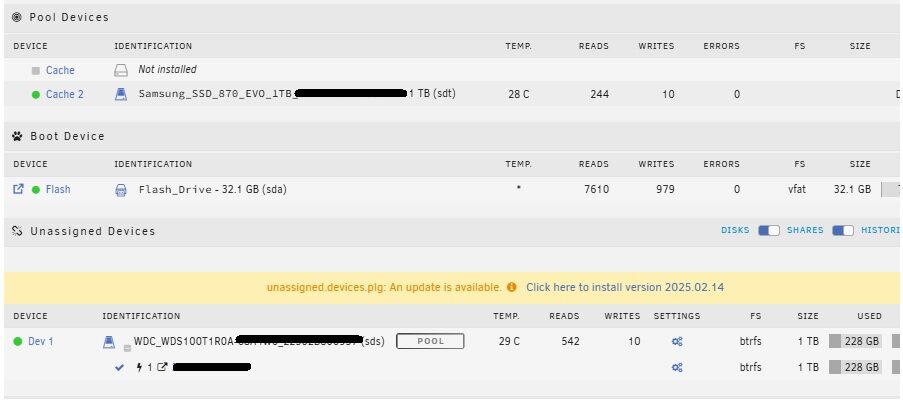
Thank you Lolight, this was very helpful. Unfortunately the content on my USB drive was corrupt even after fixing the errors as I noticed the server was booting but wasn't resolving an IP address. After dumping the diagnostics and seeing that no IP was being issued, I checked the network.cfg file and found ascii characters that didn't belong in the file. I managed to recreate the network.cfg based on another post in the forum and then the server came online. The data drive has been rebuilt. However I'm now seeing a new issue where (and probably because my config folder was out of date). I can create a new thread if you wish, please advise, but the long and short of it is that I had my cache drives in a RAID1 for redundancy. When I booted up after this fix, it showed only a "Cache 2" under "Pool Devices". Under "Unassigned Devices" I see Dev 1 and confirmed it is the other cache drive. It had a button beside the drive identification that said [MOUNT] so I pressed that. It now shows the word "POOL" beside Dev 1 (under Unassigned Devices) but it doesn't show the drive as device "Cache" under "Pool Devices". I didn't want to start the array yet in case this would have negative impacts. Much gratitude for your help.
-
Unraid 6.12.6 Supermicro, dual parity, multiple data drives Log files cannot be added as I cannot boot server Historical: I had a dead hard drive that I was going to replace. I safely shut down from within Unraid, swapped the drive, and powered up. Upon powering up, the server wouldn't boot due to USB errors and wouldn't get to the Login prompt. I shut down the server, put the USB boot drive in another Windows computer, saw Windows report there were errors on the USB, and I copied all contents from the USB to my Windows computer. I repaired the USB and copied the USB to a DIFFERENT folder in Windows to maintain them separately. Apparently not all errors on the USB could be repaired. I tried booting Unraid anyway with it and it now gets to a login prompt but I still can't connect via the webGUI. Additional: I use the flash backup tool to copy the flash drive to a PC so it is not in .ZIP format as I've read about recreating the USB with the USB Creation Tool - so there's no .ZIP I can point to. From the Unraid USB Creator, I can choose operating system "Unraid 6.12.15" (not the version I'm on - I know.. I'm behind updates) so I'm not sure if I should select that and then move the backed up "Config" folder over to the new USB. I also went to Unraid Connect, and I swore I set this all up in the past, but there's no backups listed on there (page just keeps saying "Loading"). Question: How exactly do I recover my USB boot device? Do I just copy the contents of flashbackup to a new USB3.0 device and plug that in? Thank you!
-
Thank you JorgeB, I appreciate your time. I made the change to ipvlan and read that there were certain situations where "Host access to custom networks" or "Preserve user defined networks" should also be set to Yes. Mine are set to Disabled and No respectively. Can you advise what issues I would notice if one or both of these needed to be set to the opposite settings? For the second issue of backing up and reformatting the pool, is this accomplished using the Appdata Backup plugin (which is running), or by changing the user shares from "Cache <- Array" to just "Array", format, then set the user shares back to "Cache <- Array"? This one is strange because under the Main tab > Pool Devices there are no errors noted for either cache drive.
-
I've been using Unraid for years now and currently on 6.12.6 Mobo: Supermicro X9DRH-7TF/7F/iTF/iF CPU: Intel® Xeon® CPU E5-2695 v2 @ 2.40GHz (two of them) 128 GB RAM History: Last week I noticed ads that should have been stopped by Pi-hole running in a Ubuntu VM on Unraid were coming through. Mysteriously the VM was missing from Unraid.. the whole vdisk was just ... gone. No explanation. I recreated PiHole as a docker container. Updated some dockers to later versions, etc. This morning I was streaming Plex remotely and it just stopped. The player couldn't connect and see my libraries. Waited till I got home and found Unraid webUI completely unresponsive. I couldn't connect, nothing displaying on the local server monitor either. I was forced to hard shut down and bring the server back up. Parity check started. I got about 3% through it after about 6 hours and streamed Plex again within my home. For whatever reason Plex stopped responding again. I noticed CPU use was high on a number of cores. I tried to run docker stats from a terminal but nothing was showing up. I stopped the parity check, then attempted to stop the array. It's saying "Array Stopping... Stopping Services" in the bottom left status bar for at least 20 minutes and looks like it's locked up again. I still managed to pull diagnostics, please, someone point me in a direction to look? Thanks! tower-diagnostics-20240604-2215.zip
-
ginch joined the community
-
Hello, looking for advice to properly set up my cache drives. I currently have a 1TB cache pool consisting of two drives operating in a Raid 1 (Both are 1TB Samsung 870 EVO's). Drive 1 has 40TB written, drive 2 has 35TB written. Drive 1 shows a reallocated sector count of 34, and uncorrectable error count of 5. Drive 2 has no issues listed in SMART. I have installed a new 1TB WD Red and my thought was to add it to the existing pool so that there would be three drives operating in a Raid 1 configuration. However, should this be the best approach and just wait for one of the 870's to die and know I still have redundancy in place? Or should I take out the current 870 drive with reallocated sectors and replace it with the WD Red entirely? Thanks for your thoughts.
