





Decay
Members
-
Joined
-
Last visited
Everything posted by Decay
-
Yes, it was, deleted it after I posted the diagnostic file. Had seen, that the diagnostic said, that it was still on the array.
-
I am sorry, I was stupid... Missed empty folders. Edit: Forgot to delete domains from disk1, also done that right now. Thank you for your help, I didn´t know what to do without you. There where some failures of my system, so I am not sure which answer I should mark as solution. unraid-diagnostics-20240127-1742.zip
-
Yes, all data and folders I backed up are in the "unique name" share. Just in that share are all folders have the original name. Edit: I´ll try something. I´ll add "_TMP" to the backup folders and will see what is going to happen. Edit2: Renaming doesn´t solved it. It looks like there are no data on the array, attaced some screenshots.


-
@trurl I copied all with Dynamix File Manager, Docker was offline and ther shouldn´t be any open files. @itimpi The folder I used for backup has a unique name, but all inside has the same folder name. Probably I should delete them.
-
Is it a wrong configuration? All files are marked with the cache as location. I added a screen of the appdata sahre setting. Just trying to find it in the diagnostics. Edit: I found it in the diagnostics. When I backed up the cache drive, I copied all onto a folder, location is on disc1, is that the problem?
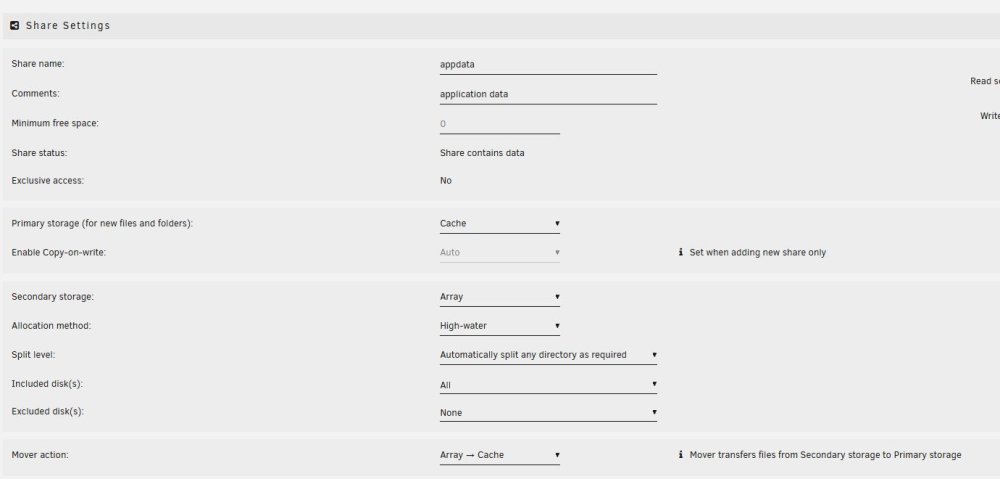
-
Done that. It looks like all files show that they are on located on the cache, the files which should be there. unraid-diagnostics-20240127-1626.zip
-
Thank you for the fast response. Just checking which files I want to keep and which not, shall I keep the folders or also delete them?
-
They are set to: array --> cache. How to solve that?
-
All data are back on the cache, the docker.img is rebuild and the dockers startet. Right now it looks good. Just a few files, still got a backup, weren´t readable. I hope the problem is solved. Edit: Just wanted to do a smart check on the new drive, but the check does not start. unraid-diagnostics-20240127-1522.zip
-
I´ll do that and come back. Just have seen, that there is a old vdisk.img from an old VM, I would assume, that it is safe to delete.
-
Okay, I startet the backup. After that I´ll copy all data back to a new cach drive. Do I have to do anything after copying the data back or just try to start docker again?
-
I also got a new cache drive, I probably do a backup and change the drive. Do you recommand a manual backup or just set alll back to array?
-
Docker failed to start. Could it be possible that the docker.img, which was recreated days before, is corrupted? It was recreated with the old hardware, which had RAM problems and suddenly completly stopped to work? To be hones, I don´t understand the docker logfile from the diagnostic. Edit: Fix common Problems plugin shows: Unable to write to cache - Drive mounted read-only or completely full. The cache drive isn´t full and it does not show that it is read-only. unraid-diagnostics-20240127-1229.zip
-
I think parity looks better now. Just did a short smart test till now. Wondering if I should give the dockers a try again or do you see any problems with that? unraid-diagnostics-20240127-1040.zip
-
Just me is using the server, so the write performance was okay for me but I think I´ll replace the parity drives with non smr drives and rebuild parity. It will take some time, I´ll report the progress if it is done. The third new drive I´ll change with drive 1 of the array and copy all data from drive 2 to drive 1. Just ordered three more drives, these will replace the rest of the drives. It is hard to get new ones, most shops are sold out in my area. @trurl Have you seen the memtest log? For me it looks good or did I missed something? MemTest86-20240121-013132.log
-
I accidently stopped the check on parity 1 and startet it agin last monday morning. Today it still was doing the samrt check, it was at 90% for days. Going to stop the check at parity 2, hope that parity 1 will run through this time. Edit: Checked the three new drives I got. They are Seagate drives, they should be cmr. Just for my understanding, should I avoid smr completly or just as parity drives? Most/all of the used drives are from WD, they are probably all smr drives. Should I stop the test and replace the drives and build the parity from scratch? After that I would replace all other drives. For my understanding it would make sense.
-
Just startet the smart test again for both parity drives. Would it make sense to change the parity drives with new ones? I got three new drives here and I´ll order some for the array also. Want to shrink the array a bit and also want to change the old drives.
-
Finally back home. The first parity disk is still running the smart-selftest, running since monday morning. I knew, it could take some time, but I think it is a little bit too long, isn´t it? Attached the new diagnostics. unraid-diagnostics-20240126-1151.zip
-
Okay, I´ll do that. Hope that the test will finish today, have to leave tomorror for my job again. Post results as fast as possible.
-
I did not see any errors directly. I did some searching on the internet to narrow down the following error, and I saw the same error messages as these: Error 127 [6] occurred at disk power-on lifetime: 54389 hours (2266 days + 5 hours) When the command that caused the error occurred, the device was active or idle. I therefore assumed that it might make sense to replace the disks. I replaced the cables, checked all the plugs again and couldn't find anything wrong. Some time ago I had replaced the power supply unit with a larger one, could it be that the error occurred before and is now negligible? I have attached the log file from the memtest here. MemTest86-20240121-013132.log
-
Could it be a smart idea to replace the discs with that failure? If I am not wrong, I have 4 drives with that problem: - 2 parity drives - drive 1 and drive 2 from the array (really old drives, which I wanted to replace) I bought three new drives and could replace both parity drives with new drives. When the parity drives are rebuild the parity I could replace drive 1 from the array and let it rebuild. After that I could copy all date from array drive2 to the new array drive1. When that is done I would also replace the other drives with new ones or try the old parity drive as a array drive. Why I got to this idea: When I googled a bit and searched for the problem, "occurred at disk power-on lifetime", i could find some reports which say´s that it could be a powerproblem but mostly it ended with drive problems. Perhaps it is a really bad idea to change them. Edit: Memtest passed the test without any error. Shall I post the logfile?
-
Disk2 is on a different power cable than the parity drives and there is no power splitter involved, at these drives.. Could the power supply be the problem or does every disk should have the same problem? Could it be that the hard disks are defect? Edit: If I am right, drive1 also have that problem now or I haven´t seen that. Just checked old diagnostic files and that drive one also had that problem. unraid-diagnostics-20240120-1952.zip
-
I just checked the diagnostic file and the problem is also shown at parity drive 1. Haven´t seen that on any other drive in the diagnostic file. Edit: disk two has the same problem. I check if all are connected to the same power cable.
-
I have done that. Both parity drives are connected to the mainboard and also the cache drive and one from the array. The rest is connected to an sata pcie card. The sata card has 4 slots free, I could try to plug the parity drive to the controller. unraid-diagnostics-20240120-1816.zip
-
Yes, I checked if all is seated well, and it looked like it is. Yes, Power splitters are involved.


