





Decay
Members
-
Joined
-
Last visited
Everything posted by Decay
-
I´ll start with your second question. No, I haven´t don it, but put in the usb stick right now and start the test. Connection problem on parity 2... I´ll check if the cables connected the right way or should I directly change the cables of the parity drive?
-
Just an additional information after I build in new hardware: After my hardware won´t work anymore, I can´t do a Memtest but tried it some different hardware an got many failures. So that was probably one thing that caused the problems. Edit: Just got ne harddisks and a new cache drive. Will change them when the actual problem is solved.
-
Here are the new diagnostic files. unraid-diagnostics-20240120-1001.zip
-
Unfortunately, I can only continue working on the problem at the end of the week at the moment, so the current status is somewhat delayed. I was finally able to format the HDD yesterday evening and then immediately started to copy the data back. I hope it wasn't wrong... The copying process is still taking a while, but land is in sight. After that I'll post the diagnostic data again, I won't do anything before that. I could imagine that I should then go through the first steps of troubleshooting again or first see if the dockers are running again?
-
The backup to the unassigned drive is done. unraid-diagnostics-20240114-2300.zip
-
Sorry that it took so long till I got a update. I tried to copie the data to another disk and decided to upgrade/ renew my disks, they are quite old. At the moment I can´t add another disk into the Computer but my sata extension card does not find the unassigned drive. just have to figure out why. I think the extension card needs to be configured to use the other four slots for drives. Edit: The cable was the problem, now I can start to copy. After copying is done I post a new diagnostic file. @trurl You said, that I should not format any disk which has my data. How should I proceed, I thought I need to format drive1 after all data are on the unassigned drive. unraid-diagnostics-20240114-1343.zip
-
I have a small update. The hardware arrived and the system works again but I still have to reformat drive1. Badly I´m missing a cable, so I can´t attach the drive for the backup. The cable will arrive tomorrow and then I can start the backup.
-
Thank you, I'll try it when the Hardware arrived.
-
At the moment I am looking for a good way to backup the data from disk1. Perhaps I can prepare something before the new hardware arrives. I checked the documentation but I couldn´t find anything for backing up one disk. How could I backup the data from only disk1 or do I have to backup all disks? Start the array with only disk1 attached? Hardware I got to prepare the backup: 2x 3tb disks, 1x Synology Disk Station I have two ways in mind: 1. I Put a new disk into the machine and copy all data to this disk. 2. I could copy all data to a Synology, reformat the disk and copy all back. 3. ... Any other way to do it?
-
Hi again, I tried a memtest but I wasn´t able to do that. The Computer does not turn on again, just starts and directly stops. Because the hardware is so old I decided to order a new CPU, Mainboard and Ram. When the Hardware arrives I´ll come back an report what happened. Everything should arrive on Tuesday. In any case, it was time to replace the hardware, now there is at least a reason. @JorgeB Thank you for the comment. I think I´ll do that when the computer is runnung again. So far, thank you all.
-
I need to do memtest tomorrow, I was just per vpn connected.
-
So, I redownloaded some dockers and I checked them and they run. After some time I wanted to check again and the dockers are stopped. A restart isn´t possible I get Error 403. A fresh diagnostic is attached. unraid-diagnostics-20240106-1931.zip
-
I think the problem is resolved. I had to turn of my power in the computer room, also I had to shutdown the server, now I could delete that folder. I´ll come back to you when I have reinstalled all. unraid-diagnostics-20240106-1845.zip
-
So far, thank you all for your help. I think I would wait for JorgeBs answer before I start the memtest.
-
Here are some fresh diagnostics: unraid-diagnostics-20240106-1744.zip
-
Thank you for the answer, I´ll come back when I am done with all steps. I can´t delete things in appdata, tried it on disk1 and cache.
-
Yeah, there are things I tried out and I don´t need it any more. Can I just delete them from the cache? I read the links you posted and I understand how to reinstall my apps, should I go on with that? After I recreated the docker file.
-
Yeah, I added the cach drive a bit later. I would like to keep it, but I just can reinstall it later. So I think I can just delete it on the cach drive and disk1.
-
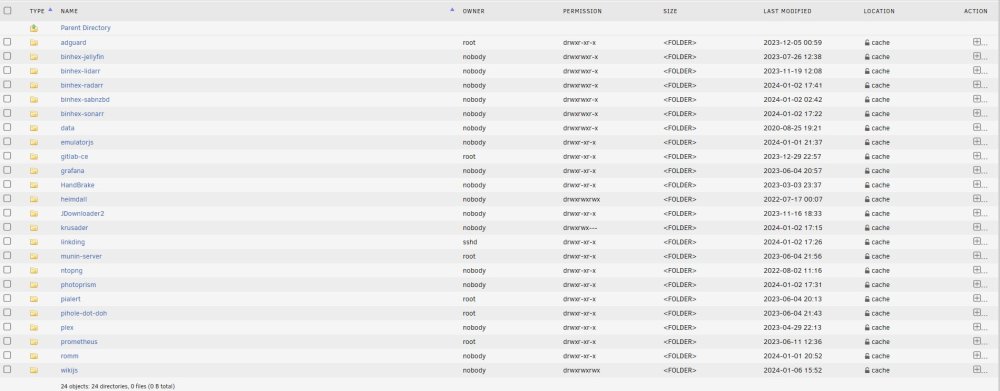
Here are the screenshots. Yes, VM and Docker are disabled.

-
I am not going to create it without your go. So, I deleted docker and libvirt. unraid-diagnostics-20240106-1634.zip
-
No, I deleted all VMs because my server is to old to handle it properly and at the moment I am good with only dockers. New hardware is planned soon but my money says that I have to wait I shall delete the docker images? These ones? /mnt/disk1/system/docker /mnt/cache/system/docker I am just a bit afraid to do that Just installed Dynamix File Manager. I understand how the File Manager works, do I have to stop Docker and VM again?
-
Here are the results: ls -lah /mnt/cache/system/libvirt total 1.8M drwxrwxrwx 1 root root 22 Jan 2 18:10 ./ drwxrwxrwx 1 nobody users 26 Aug 20 2020 ../ -rw-r--r-- 1 nobody users 1.0G Jan 6 16:00 libvirt.img ls -lah /mnt/disk1/system/libvirt total 1.0G drwxrwxrwx 1 root root 22 Aug 20 2020 ./ drwxrwxrwx 1 nobody users 26 Aug 20 2020 ../ -rw-rw-rw- 1 nobody users 1.0G Jan 2 17:41 libvirt.img ls -lah /mnt/cache/system/docker total 1.4G drwxrwxrwx 1 root root 20 Jan 2 18:10 ./ drwxrwxrwx 1 nobody users 26 Aug 20 2020 ../ -rw-r--r-- 1 nobody users 20G Jan 6 16:07 docker.img ls -lah /mnt/disk1/system/docker total 20G drwxrwxrwx 1 root root 20 Aug 20 2020 ./ drwxrwxrwx 1 nobody users 26 Aug 20 2020 ../ -rw-rw-rw- 1 nobody users 30G Jan 2 18:00 docker.img
-
I checked that and it is set to: array->cache How could I resolve that problem? Could it be possible, that that are files from an old and wrong configuration?
-
I have done all steps and restartet VM and dockers. unraid-diagnostics-20240106-1549.zip
-
It worked but all dockers are gone, how could I fix that? unraid-diagnostics-20240106-1500.zip

