





mr.answer
Members
-
Joined
-
Last visited
-
I apologize if this was asked and answered, but is the QNAP EC plugin supported in Unraid 7? I'm currently running Unraid 6.12.15, and plugin version 2023.10.06 without any issues, but I would like to update to the current version of Unraid 7. However, my QNAP NAS was constantly overheating until I was able to control the fans with this plugin, so I don't want to risk breaking it. Can I expect the plugin will continue to work if I upgrade to the current version of 7.x (looks like that's 7.2 at the moment)? Thanks!
-
Thank you, I think I was being stupid 🙃 Is modprobe qnap-ec check-for-chip=no the command that loads the plugin? I misunderstood that step and so I think it wasn't loading bc...I wasn't loading it. This is what I get for blindly following directions and not looking up what the commands I don't recognize mean. Anyway, removing the plugin, deleting and re-creating the modprobe.d folder and qnap-ec.config file, and then running that command got me back up and running. Thanks again <3
-
Ok, I managed to get the plugin reinstalled, and have just been trying to re-follow the directions here, but it seems like the plugin isn't loaded. When I check my dashboard, the fans module isn't there, and when I go to /sys/class/hwmon/, there is no symlink to ../../devices/platform/qnap-ec/hwmon/hwmonX/. root@Tower:/sys/class/hwmon# ls -la total 0 drwxr-xr-x 2 root root 0 Feb 3 11:55 ./ drwxr-xr-x 50 root root 0 Feb 3 11:54 ../ lrwxrwxrwx 1 root root 0 Feb 3 11:55 hwmon0 -> ../../devices/virtual/thermal/thermal_zone0/hwmon0/ lrwxrwxrwx 1 root root 0 Feb 3 11:55 hwmon1 -> ../../devices/pci0000:00/0000:00:1c.4/0000:03:00.0/nvme/nvme0/hwmon1/ lrwxrwxrwx 1 root root 0 Feb 3 11:55 hwmon2 -> ../../devices/platform/coretemp.0/hwmon/hwmon2/ Just in case, I rebooted after installing the plugin to see if that would get it to load. Before these problems started, the symlink was to hwmon3, but that folder isn't there now. I'm attaching my diagnostics, hoping to get some help. Thanks! tower-diagnostics-20240203-1148.zip
-
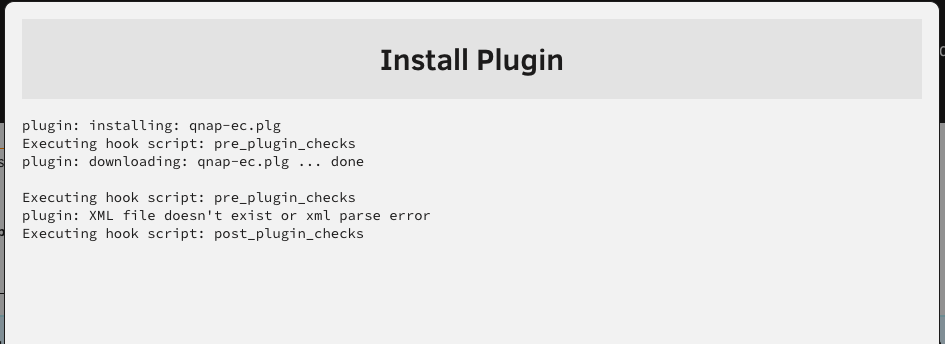
Hm, I'm having some trouble following a brief power outage. The plugin was working perfectly for me before the power outage. I did a clean reboot of my QNAP TS-464 NAS after the power came back up, and just noticed all my drives were running hot, and the box for the plugin on the dashboard was gone. I followed the setup instructions again, found that my fan seemed to have moved from hwmon3 to hwmon2, but I was getting permission errors when trying to write to pwm1. I thought maybe a fresh install would be a good idea so I removed the plugin, and now I can't even reinstall it. When I look in the "Apps" section, the QNAP EC plugin is listed as "Pending" with no download button. When I try to install directly from Plugins > Install Plugin from the URL https://github.com/ich777/unraid-qnapec/blob/master/qnap-ec.plg, I get the error plugin: XML file doesn't exist or xml parse error Any idea what I can do to get the plugin reinstalled and running successfully again? Thanks for the help!
-
I have many years of torrents seeding on a Mac server I'm in the process of retiring and replacing with a QNAP TS-464 NAS for two main functions: hosting my plex library, and seeding. I got plex moved over without too much trouble, and now trying to figure out how to migrate my large (~6400 torrents) Transmission library over. I have no allegiance to any particular client, but I need to select among clients allowed on my trackers, which seem to include current versions of Deluge, Halite, KTorrent, qbitorrent, and Transmission. In general, I think the challenge will be my file structure on the current macOS server. Most torrents are saved into a series of nested folders that looks like /Data/Music/$Year/MMYYYY $Tracker, with year and tracker matching the year and source, respectively. I see Transmissions is available for Unraid, so maybe that's the best option, but I'm not married to using that client, and am willing to do more work upfront (within reason — I obviously can't manually re-link each of the 6400 torrents) if another client will be a better choice for any reason: features, resource usage, compatibility, etc. On my Unraid server, all of the files that need to be seeded have been copied over, are in a matching file structure to the originating server, with the exception of the name of the top-level volume, which is named Media, so the folder structure looks like /Media/Music/$Year/MMYYYY $Tracker. Let me know what other info I can provide that would be relevant. Thanks for the help!
-
Just want to say a big thank you to OP for the fan control plugin for the QNAP TS-464. I'm coming down to the last week of my Unraid trial and after finally completing a big data migration, I got my Plex library migrated, and everything was looking great...except that I had constant heat warning for all of my spinning drives and even my SSD at times, and I was worried I might not be able to stick with it if I couldn't figure out the root cause. Searched around and found that Unraid can't natively communicate with the QNAP's fan controller, and that in turn lead me to the QNAP EC plugin. Thanks to your clear instructions, I was able to get it up and running in just a few minutes, and in under an hour, my SSD is back to a safe temp, and my spinning drive are down 4+ degrees already. This may have saved my Unraid instance. Thanks so much for the hard work on this 🙏

