Carmino
Members
-
Joined
-
Last visited
-
1. DiskSpeed isn't really useful. Tried that another day when trying to find the bottleneck of slow speed when transfering data from my desktop to a shared folder. There it seems to be the CPU beeing the limiting factor. Problem is here, that diskspeed only shows a blank page when I hit the "benchmark drives" button. See screenshot. 2. Thanks for the additional hint... but what does that mean? 😅
-
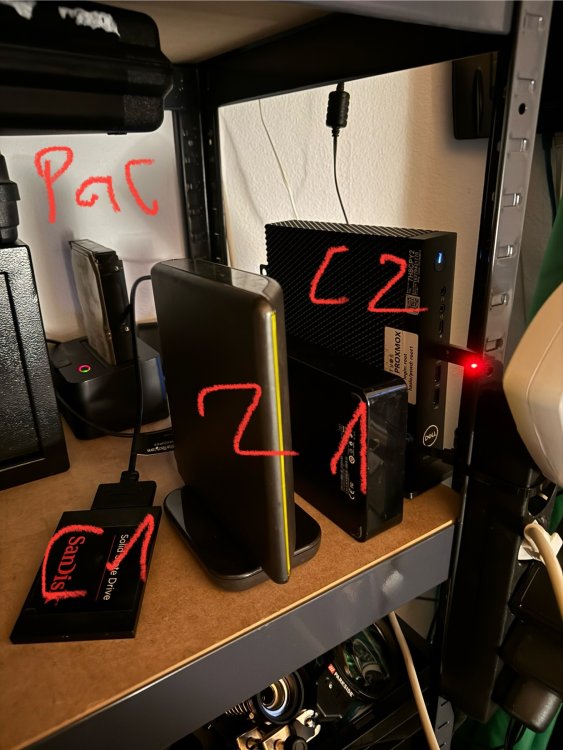
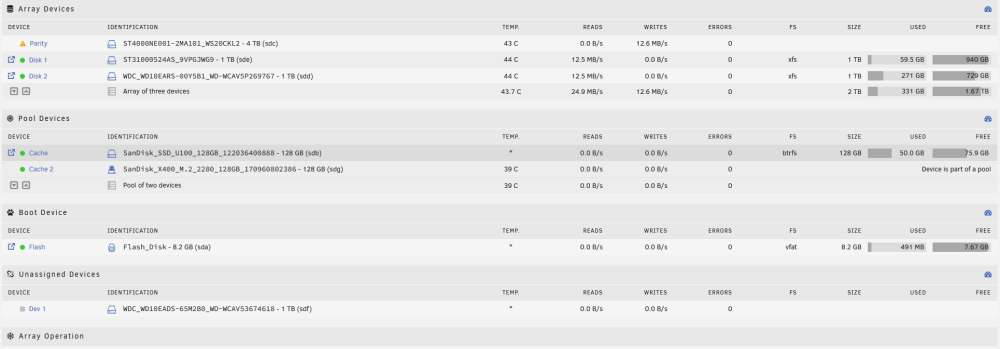
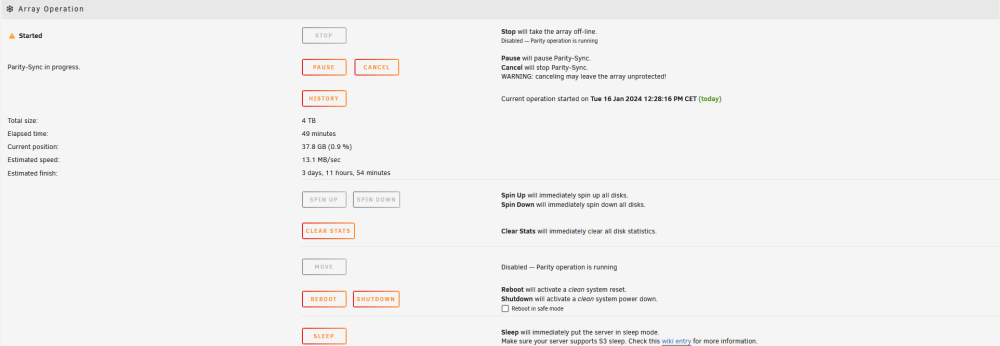
Greetings! I'm totally new to unraid and linux in general. This homeserver is my first project with unraid. Today I got a new harddrive I want to use as the parity. Within the process of preparing for this, I defined another disk as Par2. So fine, so good. Today the new drive, (Ironwolf Pro+ 4TB), arrived. I stopped the array and set the Ironwolf als Par1, disabling Par2, since it should become an array-drive in the next step. Parity sync started with no problem, but estimated time is more than 3 days with a speed of ~ 10 to 12 MB/s. My setup: Server: Dell Wyse 5070, Intel Pentium Silver J5005 CPU @ 1.50GHz, 8GB DDR4 Fantech QB-35US3-6G: 4-bay HDD/SSD Box; connected with USB 3.2 Gen 1 to an USB SS+-Slot Drives: 1. Par1 = Seagate Ironwolf Pro+ 4TB 2. Dis1 = Seagate Baracuda 1TB 3. Dis2 = WD 1TB 4. unassigned (yet) = WD 1TB The three 1TB-disks are old disks from my previous desktop-pcs; one beeing extrcated from an external USB-case. May the CPU be the bottleneck-factor? Most of the time, the 4 cores shift between 30 and 70%. But sometimes one of the cores hit the 100%... Any suggestion would be helpful, but please keep in mind that I'm pretty unexperienced in this field, so please explain it in small steps =D EDIT: Problem was the same, when I left the Par2 in place without unassigning it. Same "speed" and time for the parity-sync. unsc-gatekeeper-diagnostics-20240116-1300.zip
-
That would make sense, if there is a constant open file, like the logfile of nextcloud. Other than I thought, I found this "nextcloud.log" on disk 2... So this might be the issue and I need to find out how to let it be written on the cache...
-
Looks good so far. 10 Minutes without spin-up since I stopped Nextcloud. Still I dont get, why file activity doesnt show anything or why it didnt work before when I stopped all the dockers the other day... But I could make sense: Even when the Appdata of nextcloud is in the cache only, the user files are on the array disks. So anytime one of my clients (beeing the Desktop, Notebook and Smartphone) wnats to sync with the nextcloud on the homeserver, the userfiles are checked for any change, and so the disk has to spin up. At least one part of the user-files, since it only affects on of the two drives which are in use for nextcloud... Does that make any sense to you? I thought the syncing of nextcloud is done by a sync-protocol-file which should be on the cache...
-
Nah... nevermind. Seems to have been a rare instance that it stayed down for a couple of minutes. Now, as mentioned before, Disk 2 comes up again by itself. @itimpi By "stopping individial containers" you mean stopping the individual dockers, right?
-
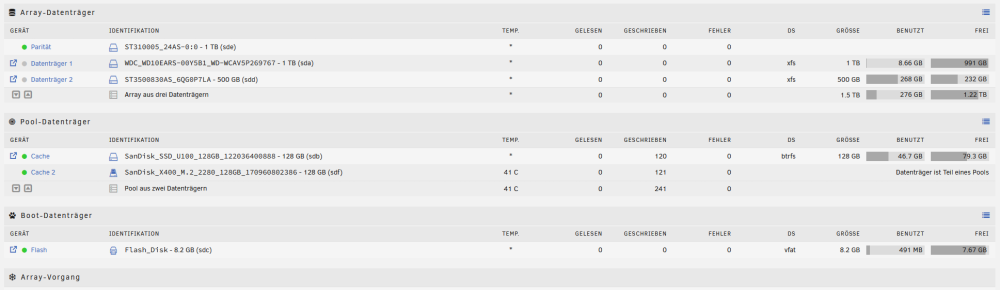
Couple of minutes later, I tried again to put both disks to sleep and voilá! Both stay down now.... So, initital problem is solved, it seems, but I find it hard to describe, what the solution was. De-activating Dockers and VMs, re-activating and then re-installing all dockers?
-
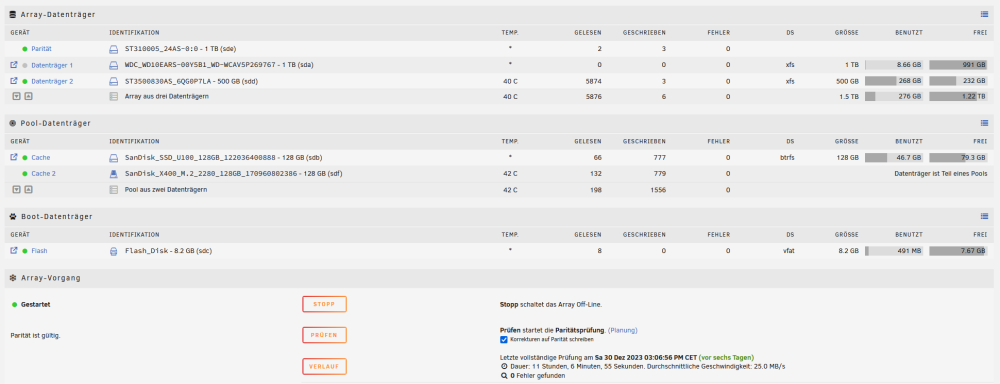
So... Dockers are back and working after also renewing the custom network. BUT: The problem of a disk spinning up again and again has now switched from Disk 1 to Disk 2...
-
You are totally right. Found that out as well and I'm on it. re-installing the dockers as you mentioned.
-
I wouldnt know how I should have done this... I just got to settings, Docker and set the line "Enable docker" to "No" and hit apply. Same for the VMs. If I look into the App-Store, under "installed apps" everything is marked as "insatlled". Not only under previous apps... (?) EDIT: I was wrong: Not everything is displayed as installed. Only the plugins I guess... I got a plugin called AppdataBackup. I try to restore it with that...
-
As far as I can see, the cache is working fine. I can access the data and find the docker.img under cache/system/docker How do I know if its damaged? It says size is 21.5GB, last changed ~20minutes ago
-
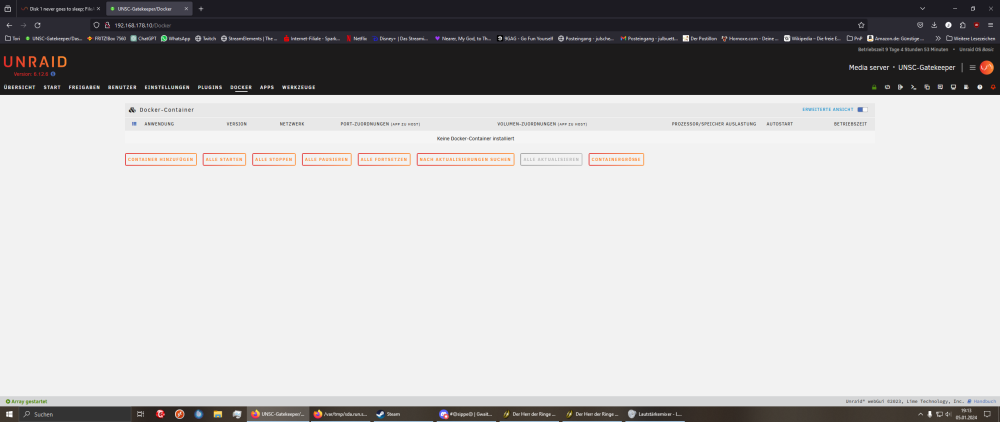
And now, after activating dockers, vm again, all my installed dockers are gone... Even after waking up the drives manually. The appdata is on the cache drives only...
-
Now I set the statistic of the drives back to zero and ordered the drive to spin down manually, by clicking on the green indicator. Now the disk is down and stays down. Maybe I tried to early before. Parity disk does not react on the order to spin down. Maybe the drive or the docking station does not support that (?) And I found this in the drive-protocol. Didn't knew there was one before. Is that helpful? I'm not sure what a "mapped drive" is. I have one shared folder on the disks, that I can access via Windows as a network-folder. But thats something else, I guess? Sry I might appear pretty stupid. I'm just really new and unexperienced in this field. Jan 5 14:23:34 UNSC-Gatekeeper emhttpd: spinning down /dev/sda Jan 5 14:23:46 UNSC-Gatekeeper emhttpd: read SMART /dev/sda Jan 5 18:38:54 UNSC-Gatekeeper emhttpd: spinning down /dev/sda Jan 5 18:39:08 UNSC-Gatekeeper emhttpd: read SMART /dev/sda Jan 5 18:45:11 UNSC-Gatekeeper emhttpd: spinning down /dev/sda
-
I stopped all dockers, then it still occurs. Didnt touch anything around VM ever, yet. I will try to disable both in settings... Aaaaand: Yep. Both deactivated via settings. Disk behaves like before, nothing changed.
-
First: With this setup, I don't have a choice other than rely on external drives. Right now, its a mashup of different harddrives I had around without using them anymore. So my Ideas was to try setting up a homeserver on minimal extra costs, as long as it does not function as wished. Since this is my first project of this kind, I didnt want to dump more money than necessary. If I get it to work, then I would consider invest some money in bigger and more modern harddrives. So: Is there a way to tell, if the eclosures or the docking station support UASP? I mean, by far the oldest drive, the Seagate 500GB, I bought somewhere around 2008 I guess, goes to sleep as intendet. Second: I would follow you about USB beeing the main problem. But since the internal M2.SSD hat the exact same problem when it was Disk 1 before, ist makes me believe, that there is another problem. Is there no way to see, which data is read every couple of seconds, so the disk spins up again and again? And: Is there a way to switch the both array disks? Making Disk 2 the new Disk 1 and the other way around? If then, Disk 2 doesnt spin down, and Disk 1 does, it's proven that it is a hardware problem.
-
Par = Parity C1/2 = Cache-Drives; C2 beeing the internal M2.SSD 1/2= Array-Drives