




Skip to content
View in the app

A better way to browse. Learn more.

Unraid

A full-screen app on your home screen with push notifications, badges and more.

To install this app on iOS and iPadOS
  1. Tap the Share icon in Safari
  2. Scroll the menu and tap Add to Home Screen.
  3. Tap Add in the top-right corner.
To install this app on Android
  1. Tap the 3-dot menu (⋮) in the top-right corner of the browser.
  2. Tap Add to Home screen or Install app.
  3. Confirm by tapping Install.

dbyler

Members
  • Joined

  • Last visited

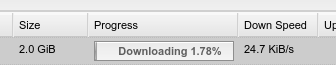
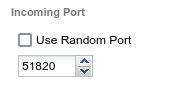
  1. Hi All! I'm struggling with slow speeds with DelugeVPN. I watched spaceinvaderone's tutorial, set it up for wireguard using PureVPN. Have specified the port that I forwarded within the PureVPN configuration page and am getting super slow down speeds. I saw the note in the FAQ related to "Strict_port_forward" and PIA users potential for slow speeds, but since I'm using PureVPN it seems that won't apply. If I use deluge as a thick client on my Linux desktop I'll get 6MB down with the same VPN service/server, so my Internet connection and the server I'm using shouldn't be the bottleneck. Any help is appreciated!
Account

Navigation

Search

Search

Configure browser push notifications

Chrome (Android)
  1. Tap the lock icon next to the address bar.
  2. Tap Permissions → Notifications.
  3. Adjust your preference.
Chrome (Desktop)
  1. Click the padlock icon in the address bar.
  2. Select Site settings.
  3. Find Notifications and adjust your preference.