un1ty
Members
-
Joined
-
Last visited
Everything posted by un1ty
-
I've also tried to compare between 1440fx and Q35.. Haven't gone through extensive testing yet, since sadly 3/4 of my brand new harddrives failed, with luckily all of the VM's and dockers stored on SSD's and private photos/videos backup to a NAS and cloud. But also this seems to provide a minimum performance improvement of around 10%.
-
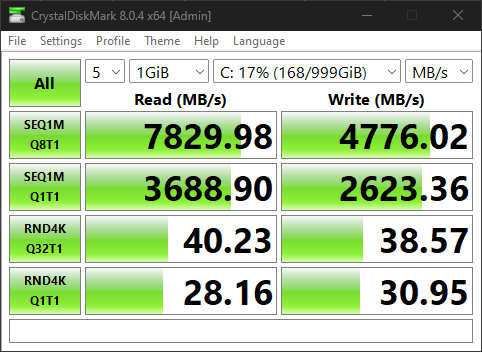
I have to retract this statement, the load wasn't visible due to the setting of the timescale of the graph. I do see a 100% loads on the number of threads specified in the benchmarks, so it could very well be the bottleneck. I have performed tests in several different CPU configurations; first or second CCD only, core isolation on/off, more cores towards VM or unraid etc. And the performance change of this was within 10% (so similar changes were visible from run to run). So this doesn't seem to be the solution. I have changed from btrfs to zfs and did see a bump up in sequential speeds, but practically none in the random speeds. Moreover, even when I parsed through the drives as a raid directly to the VM, I saw a negligible raise in performance.
-
Ps. I'm aware I should format my 1 disk NVME cache to xfs as well, but that shouldn't impact the random IO performance of the "windows" share. What I'm really asking is should I use a different file system for the windows share, or should I directly parse the disks to the OS as a raid 0 to gain the expected benefits?
-
Hi all, I'm new to unraid and i've just finished my first setup and things seem to be looking good so far, apart from one thing, and that is random IO read and write performance in my Windows VM. Here is my setup in short; AMD Ryzen 7950X3D 32GB DDR6000 Nvidia RTX4060 4 x 12TB Toshiba HDD as unraid array (xfs) 1 x 1TB Samsung 970 pro as cache pool (btrfs) 3 x 1TB Samsung 970 evo plus windows pool (btrfs raid 0) Cores 0:3 un-isolated. Cores 4:5 + 2GB ram assigned to HomeAssistant VM. Cores 6:15 + 20GB ram + GPU passthrough assigned to Windows VM. All in all, compute performance is upwards of 80% of what windows would perform on baremetal, and it's a huge win (3 to 4x) in performance given my old setup. Most notably, the dockers and home assistant VM are way more responsive than when they were running on raspberry pi's and a synology NAS, while the system is consuming less energy! I have chosen to partition only 2TB of the total 3TB to leave room for OP and wear leveling. However the random IO performance of the NVME pool is lackluster, whereas the sequential performance is somewhat in line with what I would expect, see attached screenshot: I don't have exact numbers on the drives performance on baremetal, but from guru3d, for a single disk; As you can see, the sequential read and write improved by (resp.) ~200% and 150%, what you would expect from a raid setup, but the random read and write tanked! It doesn't seem like there is a problem compute or memory wise, since even during these benchmarks the loads are <10%. Does anyone have a clue or a hint on how I can improve this performance? Since it noticably impacts my work (code compile/linting etc.). Also don't worry about the safety of Windows VM being in raid 0, the VM is being backed up regularly to the array, on the synology NAS and off-site.