





un1ty
Members
-
Joined
-
Last visited
Everything posted by un1ty
-
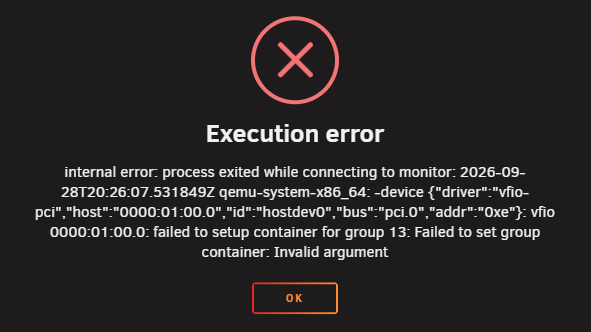
Any update from the unraid side yet? because this is starting to get annoying, where up by 2 whole minor releases and currently on 7.4.0-beta3 and it is still not working. tried everything under the sun so far, and no amount of bios changes / unraid settings have solved this. This VM used to work fine, now it is unusable.
-
I'm having a similar issue with X670E and a 7950X3D trying to pass through a nvidia 5080. This seems to be both manufacturer, bios and unraid related. My VM used to work before unraid 7.2 with gigabytes's F39 bios for the X670E Aorus Master. Now it's pretty much impossible to run VM's with GPU passthrough. I hope these vendors solve it soon, because it practically made my workstation imposslbe to use with unraid. I will switch to another vendor soon because I really need it to work as it hasn't been working for over 3 months already. I don't mind some development quirks, but this is completely unnacceptable.
-
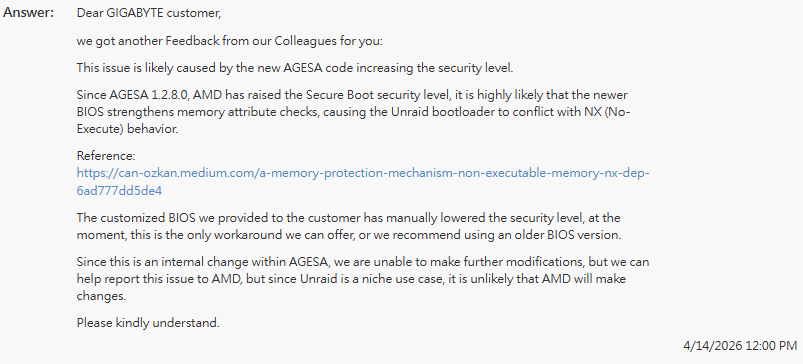
Yep, this was also the feedback I got from unraid. But just to add to the topic, I did receive a custom bios from gigabyte based of F42a, which allowed me to boot with the existing bootloader. Here is the message I received after confirming that this modified bios worked;
-
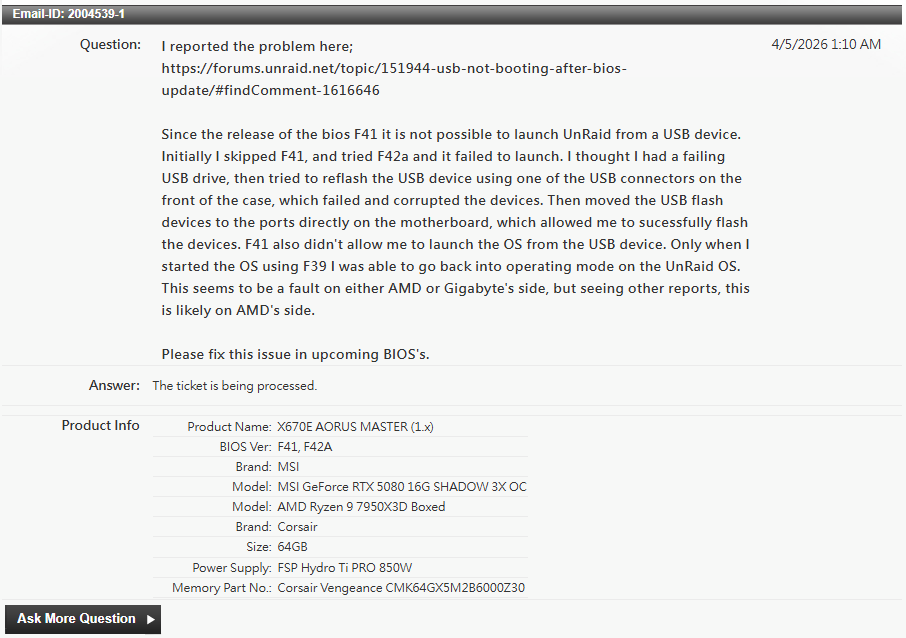
I actually think this needs to be bumped all the way to the top, because there are going to be support tickets coming left and right! I can confirm this issue also affects the Gigabyte X670E AORUS Master, and the failure goes beyond just blocking USB boot. After updating to F42a, Unraid would no longer boot from USB. Rolling back to F41 did not fix it. Only after downgrading to F39 was I able to boot Unraid again. Here’s the BIOS progression: F42a (Mar 2026) AGESA 1.3.0.0a DDR5 vulnerability fix (CVE‑2025‑6202) Result: Unraid USB will not boot. Additional issue: All front‑panel USB ports became unstable. I could not reliably format, flash, or write to any USB drive connected to the case ports. Attempts to repair the Unraid boot device on those ports failed completely and even caused corruption. Only the rear motherboard USB ports were stable enough to restore the boot device. F41 (Feb 2026) AGESA 1.2.8.0 Result: Unraid USB still will not boot. F39 (Dec 2025) Pre‑2026 AGESA Result: Unraid boots normally again. USB ports behave normally. Based on this, it appears that all 2026 BIOS releases for this board break UnRaid USB booting and likely also other AMD AM5 boards, likely due to AGESA changes and new security hardening. The USB instability in F42a suggests deeper changes to the USB initialization stack, not just the bootloader path. For anyone troubleshooting similar symptoms: F39 is currently the last known‑good BIOS for Unraid on the X670E AORUS Master. I've sent out a message to LimeTech and will also send out a message to gigabyte regarding this problem.
-
I upgraded to 7.0.0-beta.1, and can confirm, backup is now running normally again. Still a bit confusing how 6.12.10 broke what used to be working, but I'm happy that all is back to normal working order!
-
What I meant is how can I get / know when I will receive the newest kernel. Will the kernel be updated in conjunction with unraid 6.13? I completely misread your message! You meant Unraid 7.0.0, gotcha! That is indeed a much newer kernel (currently at 6.1).
-
Is the kernel/KVM releasing with Unraid 6.13? Than I will make note of it and test again after it has been released. Ps. I've just checked my logs once more; and I spotted the kernel/KMV error message; Jun 21 13:59:50 un1ty kernel: SVM: kvm [17169]: vcpu1, guest rIP: 0xfffff85876eb30ec unimplemented wrmsr: 0xc0010115 data 0x0 However it has been running for 6 hours after the message popped up.
-
So the tests I have performened kind of rules out the following issues: It's not hardware (load) related. It's not ZFS related. I've tried with and without ACS with no fix, so it's not ACS related. I had to re-enable it in the end because my network connection is shared with my most important USB ports.... So the issue I'm experiencing is confined to the VM. So the KVM would be my main suspect. Would de-anonymization help with debugging the problem? I'm so happy finding a weird edge case problem on a system that I use on a daily base... NOT 😅! Not complaining to the unraid developers/community, I'm a (embedded) software developer myself so I fully understand how difficult it can be. But this really is an issue that can pop up for anyone at some point. I'm perfectly okay with being on a call with a developer troubleshooting this, because it's the only thing from keeping me the VM as a all-day operating system.
-
So far I've tried the following without causing the system to crash, all while the Windows VM was online: Created a new share on both the flash and disk zpools (temp_src and temp_dst resp), and copied all of the drive's content onto the flash share. Copied using the unraid WebGUI from temp_src to temp_dst Created a 7z archive, using '7z a -t7z /mnt/tank/tmp_dst/D.7z /mnt/flash-tank/tmp_src/D' Moved the content onto the share/dataset 'flash-tank/domains/Windows 11' where the vdisk images also reside, and created a 7z archive to dataset 'tank/backup/01_Disk/' where the backups are normally stored stored. using '7z a -t7z /mnt/tank/backup/01_Disk/D.7z "/mnt/flash-tank/domains/Windows 11/D"'. Creating the archives fully loaded up the isolated CPU cores, and I even attempted to put some extra load on the system while the it was creating the archives, by running cinebench for and crystal disk mark. But none of it caused the system to even hitch, file copies were a bit slower, but that was to be expected copying small files onto a spinning rust.
-
I have copied the vdisk images before in the same way, even recently after the problems arrose, without problems (at 600+MB/s, so decent performance). I suppose I can place the contents of vdisk2 onto a share on flash based zfspool and copy it to the harddrive based zfspool, so it would include more random IO. Would that suffice as a test?
-
How would I troubleshoot this any further? I have even tried setting up a 'clean' Windows VM from the template, using only the options given from the form (no edits in the xml. But that did not solve the issue.
-
tl:dr in bold. So I've been working all day in the VM without issues (12 hour uptime) before I turned off ACS, using the SVN repo that would cause the crash if it was included in the backup. Then I did a complete SVN clean and check the repo status to make sure there are no inconsistencies / weird things going on. Then I disabled ACS. After which I restarted the server twice just to make sure everything was in working order, then I repeated the same steps I did before: Add the folders containing the SVN repo(s) back into the backup schedule, and perform the backup. But with no succes, the system once more crashed. Then booting up after the crash, I removed the SVN repo from the backup and ran the backup once more, but this time it finished backing up succesfully. I also tried to backup the repo folders containing only the .svn folder without the contents, and this also fails. To me this really seems like a bug in either the unraid kernel or the filesystem, and not necessarily a hardware fault. ZFS is relatively new in unraid, maybe there is an edge case where ZFS is running out of memory because it attempts to deduplicate as much as it can? it's a SVN repo with a lot of repeating externals (jay for legacy code/systems). I've added diagnostics, but there is nothing on there that jumps out to me that indicates what caused the fatal error. un1ty-diagnostics-20240617-2204.zip
-
Yes, I have had ACS override enabled since the beginning, because it wasn't able to detect my onboard wifi otherwise. Is ACS override something that could affect from within the VM over time (driver updates etc)? Since 'on the outside' of the VM, nothing has changed other than unraid updates. However, given the timeframe, it did start occuring right around the time 6.12.10 became available? List of the hardware (note, apart from the SSD's these were all bought Q3-Q4 of 2024); AMD Ryzen 9 7950X3D Gigabyte AORUS X670E MASTER Gigabyte GeForce RTX 4060 Gaming OC 8G (VM passthrough) 4x Toshiba MG07ACA12TE (512e), 12TB (ZFS pool 2) 1x WD Red Plus "5400rpm class", 14TB (unassigned, cold spare) G.Skill Flare X5 F5-6000J3038F16GX2-FX5 (2x 16GB DDR5 6000 CL30, plan on switching to 96GB so ZFS can use more for ARC) FSP Hydro Ti PRO 850W 3x Samsung 970 Evo Plus 1TB (ZFS pool 1) 1x Samsung 980 Pro 1TB (baremetal windows installation) Gigabyte GC-TPM2.0 SPI 2.0 I specifically picked the core components for longevity (or at least didn't cheap out on), so being barely 6 months old for the most part, component failure feels unlikely. Especially given that it was running for months without failure beforehand, with uptimes of +2 weeks at given times and the fact that all the stress tests that I threw at it (and can still perform without issue). Ps. I wouldn't exactly call it 'server restarting', it's almost as if someone pressed the hardware reset button on the motherboard. But instead it seemes to be caused by some software interaction (in this case IO operations). I would almost compare it to a hardfault on embedded systems, like div0 or segmentation fault, based on how (sudden) it occurs. Edit: I don't need the WiFi/bluetooth passthrough anymore right now, I will give it a try tomorrow with ACS disabled and check if it solves anything. Unless you have another idea.
-
The thing is, none of the drives report any smart issue. I also ran multiple benchmarks (furmark, memtest, cinebench, crystaldisk mark) for hours without any instability, because I also assumed it was hardware related. Baremetal Windows runs just fine, and as long as I don't use the Windows VM, unraid is stable as well (with HA VM and plex, sonarr, radarr dockers etc.).
-
Hi all, I've setup my unraid system in December and have been mostly happy about how it performed. However, I didn't like the IO performance of the of the unraid array, so in January I switched over to ZFS pools and it was running 100% stably for the first 4 months. However recently I've been experiencing sudden system crashes and haven't been able to pinpoint what is causing the problem, but can reproduce it quite easily. In my setup I have the following: ZFS pool 1: 3*1TB Samsung 970 SSD (zraid) ZFS pool 2: 4*12TB Toshiba MG07 HDD (zraid) For my Windows VM I'm using 2 qcow images on pool 1, vdisk1 for the operating system and vdisk2 for data/game storage. I use EaseUS todo backup to create separate backups of the 'drives' from inside the VM onto pool 2, I use this instead of snapshots because I can do this while the VM is running + I use it as a base image/template for creating new Windows VM's. Also it allows me to synchronise data between my VM and the baremetal Windows installation on a 4th SSD inside the system. However recently the system started crashing (immediate power down, back to bios) while creating a backup. The vdisk1 backs up without any issues, but during the backup process vdisk2 the system crashes around 90% progress. Note that the backup of vdisk2 is a file backup, not a drive backup. What I've found is that this is happening while it is in the process of backing up a SVN repository I have stored on that drive. If I exclude that folder the backup finishes succesfully again, which is odd because that repository has been on the drive since the beginning and hasn't caused any problem before. Also this isn't the only time the system crashes, but the most common one, it also (irregularly) happens when I play a game which is also stored on vdisk2. What I have tried to troubleshoot the problem so far: - Restore to an older backup of vdisk2 (~2 months old, far before the problems started) - Scrub both pools (no errors found) - Qemu-img check -r all (no errors found) - Performed chkdsk from within the VM (no errors found). - Create a new vdisk and restore data of vdisk2 I'm at a dead-end and can't think of anything else that could cause &| fix the problem. My gut feeling is that it has to do with the ZFS pool itself, and scrub is not properly finding and repairing problems (unlike the normal raid integrity checks).
-
I have the same problem, however I see many warnings that ZFS is not available on the newer kernels.. So I'm afraid I'm stuck at the default 6.1.74 kernel with Unraid 6.12.8. Or do you have other experiences?
-
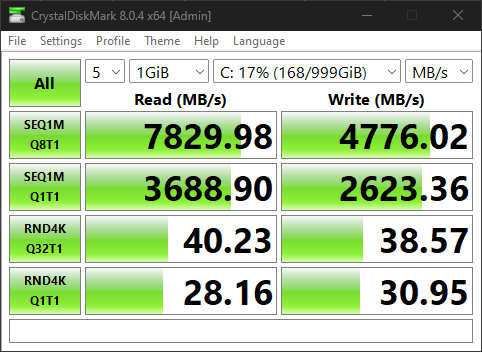
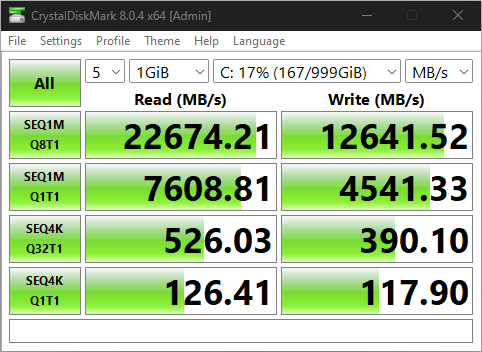
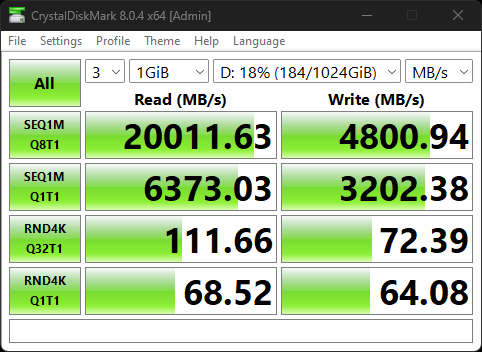
Also to update from my original post at Original performance (cpu mode passthrough): Same configuration (cpu mode QEMU64): Current configuration (cpu mode passthrough, tuned) is attached. sequential is much better, but random IO barely doubled, where as it should have been closer to 6x or above to approach baremetal.
-
Here are the diagnostics un1ty-diagnostics-20240226-2250.zip
-
Okay, I will add those in a bit. I have changed some things in my configuration since the start of this post to experiment with other settings: <?xml version='1.0' encoding='UTF-8'?> <domain type='kvm' id='3'> <name>Windows 11</name> <uuid>f40f9d6c-7709-b2e2-fc68-1660a0537782</uuid> <metadata> <vmtemplate xmlns="unraid" name="Windows 11" icon="windows11.png" os="windowstpm"/> </metadata> <memory unit='KiB'>16777216</memory> <currentMemory unit='KiB'>16777216</currentMemory> <memoryBacking> <nosharepages/> </memoryBacking> <vcpu placement='static'>24</vcpu> <iothreads>4</iothreads> <cputune> <vcpupin vcpu='0' cpuset='4'/> <vcpupin vcpu='1' cpuset='20'/> <vcpupin vcpu='2' cpuset='5'/> <vcpupin vcpu='3' cpuset='21'/> <vcpupin vcpu='4' cpuset='6'/> <vcpupin vcpu='5' cpuset='22'/> <vcpupin vcpu='6' cpuset='7'/> <vcpupin vcpu='7' cpuset='23'/> <vcpupin vcpu='8' cpuset='8'/> <vcpupin vcpu='9' cpuset='24'/> <vcpupin vcpu='10' cpuset='9'/> <vcpupin vcpu='11' cpuset='25'/> <vcpupin vcpu='12' cpuset='10'/> <vcpupin vcpu='13' cpuset='26'/> <vcpupin vcpu='14' cpuset='11'/> <vcpupin vcpu='15' cpuset='27'/> <vcpupin vcpu='16' cpuset='12'/> <vcpupin vcpu='17' cpuset='28'/> <vcpupin vcpu='18' cpuset='13'/> <vcpupin vcpu='19' cpuset='29'/> <vcpupin vcpu='20' cpuset='14'/> <vcpupin vcpu='21' cpuset='30'/> <vcpupin vcpu='22' cpuset='15'/> <vcpupin vcpu='23' cpuset='31'/> <emulatorpin cpuset='2-3,18-19'/> <iothreadpin iothread='1' cpuset='2,18'/> <iothreadpin iothread='2' cpuset='3,19'/> </cputune> <resource> <partition>/machine</partition> </resource> <os> <type arch='x86_64' machine='pc-q35-7.2'>hvm</type> <loader readonly='yes' type='pflash'>/usr/share/qemu/ovmf-x64/OVMF_CODE-pure-efi-tpm.fd</loader> <nvram>/etc/libvirt/qemu/nvram/f40f9d6c-7709-b2e2-fc68-1660a0537782_VARS-pure-efi-tpm.fd</nvram> <smbios mode='host'/> </os> <features> <acpi/> <apic/> <kvm> <hidden state='on'/> </kvm> <ioapic driver='kvm'/> </features> <cpu mode='host-passthrough' check='none' migratable='off'> <topology sockets='1' dies='1' cores='12' threads='2'/> <cache mode='passthrough'/> <feature policy='disable' name='hypervisor'/> </cpu> <clock offset='localtime'> <timer name='rtc' tickpolicy='catchup'/> <timer name='pit' tickpolicy='delay'/> <timer name='hpet' present='no'/> <timer name='hypervclock' present='no'/> <timer name='tsc' present='yes' mode='native'/> </clock> <on_poweroff>destroy</on_poweroff> <on_reboot>restart</on_reboot> <on_crash>restart</on_crash> <devices> <emulator>/usr/local/sbin/qemu</emulator> <disk type='file' device='disk'> <driver name='qemu' type='qcow2' cache='writeback'/> <source file='/mnt/user/domains/Windows 11/vdisk1.snap0' index='1'/> <backingStore type='file' index='2'> <format type='qcow2'/> <source file='/mnt/user/domains/Windows 11/vdisk1.img'/> <backingStore/> </backingStore> <target dev='hdc' bus='virtio'/> <serial>vdisk1</serial> <boot order='1'/> <alias name='virtio-disk2'/> <address type='pci' domain='0x0000' bus='0x03' slot='0x00' function='0x0'/> </disk> <controller type='pci' index='0' model='pcie-root'> <alias name='pcie.0'/> </controller> <controller type='pci' index='1' model='pcie-root-port'> <model name='pcie-root-port'/> <target chassis='1' port='0x8'/> <alias name='pci.1'/> <address type='pci' domain='0x0000' bus='0x00' slot='0x01' function='0x0' multifunction='on'/> </controller> <controller type='pci' index='2' model='pcie-root-port'> <model name='pcie-root-port'/> <target chassis='2' port='0x9'/> <alias name='pci.2'/> <address type='pci' domain='0x0000' bus='0x00' slot='0x01' function='0x1'/> </controller> <controller type='pci' index='3' model='pcie-root-port'> <model name='pcie-root-port'/> <target chassis='3' port='0xa'/> <alias name='pci.3'/> <address type='pci' domain='0x0000' bus='0x00' slot='0x01' function='0x2'/> </controller> <controller type='pci' index='4' model='pcie-root-port'> <model name='pcie-root-port'/> <target chassis='4' port='0xb'/> <alias name='pci.4'/> <address type='pci' domain='0x0000' bus='0x00' slot='0x01' function='0x3'/> </controller> <controller type='pci' index='5' model='pcie-root-port'> <model name='pcie-root-port'/> <target chassis='5' port='0xc'/> <alias name='pci.5'/> <address type='pci' domain='0x0000' bus='0x00' slot='0x01' function='0x4'/> </controller> <controller type='pci' index='6' model='pcie-root-port'> <model name='pcie-root-port'/> <target chassis='6' port='0xd'/> <alias name='pci.6'/> <address type='pci' domain='0x0000' bus='0x00' slot='0x01' function='0x5'/> </controller> <controller type='pci' index='7' model='pcie-root-port'> <model name='pcie-root-port'/> <target chassis='7' port='0xe'/> <alias name='pci.7'/> <address type='pci' domain='0x0000' bus='0x00' slot='0x01' function='0x6'/> </controller> <controller type='pci' index='8' model='pcie-root-port'> <model name='pcie-root-port'/> <target chassis='8' port='0xf'/> <alias name='pci.8'/> <address type='pci' domain='0x0000' bus='0x00' slot='0x01' function='0x7'/> </controller> <controller type='pci' index='9' model='pcie-root-port'> <model name='pcie-root-port'/> <target chassis='9' port='0x10'/> <alias name='pci.9'/> <address type='pci' domain='0x0000' bus='0x00' slot='0x02' function='0x0' multifunction='on'/> </controller> <controller type='pci' index='10' model='pcie-root-port'> <model name='pcie-root-port'/> <target chassis='10' port='0x11'/> <alias name='pci.10'/> <address type='pci' domain='0x0000' bus='0x00' slot='0x02' function='0x1'/> </controller> <controller type='pci' index='11' model='pcie-root-port'> <model name='pcie-root-port'/> <target chassis='11' port='0x12'/> <alias name='pci.11'/> <address type='pci' domain='0x0000' bus='0x00' slot='0x02' function='0x2'/> </controller> <controller type='virtio-serial' index='0'> <alias name='virtio-serial0'/> <address type='pci' domain='0x0000' bus='0x02' slot='0x00' function='0x0'/> </controller> <controller type='sata' index='0'> <alias name='ide'/> <address type='pci' domain='0x0000' bus='0x00' slot='0x1f' function='0x2'/> </controller> <controller type='usb' index='0' model='qemu-xhci' ports='15'> <alias name='usb'/> <address type='pci' domain='0x0000' bus='0x00' slot='0x07' function='0x0'/> </controller> <interface type='bridge'> <mac address='52:54:00:bf:12:d0'/> <source bridge='br0'/> <target dev='vnet2'/> <model type='virtio'/> <alias name='net0'/> <address type='pci' domain='0x0000' bus='0x01' slot='0x00' function='0x0'/> </interface> <serial type='pty'> <source path='/dev/pts/1'/> <target type='isa-serial' port='0'> <model name='isa-serial'/> </target> <alias name='serial0'/> </serial> <console type='pty' tty='/dev/pts/1'> <source path='/dev/pts/1'/> <target type='serial' port='0'/> <alias name='serial0'/> </console> <channel type='unix'> <source mode='bind' path='/var/lib/libvirt/qemu/channel/target/domain-3-Windows 11/org.qemu.guest_agent.0'/> <target type='virtio' name='org.qemu.guest_agent.0' state='connected'/> <alias name='channel0'/> <address type='virtio-serial' controller='0' bus='0' port='1'/> </channel> <input type='mouse' bus='ps2'> <alias name='input0'/> </input> <input type='keyboard' bus='ps2'> <alias name='input1'/> </input> <tpm model='tpm-tis'> <backend type='emulator' version='2.0' persistent_state='yes'/> <alias name='tpm0'/> </tpm> <audio id='1' type='none'/> <hostdev mode='subsystem' type='pci' managed='yes'> <driver name='vfio'/> <source> <address domain='0x0000' bus='0x01' slot='0x00' function='0x0'/> </source> <alias name='hostdev0'/> <address type='pci' domain='0x0000' bus='0x04' slot='0x00' function='0x0'/> </hostdev> <hostdev mode='subsystem' type='pci' managed='yes'> <driver name='vfio'/> <source> <address domain='0x0000' bus='0x01' slot='0x00' function='0x1'/> </source> <alias name='hostdev1'/> <address type='pci' domain='0x0000' bus='0x05' slot='0x00' function='0x0'/> </hostdev> <hostdev mode='subsystem' type='pci' managed='yes'> <driver name='vfio'/> <source> <address domain='0x0000' bus='0x0e' slot='0x00' function='0x0'/> </source> <alias name='hostdev2'/> <address type='pci' domain='0x0000' bus='0x06' slot='0x00' function='0x0'/> </hostdev> <hostdev mode='subsystem' type='pci' managed='yes'> <driver name='vfio'/> <source> <address domain='0x0000' bus='0x10' slot='0x00' function='0x0'/> </source> <alias name='hostdev3'/> <address type='pci' domain='0x0000' bus='0x07' slot='0x00' function='0x0'/> </hostdev> <hostdev mode='subsystem' type='pci' managed='yes'> <driver name='vfio'/> <source> <address domain='0x0000' bus='0x12' slot='0x00' function='0x0'/> </source> <alias name='hostdev4'/> <address type='pci' domain='0x0000' bus='0x08' slot='0x00' function='0x0'/> </hostdev> <hostdev mode='subsystem' type='pci' managed='yes'> <driver name='vfio'/> <source> <address domain='0x0000' bus='0x15' slot='0x00' function='0x2'/> </source> <alias name='hostdev5'/> <address type='pci' domain='0x0000' bus='0x09' slot='0x00' function='0x0'/> </hostdev> <hostdev mode='subsystem' type='pci' managed='yes'> <driver name='vfio'/> <source> <address domain='0x0000' bus='0x15' slot='0x00' function='0x3'/> </source> <alias name='hostdev6'/> <address type='pci' domain='0x0000' bus='0x0a' slot='0x00' function='0x0'/> </hostdev> <hostdev mode='subsystem' type='pci' managed='yes'> <driver name='vfio'/> <source> <address domain='0x0000' bus='0x15' slot='0x00' function='0x4'/> </source> <alias name='hostdev7'/> <address type='pci' domain='0x0000' bus='0x0b' slot='0x00' function='0x0'/> </hostdev> <hostdev mode='subsystem' type='usb' managed='no'> <source startupPolicy='optional' missing='yes'> <vendor id='0x0e8d'/> <product id='0x0616'/> </source> <alias name='hostdev8'/> <address type='usb' bus='0' port='1'/> </hostdev> <memballoon model='none'/> </devices> <seclabel type='dynamic' model='dac' relabel='yes'> <label>+0:+100</label> <imagelabel>+0:+100</imagelabel> </seclabel> </domain> With the hope that I can get cpu mode passthrough to get as good random IO performance as i did with emulated (QEMU64). Moreover so to make Windows no longer think it's running inside a VM. I was also running into some bluescreens when running passmark's disk tests with the configuration I posted in the OP, though unraid itself remained stable without a hickup. I've also set the PCIe ACS override to both, this resolved another issue I had where I wasn't able to see my AMD RZ616 WiFi/Bluetooth card in the list of system devices, and therefore couldn't parse it to the VM. Now it is visible and works like a charm. So I no longer have to use some dodgy USB bluetooth adapter.
-
You might also want to benchmark with the changes I tried here: SLOW RANDOM IO PERFORMANCE ON NVME POOL I also sadly had to struggle my way to get better random IO performance, though I am not passing through my PCI-e device, since I wanted to group my SSD's into a raid or a storage pool, but AMD Raid doesn't function properly in a VM. The best uplift in performance I saw was by moving from: cpu mode='host-passthrough' to emulated.
-
I never noticed the snapshot, my best bet is that it was added by the easy backup plugin. Also what kind of diagnostics would you require? from unraid itself, benchmarks or something else? And yes, I have seen that thread before, but only had marginal changes to performance.
-
In plain text here is my configuration which I will refer to as the default: <?xml version='1.0' encoding='UTF-8'?> <domain type='kvm' id='5'> <name>Windows 11</name> <uuid>f40f9d6c-7709-b2e2-fc68-1660a0537782</uuid> <metadata> <vmtemplate xmlns="unraid" name="Windows 11" icon="windows11.png" os="windowstpm"/> </metadata> <memory unit='KiB'>16777216</memory> <currentMemory unit='KiB'>16777216</currentMemory> <memoryBacking> <nosharepages/> </memoryBacking> <vcpu placement='static'>24</vcpu> <iothreads>2</iothreads> <cputune> <vcpupin vcpu='0' cpuset='4'/> <vcpupin vcpu='1' cpuset='20'/> <vcpupin vcpu='2' cpuset='5'/> <vcpupin vcpu='3' cpuset='21'/> <vcpupin vcpu='4' cpuset='6'/> <vcpupin vcpu='5' cpuset='22'/> <vcpupin vcpu='6' cpuset='7'/> <vcpupin vcpu='7' cpuset='23'/> <vcpupin vcpu='8' cpuset='8'/> <vcpupin vcpu='9' cpuset='24'/> <vcpupin vcpu='10' cpuset='9'/> <vcpupin vcpu='11' cpuset='25'/> <vcpupin vcpu='12' cpuset='10'/> <vcpupin vcpu='13' cpuset='26'/> <vcpupin vcpu='14' cpuset='11'/> <vcpupin vcpu='15' cpuset='27'/> <vcpupin vcpu='16' cpuset='12'/> <vcpupin vcpu='17' cpuset='28'/> <vcpupin vcpu='18' cpuset='13'/> <vcpupin vcpu='19' cpuset='29'/> <vcpupin vcpu='20' cpuset='14'/> <vcpupin vcpu='21' cpuset='30'/> <vcpupin vcpu='22' cpuset='15'/> <vcpupin vcpu='23' cpuset='31'/> <emulatorpin cpuset='6-7,22-23'/> </cputune> <resource> <partition>/machine</partition> </resource> <os> <type arch='x86_64' machine='pc-q35-7.2'>hvm</type> <loader readonly='yes' type='pflash'>/usr/share/qemu/ovmf-x64/OVMF_CODE-pure-efi-tpm.fd</loader> <nvram>/etc/libvirt/qemu/nvram/f40f9d6c-7709-b2e2-fc68-1660a0537782_VARS-pure-efi-tpm.fd</nvram> </os> <features> <acpi/> <apic/> <hyperv mode='custom'> <relaxed state='on'/> <vapic state='on'/> <spinlocks state='on' retries='8191'/> <vendor_id state='on' value='none'/> </hyperv> </features> <cpu mode='custom' match='exact' check='full'> <model fallback='forbid'>EPYC</model> <topology sockets='1' dies='1' cores='24' threads='1'/> <feature policy='disable' name='monitor'/> <feature policy='require' name='x2apic'/> <feature policy='require' name='hypervisor'/> <feature policy='disable' name='svm'/> <feature policy='require' name='topoext'/> </cpu> <clock offset='localtime'> <timer name='rtc' tickpolicy='catchup'/> <timer name='pit' tickpolicy='delay'/> <timer name='hpet' present='no'/> <timer name='hypervclock' present='yes'/> </clock> <on_poweroff>destroy</on_poweroff> <on_reboot>restart</on_reboot> <on_crash>restart</on_crash> <devices> <emulator>/usr/local/sbin/qemu</emulator> <disk type='file' device='disk'> <driver name='qemu' type='qcow2' cache='writeback'/> <source file='/mnt/user/domains/Windows 11/vdisk1.snap0' index='1'/> <backingStore type='file' index='2'> <format type='qcow2'/> <source file='/mnt/user/domains/Windows 11/vdisk1.img'/> <backingStore/> </backingStore> <target dev='hdc' bus='virtio'/> <serial>vdisk1</serial> <boot order='1'/> <alias name='virtio-disk2'/> <address type='pci' domain='0x0000' bus='0x03' slot='0x00' function='0x0'/> </disk> <controller type='sata' index='0'> <alias name='ide'/> <address type='pci' domain='0x0000' bus='0x00' slot='0x1f' function='0x2'/> </controller> <controller type='pci' index='0' model='pcie-root'> <alias name='pcie.0'/> </controller> <controller type='pci' index='1' model='pcie-root-port'> <model name='pcie-root-port'/> <target chassis='1' port='0x8'/> <alias name='pci.1'/> <address type='pci' domain='0x0000' bus='0x00' slot='0x01' function='0x0' multifunction='on'/> </controller> <controller type='pci' index='2' model='pcie-root-port'> <model name='pcie-root-port'/> <target chassis='2' port='0x9'/> <alias name='pci.2'/> <address type='pci' domain='0x0000' bus='0x00' slot='0x01' function='0x1'/> </controller> <controller type='pci' index='3' model='pcie-root-port'> <model name='pcie-root-port'/> <target chassis='3' port='0xa'/> <alias name='pci.3'/> <address type='pci' domain='0x0000' bus='0x00' slot='0x01' function='0x2'/> </controller> <controller type='pci' index='4' model='pcie-root-port'> <model name='pcie-root-port'/> <target chassis='4' port='0xb'/> <alias name='pci.4'/> <address type='pci' domain='0x0000' bus='0x00' slot='0x01' function='0x3'/> </controller> <controller type='pci' index='5' model='pcie-root-port'> <model name='pcie-root-port'/> <target chassis='5' port='0xc'/> <alias name='pci.5'/> <address type='pci' domain='0x0000' bus='0x00' slot='0x01' function='0x4'/> </controller> <controller type='pci' index='6' model='pcie-root-port'> <model name='pcie-root-port'/> <target chassis='6' port='0xd'/> <alias name='pci.6'/> <address type='pci' domain='0x0000' bus='0x00' slot='0x01' function='0x5'/> </controller> <controller type='pci' index='7' model='pcie-root-port'> <model name='pcie-root-port'/> <target chassis='7' port='0xe'/> <alias name='pci.7'/> <address type='pci' domain='0x0000' bus='0x00' slot='0x01' function='0x6'/> </controller> <controller type='pci' index='8' model='pcie-root-port'> <model name='pcie-root-port'/> <target chassis='8' port='0xf'/> <alias name='pci.8'/> <address type='pci' domain='0x0000' bus='0x00' slot='0x01' function='0x7'/> </controller> <controller type='pci' index='9' model='pcie-root-port'> <model name='pcie-root-port'/> <target chassis='9' port='0x10'/> <alias name='pci.9'/> <address type='pci' domain='0x0000' bus='0x00' slot='0x02' function='0x0' multifunction='on'/> </controller> <controller type='pci' index='10' model='pcie-root-port'> <model name='pcie-root-port'/> <target chassis='10' port='0x11'/> <alias name='pci.10'/> <address type='pci' domain='0x0000' bus='0x00' slot='0x02' function='0x1'/> </controller> <controller type='pci' index='11' model='pcie-root-port'> <model name='pcie-root-port'/> <target chassis='11' port='0x12'/> <alias name='pci.11'/> <address type='pci' domain='0x0000' bus='0x00' slot='0x02' function='0x2'/> </controller> <controller type='virtio-serial' index='0'> <alias name='virtio-serial0'/> <address type='pci' domain='0x0000' bus='0x02' slot='0x00' function='0x0'/> </controller> <controller type='usb' index='0' model='qemu-xhci' ports='15'> <alias name='usb'/> <address type='pci' domain='0x0000' bus='0x00' slot='0x07' function='0x0'/> </controller> <interface type='bridge'> <mac address='52:54:00:bf:12:d0'/> <source bridge='br0'/> <target dev='vnet4'/> <model type='virtio'/> <alias name='net0'/> <address type='pci' domain='0x0000' bus='0x01' slot='0x00' function='0x0'/> </interface> <serial type='pty'> <source path='/dev/pts/0'/> <target type='isa-serial' port='0'> <model name='isa-serial'/> </target> <alias name='serial0'/> </serial> <console type='pty' tty='/dev/pts/0'> <source path='/dev/pts/0'/> <target type='serial' port='0'/> <alias name='serial0'/> </console> <channel type='unix'> <source mode='bind' path='/var/lib/libvirt/qemu/channel/target/domain-5-Windows 11/org.qemu.guest_agent.0'/> <target type='virtio' name='org.qemu.guest_agent.0' state='connected'/> <alias name='channel0'/> <address type='virtio-serial' controller='0' bus='0' port='1'/> </channel> <input type='mouse' bus='ps2'> <alias name='input0'/> </input> <input type='keyboard' bus='ps2'> <alias name='input1'/> </input> <tpm model='tpm-tis'> <backend type='emulator' version='2.0' persistent_state='yes'/> <alias name='tpm0'/> </tpm> <audio id='1' type='none'/> <hostdev mode='subsystem' type='pci' managed='yes'> <driver name='vfio'/> <source> <address domain='0x0000' bus='0x01' slot='0x00' function='0x0'/> </source> <alias name='hostdev0'/> <address type='pci' domain='0x0000' bus='0x04' slot='0x00' function='0x0'/> </hostdev> <hostdev mode='subsystem' type='pci' managed='yes'> <driver name='vfio'/> <source> <address domain='0x0000' bus='0x01' slot='0x00' function='0x1'/> </source> <alias name='hostdev1'/> <address type='pci' domain='0x0000' bus='0x05' slot='0x00' function='0x0'/> </hostdev> <hostdev mode='subsystem' type='pci' managed='yes'> <driver name='vfio'/> <source> <address domain='0x0000' bus='0x0e' slot='0x00' function='0x0'/> </source> <alias name='hostdev2'/> <address type='pci' domain='0x0000' bus='0x06' slot='0x00' function='0x0'/> </hostdev> <hostdev mode='subsystem' type='pci' managed='yes'> <driver name='vfio'/> <source> <address domain='0x0000' bus='0x10' slot='0x00' function='0x0'/> </source> <alias name='hostdev3'/> <address type='pci' domain='0x0000' bus='0x07' slot='0x00' function='0x0'/> </hostdev> <hostdev mode='subsystem' type='pci' managed='yes'> <driver name='vfio'/> <source> <address domain='0x0000' bus='0x12' slot='0x00' function='0x0'/> </source> <alias name='hostdev4'/> <address type='pci' domain='0x0000' bus='0x08' slot='0x00' function='0x0'/> </hostdev> <hostdev mode='subsystem' type='pci' managed='yes'> <driver name='vfio'/> <source> <address domain='0x0000' bus='0x15' slot='0x00' function='0x2'/> </source> <alias name='hostdev5'/> <address type='pci' domain='0x0000' bus='0x09' slot='0x00' function='0x0'/> </hostdev> <hostdev mode='subsystem' type='pci' managed='yes'> <driver name='vfio'/> <source> <address domain='0x0000' bus='0x15' slot='0x00' function='0x3'/> </source> <alias name='hostdev6'/> <address type='pci' domain='0x0000' bus='0x0a' slot='0x00' function='0x0'/> </hostdev> <hostdev mode='subsystem' type='pci' managed='yes'> <driver name='vfio'/> <source> <address domain='0x0000' bus='0x15' slot='0x00' function='0x4'/> </source> <alias name='hostdev7'/> <address type='pci' domain='0x0000' bus='0x0b' slot='0x00' function='0x0'/> </hostdev> <hostdev mode='subsystem' type='usb' managed='no'> <source startupPolicy='optional' missing='yes'> <vendor id='0x0e8d'/> <product id='0x0616'/> </source> <alias name='hostdev8'/> <address type='usb' bus='0' port='1'/> </hostdev> <memballoon model='none'/> </devices> <seclabel type='dynamic' model='dac' relabel='yes'> <label>+0:+100</label> <imagelabel>+0:+100</imagelabel> </seclabel> </domain>
-
Hi all, I've made a post previously about the lackluster I/O performance in my Windows 11 VM (SLOW RANDOM IO PERFORMANCE ON NVME POOL), that I've somewhat managed to resolve myself. However, it seems that that forum category is almost, if not completely, dead. I want to further optimize my Windows 11 VM experience to be almost similar to baremetal. I use my system in several different ways; - Windows workstation (main VM) - Windows gaming station (secondary VM, only online when main VM is offline) - Home assistant VM (24/7, runs on 1c/2t) - Dockers for managing libraries (24/7, runs on 2c/4t) - Backups of VM's to spinning metal (scheduled either through unraid plugins or windows native applications). Here's my hardware configuration: CPU: Ryzen 9 7950X3D RAM: 2*16GB DDR5 6000MT/s CL30-38-38-96 Storage: 3x Samsung 970 evo plus (BTRFS Raid 0 pool) for the storage of the Windows VM's virtual disk. 1x Samsung 980 pro for cache to the data array, storage of dockers and home assistant VM. GPU: Gigabyte GeForce RTX 4060 Gaming OC 8G Motherboard: Gigabyte AORUS X670E MASTER I mainly work on my workstation VM, which I work on by passing through the GPU and some USB devices. It's been mostly fine, but I think there are some configurations improvements that can be made that I'm not aware of. I work as a embedded software developer so there are 2 key aspects that I would like to fine tune; CPU performance and IO performance. Since the tooling that I'm using is heavily random IO dependant. There are also some gaming aspects that I'd like to address, since my Windows VM says it's running in a virtual machine. But that is of secondary importance, since the games I play don't involve anti-cheat software. Things that (I think) can improve: CPU performance. random read/write IOPS. BIOS/UEFI information in the OS (fan/temp/whatever). False-positive anti-cheat detection Rationale: I don't think the 3D vcache is properly being utilized, and even L1/L2 cache isn't properly reported to the guest VM to take use off. I've tried a couple of different QEMU setting regarding CPU mode. I've stopped at the current setting emulating a AMD EPYC processor. Which is as similar as it is different from the actual processor. And performance wise hasn't been too negative. There seems to be a translation bottleneck between how Windows and Linux write to the file system, which requires CPU. I'm willing to reformat/rebuild the pool in whatever configuration. Attached is the default configuration, which I will allow to benchmark overnight using passmark (will attach results later). default.xml
-
In my old NAS I'm still running 2 WD Red pro 4TB drives in raid 0 since late 2014. They have a online time of over 9 years without any failure, issue or sign of slowing down.
-
The ones I was using were 12TB HDD's (9 internal disks) from toshiba, they were making a much louder normal read/write noise (clicking/clacking) from the head assembly, compared to my old 'shucked' WD red plus which I intended to replace, and those were also producing chirping sounds as if they were spinning down when they shouldn't while not performing any better. Which resulted into complete failure, at first it was only the first drive, but eventually the second drive failed as well. TL:DR; They were louder than need be, they (completely) failed without warning, they wouldn't even show up in bios eventually. Here is the unformatted report of the failure on drive 1:

