jalari
Members
-
Joined
-
Last visited
Everything posted by jalari
-
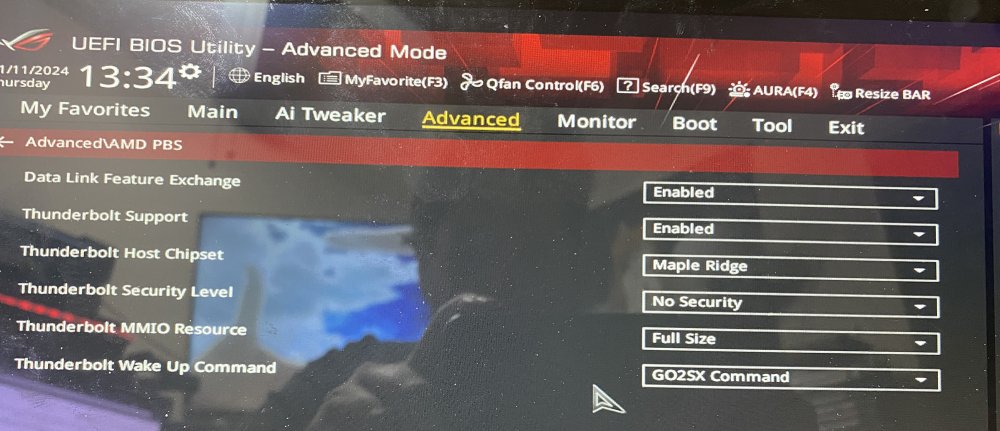
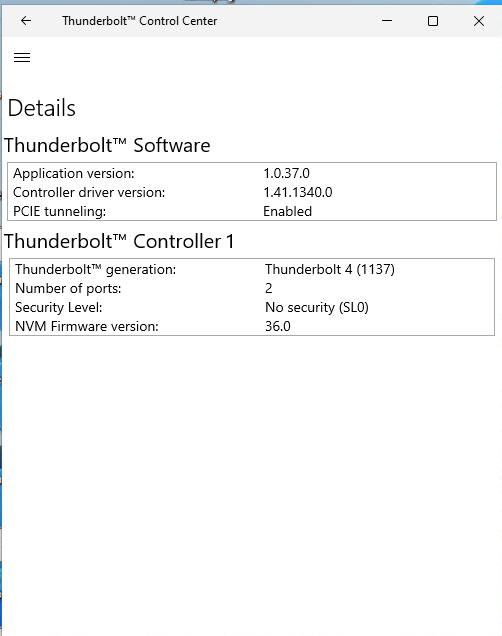
I know this is an old post and I am only providing this info for future people who may need it. One thing I will point out that I have found with the ASUS ThunderboltEX 4 and getting it to work on my "Asus ROG Strix B550-F Gaming WiFi II" motherboard and with windows is it HAD to be in the last slot of my motherboard for it to work. When I tried it in the first slot, it refused to work. The second issue I found is while in the last slot, if I had certain other x1 slots filled with anything, the same problem happened and it would not work. It seems it uses that last slot and a few others to share its resources with. While I have it working fine in a true Windows boot environment, I was never able to get it to work in unraid though. Any time I tried to boot it with the drives plugged in, it would just crash and reboot, and same for after it was booted and I plugged them in. I still suspect it has to do with authorizing the devices in Unraid before it boots, but I do not know enough about Linux to figure it out, and I was not able to get any help here in the forums in another post I made. Also here is a picture of some of the settings in my bios I had to set for it to work. Note that the "Host Chipset" for this card as to be Maple Ridge, if you have the EX 3, then it needs to be the previous option that I cannot recall the name of. I am not sure if I kept "Data Link Feature Exchange" enabled or not though. That setting was disabled by default after first enabling TB and I was trying different things to try to get it working with Unraid. There are a few other settings that need to be on too like enable "Above 4G Decoding" and "Resize BAR". I hope this helps some others at least.
-
Dang, that is unfortunate. Yeah, its looking like I won't be getting any assistance any time soon either, so I guess I will need to go the Softraid route. I just hate that it only supports raid 5 and you cannot add more drives to the array without wiping it and starting it fresh. I really wanted Unraid to work, but it just will not. Oh well, thanks!
-
Hey, just thought I would ask if you ever did try this and get this to work? I have another post with the issues I am having as I have 3 of these same enclosures and my hope was to use them with Unraid, but no luck yet. They work fine in windows, but the Softraid software has its limits with twice the cost, so I'm really hoping Unraid is the better choice, but I cant get it to boot into Unraid when the drives are connected, so I hoped maybe you figured it out. Thanks for any info you may be able to provide!
-
Well, I think I am ready to give up. I've tried everything I can think of. Even figured out how to add the lines that the other posts talk about, but still no good. It will not boot if they are plugged in, and if I plug them in after the boot and tell it to rescan from the terminal, it crashes and reboots. I did find m bios was a few revisions behind, even though it was updated a few months ago, but that did not work. The only thing I can think of is this is a Thunderbolt 4 card and all the forum posts talk about TB3, so I am guessing the card is too new, or some other related issue. I am frankly tired of fighting with this and I just want to be able to use it. Looks like I have no choice but to go with the limits of Softraid for the absurd price. The only other option is to try trusting windows storage spaces again, but I am just not willing to do that. Maybe in time someone will see this post and hopefully know what to do, but I am throwing in the towel on Unraid.
-
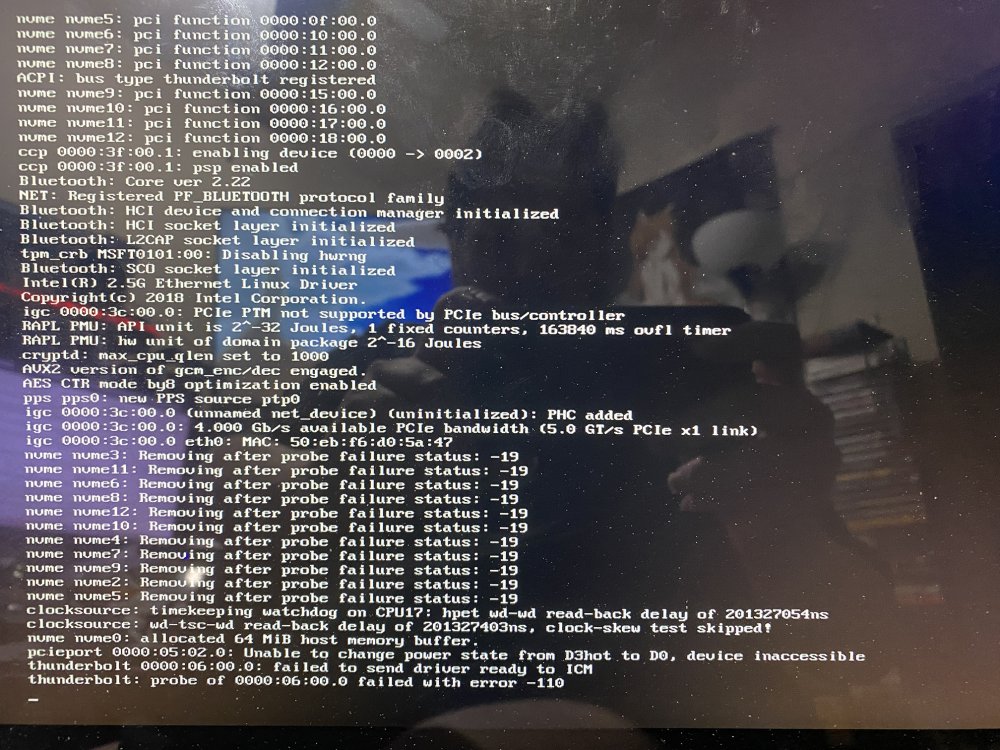
Hey all, I am a Unraid newbie, and very limited experience with linux types of OS's so bare with me. I am trying to use Unraid with several 4tb NVME drives that are wired up via 3 separate "OWC Express 4M2 4-Slot M.2 NVMe SSD Enclosures". I first set all of this up in windows to try and get things going there and to verify it all works fine there, but I no longer trust windows storage spaces (as I lost about 24tb of important data thanks to that POS several months ago), and I am trying to find other software raid options. Its down to OWC's own Softraid which will cost $250 but only works with RAID 5 (and I would at least like RAID 6 or similar), or Unraid which is about half the price and also has the ability to add more storage to the array if I need to (which Softraid does not). Anyway, I have read the few forum posts about getting thunderbolt to work, and I've been trying to follow some of those tips, but I also think those old posts don't apply mostly now as it seems to be nativly capable now, I think. The info they provide is fairly limited, and it deals a lot with making changes to system files that I honestly have no idea how to do. But the strangest thing is that I can't even have the drives plugged in when booting or when its booted. Once I do and I guess it tries to mount the drives, it causes the system to reboot. During the boot, I see various error message when it looks like its trying to mount or access the drives, but shortly after this is when it reboots. I am at a total loss here. I suspect it has to do with what the other post mentions about needing to add the line to authorize the devices or disable the security, but I just do not know how to do that. I am very skilled with PC's and windows, but linux always makes my brain hurt. Again, everything work fine is windows, so I know I have the bios settings right for the thunberbolt and all that, so any advice would be great! (Sorry for the bad picture, taking this at 5am after many hours if fighting with this and months of trying to recover my 24tb of data that I finally just gave up on, so I am just at my wits end.)