Skip to content
View in the app

A better way to browse. Learn more.

Unraid

A full-screen app on your home screen with push notifications, badges and more.

To install this app on iOS and iPadOS
  1. Tap the Share icon in Safari
  2. Scroll the menu and tap Add to Home Screen.
  3. Tap Add in the top-right corner.
To install this app on Android
  1. Tap the 3-dot menu (⋮) in the top-right corner of the browser.
  2. Tap Add to Home screen or Install app.
  3. Confirm by tapping Install.

FrankF

Members
  • Joined

  • Last visited

  1. OK, I removed the docker.img and re-installed the "previous app". So, back to normal without knowing the reason for the issue.
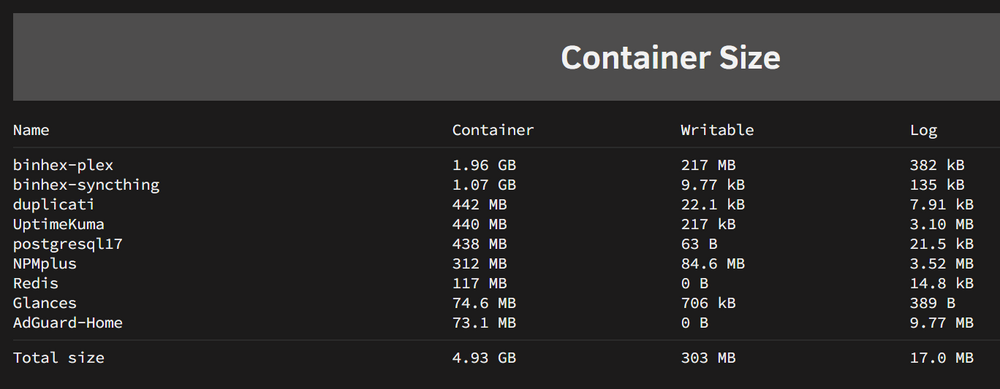
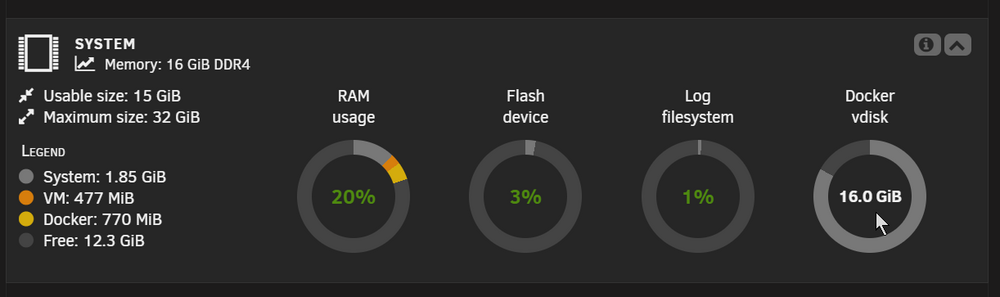
  2. Hi, I am a bit confused... I am constantly getting warnings that my Docker vdisk is almost full 16 GB or 83%. Looking at the container sizes I only find content of about 5GB. Is there a way to "clean" my vdisk? Can I just remove the file and simply re-deploy all apps? All help is really appreciated. Take care Frank unraid-diagnostics-20250505-1503.zip
  3. Hi, I am running the same hardware for about a month or so without any problem. The only difference is I use only 16 GB RAM and just a 500 GB internal SSD. So, I guess either you RAM or the whole board is faulty. Frank

Account

Navigation

Search

Search

Configure browser push notifications

Chrome (Android)
  1. Tap the lock icon next to the address bar.
  2. Tap Permissions → Notifications.
  3. Adjust your preference.
Chrome (Desktop)
  1. Click the padlock icon in the address bar.
  2. Select Site settings.
  3. Find Notifications and adjust your preference.