cxunraid
Members
-
Joined
-
Last visited
Everything posted by cxunraid
-
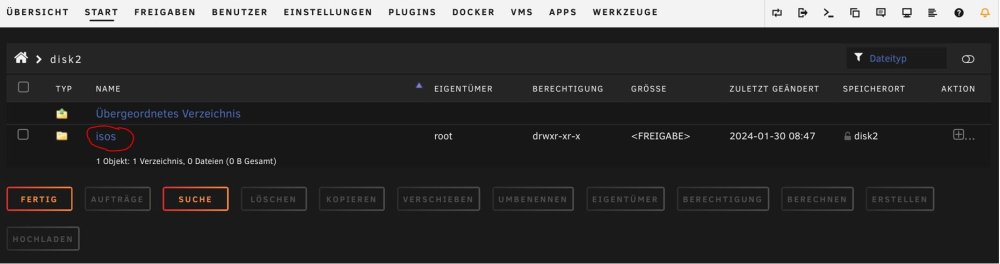
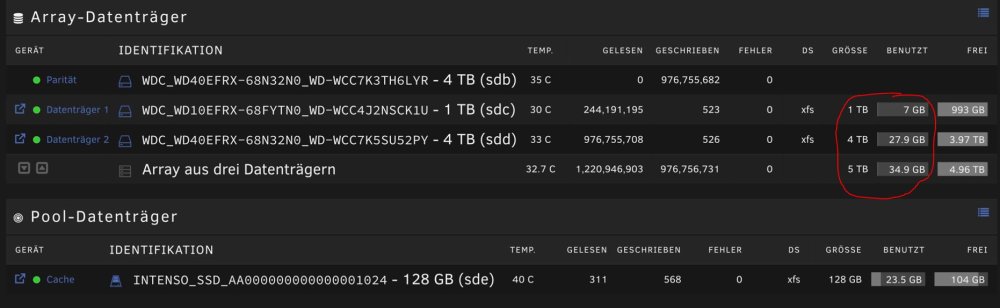
Hallo zusammen, ich habe diese Woche das erste mal einen Unraidserver gebaut und bin somit absoluter Neuling. Testweise habe ich in Unraid ein paar Einstellungen vorgenommen. Apps installieren (z.b. Dynamix File Manager, unassigned Devices etc.) und das erste Testarray mit Paritätsplatte ohne Cache erstellt. Testarray: 4TB HDD -> Parität Disk1: 4TB HDD (Hier waren dann auch die Systemordner von UNRAID abgelegt) Disk2: 1TB HDD Disk3: 128GB SSD Dann habe ich das System neu aufgesetzt. 1. Werkzeuge->Neue Konfiguration 2. Alle Freigaben entfernt 3. Alle Festplatten über "unassigned Devices" formatiert. 4. Das System wie folgt neu aufgesetzt und den Paritätsvorgang/Arrayerstellung gestartet. 4TB HDD -> Parität Disk1: 1TB HDD (zuvor Disk2) Disk2: 4TB HDD (zuvor Disk1) Cache/Pool: 128GB SSD (Einstellung: Array->Cache) Nach Fertigstellung ist mir nun folgendes Aufgefallen: 1. Unter Disk2 ist nun der Ordner "isos" (siehe Bild1). - Ist der Ordner noch ein Überbleibsel des alten Array? - Wenn nicht, müsste der Ordner nicht eher auf der Cache/Pool SSD liegen? 2. In der Arrayinfo (siehe Bild2) wird schon 34,9GB benutzter Speicher angezeigt. - Mit was ist der Speicher belegt? Ich hatte die Festplatten zuvor ja formatiert. 3. Bin ich bei Erstellung einer neuen Konfiguration überhaupt richtig vorgegangen? Hätte ich noch die Apps oder Systemkonfig deinstallieren müssen?