





Baregills
Members
-
Joined
-
Last visited
Everything posted by Baregills
-
Just a note to confirm that the problem was indeed Mac related, although I was unable to find any reason for the dropouts, but within a day or two the problem became much more frequent and also began to affect USB connected devices. This made Time Machine unusable once again because I had set it up on a USB disc which was disconnecting every few minutes. I had to stop taking back ups, but today, for no apparent reason, the fault has gone away and I am again able to back up to the array. I wonder if the source of this problem is Time Machine but I am at a loss to understand why it would cause a transient issue when there has been no change made to the OS.
-
You are not wrong. I'm still having dropouts. I'm beginning to suspect the Mac is the problem. Thanks again for your input.
-
So I just set the share option to yes from auto and there is now a share.cfg file on the flash drive so that's something. It contains the following:- # Generated settings: shareDisk="yes" shareUser="e" shareUserInclude="" shareUserExclude="" shareUserExclusive="no" shareSMBEnabled="yes" shareNFSEnabled="no" shareNFSFsid="100" shareInitialOwner="Administrator" shareInitialGroup="Domain Users" shareCacheEnabled="yes" shareCacheFloor="2000000" shareMoverSchedule="40 3 * * *" shareMoverLogging="no" fuse_remember="330" fuse_directio="auto" fuse_useino="yes" shareNOFILE="" shareAvahiEnabled="yes" shareAvahiSMBName="%h" shareAvahiSMBModel="Xserve" I hope that will have some effect but even if not, thank you for your help. I really appreciate it.
-
No. Neither of those files are on the flash drive. I'll do some digging on those and investigate the Samba errors too.
-
My apologies. I replied using my phone and it's not here! The connection drops out and the server disappears from my desktop but when I look on finder it is connected and when I double click it in the finder it reconnects. At no point does the server actually stop working as far as I can see,
-
Thanks for the response. I have replaced the appropriate cables but it hasn't helped.
-
I have always had the odd server dropout but have lived with it. It has now become a real issue with dropouts happening too frequently. I had to abandon my Time Machine backups as a result of many dropouts in the course of a backup. Other than this, everything seems fine. On checking the system log I see no record of any problems so am stuck. Any ideas please? Diagnostics attached. tower-diagnostics-20250824-1104.zip
-
Yes, it appears you are correct. Safari has an option to open files after download. That's news to me. I don't recall this happening before so it may have been set active in OS Sequoia which I recently installed.
-
Thank you so much. I've been puzzling over this for ages. As for the diagnostics, I uploaded exactly what appeared in my downloads folder. I wondered if I had done something to alter the output, so I just ran it again with the same result. Whilst the program clearly displayed that it intended to download a ,zip, that's not what I ended up with. Perhaps my Mac is becoming too smart.
-
Thank you. Here they are. unraid-7.1.4.txt domain.cfg cache.cfg tempo.cfg docker.cfg editor.cfg super.dat network-rules.cfg ident.cfg network.cfg go.txt favorites.cfg disk.cfg listen.txt Sabrent_0546079B11F300654799-2025-06-04 tempo (nvme0).txt HGST_HUH728080ALE604_VKJBD9DX-2025-06-04 disk1 (sdd).txt SPCC_Solid_State_Disk_MP49W23228263-2025-06-04 cache (sdb).txt nvme.1987-3035343630373942313146333030363534373939-53616272656e74-00000001-2025-06-04 tempo (nvme0).txt USB_SanDisk_3.2Gen1_01010d3b4049c090dcd29f7efc6aadea0679845b44f2cfd07c4d76513779a9ddfdc500000000000000000000438651ecff81420083558107c82e1294-0-0-2025-06-04 flash (sda).txt TOSHIBA_MG08ADA800E_X3N0A30KFCXH-2025-06-04 disk2 (sde).txt HGST_HUH728080ALE604_VKJWP1MX-2025-06-04 parity (sdc).txt cmdline.txt btrfs-usage.txt drm.txt plugins.txt motherboard.txt iommu_groups.txt ntp.txt aspm-status.txt ethtool.txt folders.txt sshd.txt lsmod.txt lsscsi.txt loads.txt testparm.txt memory.txt lspci.txt meminfo.txt lsusb.txt urls.txt top.txt servers.conf.txt vars.txt lscpu.txt lsof.txt df.txt ifconfig.txt dhcplog.txt graphql-api.txt syslog-previous.txt syslog.txt appdata.cfg m---a.cfg a------p.cfg j---y.cfg system.cfg o------f.cfg shareDisks.txt tm.cfg b----p.cfg
-
I am receiving regular messages about one of my drives showing ata4 needing to be reset. I cannot find anywhere how to identify which drive this is since ata doesn't seem to appear anywhere in the tools. Thanks in anticipation.
-
Well, today I wrote some changes to the array and they went to the pool drive and not the array. I then initiated a move and the changes were written to the array and deleted from the pool. I changed nothing to facilitate this. I wonder if the change to the capitalization of there media folder was somehow delayed, though I can't see how. I rebooted after making the change and checked after that. Anyway, it is now fixed. Thank you for your help and as always, it is much appreciated.
-
Yes. I am looking from Main at the array and the pool. They both show the file I am using as a test file. Time to reflect and try to think how this could have happened and perhaps a new load of Unraid and see if that clears it. I'll leave it for a day or two before doing anything silly/brave!
-
Yes. I fixed that but I'm still writing to both the pool and the array.
-
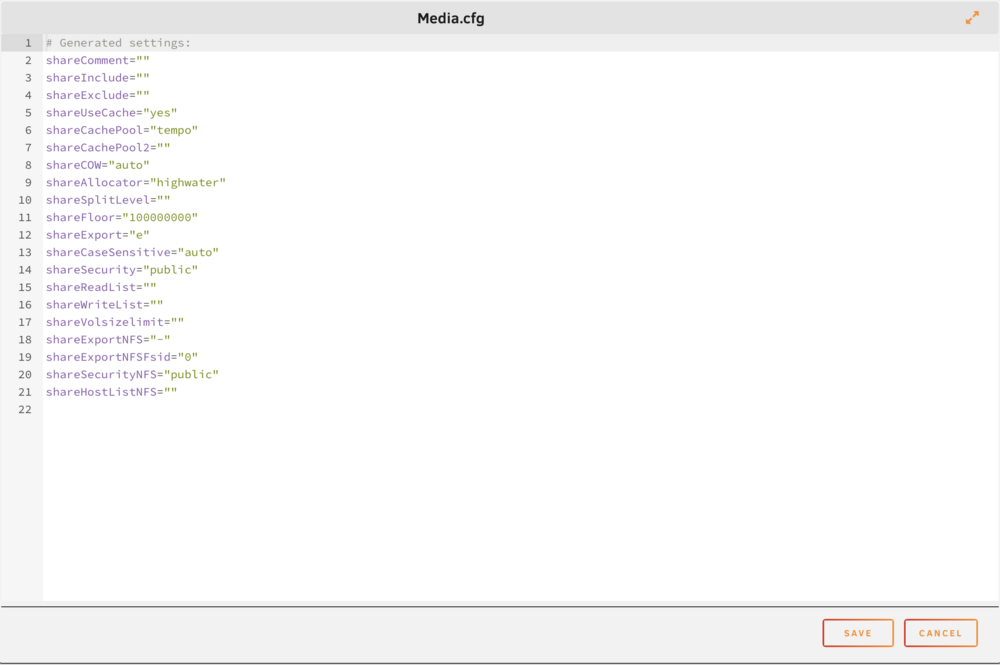
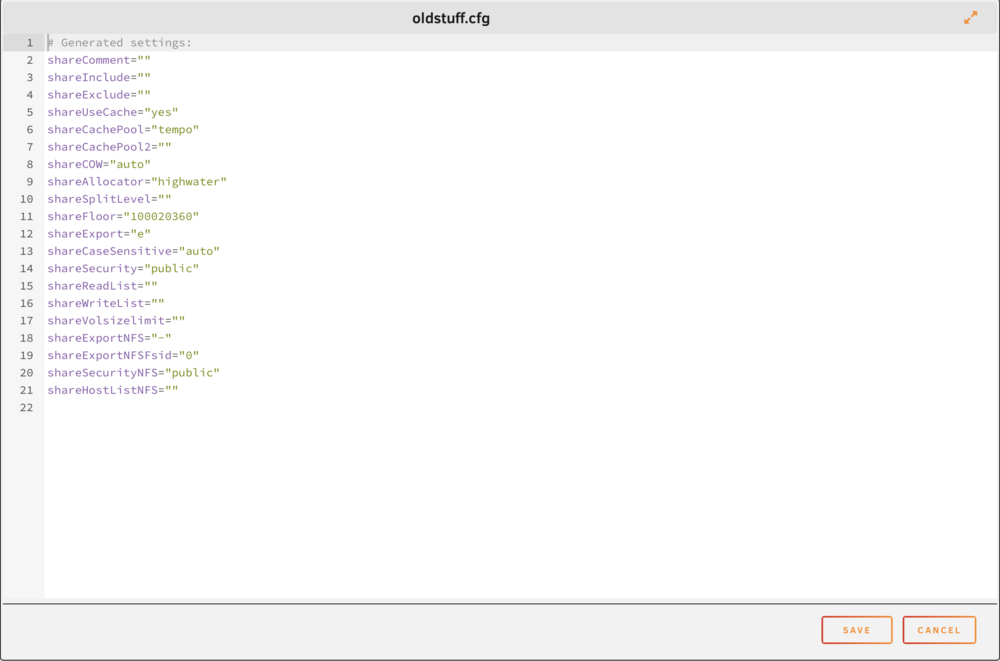
I just noticed the media.cfg is capitalized!!
-
Thanks for the speedy response. I appreciate that. I have checked the ;flash drive and the two .cfg files appear to be correct. Here are the contents of the files in question. I deleted the domains share on my array and . . . . the domains file disappeared from my cache. I checked it was there before I deleted from the array, it was, but is not now. As I'm not running any VMs I don't think it's a problem and the array runs and reboots fine. Any other suggestions would be welcome.
-
I recently had to change my cache drive and I made a bit of a dog's breakfast of it, but recovered successfully and I thought all was well. However, I noticed that new data was remaining on my tempo pool drive and I thought not updating the array when I initiated a move. On closer examination, I saw that the changes are being written to both the target share and to the tempo drive. I have tried various things such as removing the tempo drive and then replacing it but that has not worked. I also tried changing the settings of the two shares associated with the tempo drive to write changes to only the tempo drive and that did not work either. The changes were written directly to the array regardless of what I put in the settings for primary location. I can't see anything wrong with the user share settings and they were working fine before the dog ate his breakfast, so I have to believe that is where the problem lies. I have attached the diagnostics in the hope somebody more clever than I can help. tower-diagnostics-20250201-1144.zip
-
Thank you for that. I had not discovered that setting. Unfortunately it was set to use Ethernet as the first priority which it clearly was not doing, so it seems this will not resolve my issue. I did try changing the order just to see what would happen and the result was that nothing changed if the order changed. Anyway, disabling wifi seems to achieve the best compromise in my situation. I just have to remember to switch it on when I need it.
-
Thanks for your input. I have spent some considerable time looking for any way to resolve this by way of system settings without success. I have taken the easy way out (I was a day tripper) and disabled wifi until I absolutely need it and that does the trick.
-
Unraid 6.12.11. I have finally got my server running with 10 GBE ethernet and it usually works well. However sometimes data transfer is very slow and I have been stumped why, but the brain kicked in today and I realised that my Mac sometimes connects using ethernet and sometimes using wifi, in which case the connection is very much slower. Is there any way to mandate only ethernet connection to the server other than disabling wifi? I have family member connecting to my Plex library via external internet, so that needs to be maintained. I'm using Norton internet protection which has installed the Norton firewall which is a mystery to me.
-
OK. Thank you for that. I will try and get that implemented.
-
Yes. It's connected to a 10Gb port on a small switch and the second 10 Gb port on the switch connects to another small switch to which the array is connected via the second 10 Gb port. These switches have 2 10 Gb ports and 4 2.5 Gb ports. What I want to achieve is to free up two of these 10 Gb switch ports by connecting the Mac to the array directly rather than though the 2 switches. and to use the 4 spare array 2.5 Gb ports to connect to the network Note that the array is not local to the Mac hence the two switches.
-
Thank you for the reply. No. I want to keep the 10Gb connected to my Mac and the 2.5 Gb ports available to the network for when my Mac is offline.
-
I recently purchased a low end server mainboard which I used as the heart of my NAS. The board supports four 2.5 Gb comms ports and initially the system ran with this set up. I then purchased a 10 Gb port to fit in the only PCI slot on the board but ran in to difficulties where the new port would not map in Unraid. I spent a lot of time searching this forum and the web for a solution, but the most sensible info I found was to disable the 2.5 Gb ports and just run om the 10 Gb. That seemed a good solution and I can transfer data much faster than before with the 10 Gb port. I now have an issue with a lack of 10 Gb ports on my switches and wondered if I could reactivate the 2.5 Gb ports so that they could provide network access for my tower allowing me to connect the 10 Gb port direct to my Mac Studio. That would allow the tower to link to my network even when my Mac is switched off and save the need for another 10 Gb switch port. What I really want to understand is how to reactivate my 2.5 Gb ports so that they work happily alongside my 10 Gb connection. I have appended my diagnostics if they help. Here's hoping for some good advice! tower-diagnostics-20240604-1010.zip
-
That was very scary - but it looks like it has worked!!! Thank you so much.



